
path() 字段处理器的路径表达式由 JQuick-Path 解析:$、属性访问、数组下标、切片、通配符等写法直接可用,异构数据源按 JSON 路径取嵌套字段。
查看 Connector 集成 →JQuick-Path
纯 Java 8+ · Apache-2.0 · Maven Central 2.0.0
JSON 的 XPath:一条表达式,定位任意节点不手写树遍历、不层层判空——路径直达嵌套 JSON 的任何值
$.store.books..[2].price 这样一条表达式就能钻进任意深度的嵌套结构:属性访问、通配符、递归下降、数组下标与切片、[?(...)] 过滤、算术下标共 15 种语法形式自由组合;JPredicate 谓词库(eq/gt/like/regex/in/exists…)与完整过滤表达式引擎负责筛选,limit()/skip() 为递归下降设置边界防结果膨胀,as()/asList() 把结果直接映射成 Java Bean。纯 Java 无 JNI,Windows、Linux、macOS 与信创环境行为一致。
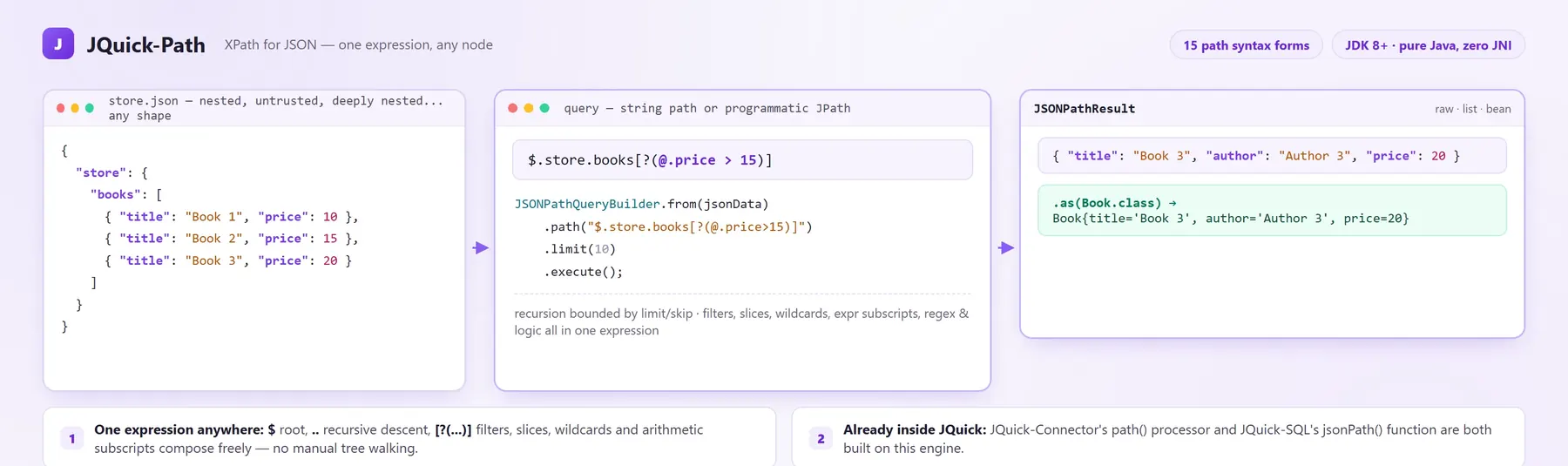
左:任意形状的嵌套文档;中:字符串路径或编程式 JPath;右:原始结果或 as() 映射的 Bean
- 15 种路径语法形式:递归、切片、过滤、算术下标
- 18 个谓词与逻辑算子,含 regex / in / exists
- 4 种输入来源:JSON 字符串 / Map / POJO / JSONObject
- 0 JNI纯 Java 跨平台,信创环境已验证
生态位:JQuick 生态的 JSON 取值底座
这个引擎不只在文档里——生态组件的 JSON 提取能力就构建在它上面。
jsonPath(json, path) 函数基于 JSONPathQueryBuilder 实现:SQL 里对行内的 JSON 字段按路径取值,与 259 个内置函数同一套 SPI 体系。
查看 SQL 集成 →JSONPathResult result = JSONPathQueryBuilder.from(jsonData) .path("$.store.books..[2].price") .limit(10) .execute();
System.out.println(result.getRawData()); // 20示例与输出取自文档快速开始章节:from → path → limit → execute,getRawData() 直接得到 20。
// 过滤:等价路径表达式 $.books[?(@.price>15)]List<Book> books = JSONPathQueryBuilder.from(jsonData) .path("$.books[?(@.price>15)]") .sort(JSortBuilder.desc("price")) .asList(Book.class); // Book{title='Book 3', price=20}同一套流式 API:sort(JSortBuilder.desc("price")) 排序,as()/asList() 映射 POJO,无需手工遍历与转型。
同样的嵌套取值,手写树遍历要付出什么
比较的是「表达与防护的成本」,不是「能不能实现」。
| 对比维度 | JQuick-Path | 手写 JSON 树遍历 |
|---|---|---|
| 取值表达 | 一条路径表达式直达任意深度:递归、切片、过滤自由组合 | 逐层 get/instanceof/判空,嵌套越深代码越长 |
| 条件筛选 | [?(...)] 过滤表达式 + 18 个谓词算子,筛选在路径里完成 | 先取集合再手写循环与比较逻辑 |
| 结果落地 | as()/asList() 直接映射 Java Bean,sort/limit/skip 链式收尾 | 手工遍历 Map 构造对象,转型与装配各写一遍 |
| 不可信输入 | 递归下降受 limit()/skip() 约束,遍历有界防结果膨胀 | 防护逻辑自己实现,容易遗漏 |
| 多态输入 | JSON 字符串 / Map / POJO / JSONObject 四种来源同一入口 | 每种来源各写一套读取与转换 |
| 平台覆盖 | 纯 Java 无 JNI,Windows / Linux / macOS / 信创行为一致 | 取决于所选 JSON 库的本地依赖情况 |
不是完整的 JSON 库,也不替代序列化框架:就是专注把「从嵌套 JSON 里取值」收敛成一条有边界的路径表达式。
JQuick-Path 是一种用于从 JSON 文档中提取数据的查询语言与运行时,它在 JSON 中扮演的角色,正如 XPath 在 XML 中的角色:通过一条简洁的路径表达式,即可定位嵌套 JSON 结构中的任意节点。
JQuick-Path 采用纯 Java 实现,由自研语法解析器驱动,不包含任何本地依赖,在 Windows、Linux、macOS 以及信创操作系统上行为一致。库底层提供流式、类型安全的查询构建器 JSONPathQueryBuilder,以及完整的表达式引擎:根节点与当前节点选择器、属性访问、通配符、递归下降、数组下标、切片、过滤、算术与逻辑表达式,并支持将查询结果映射为 Java Bean。
JQuick-Path 的依赖中不包含 Spring,无需任何容器即可独立引入使用:普通 Java 项目与 Spring Boot 项目均使用同一套 API。
核心特性一览:
- 流式查询构建器:
JSONPathQueryBuilder.from(...).document(...).limit(...).execute()链式完成查询。 - 编程式路径构建:通过
JPath、JSegments、JSubscripts组合路径,无需手写字符串。 - 字符串路径表达式:
$.store.books..[2]之类的表达式可直接传给path(String)。 - 根节点与当前节点选择器:
$(JRoot.ROOT)与@(JRoot.CURRENT)。 - 段选择器:属性访问、通配符
*、递归下降..、下标段与递归下标段。 - 下标选择器:数字下标、负数下标、通配符、对象属性
['title']、切片[start:end:step]、过滤[?(...)]与算术表达式下标。 - 丰富的谓词库:
eq、ne、gt、ge、lt、le、like、regex、startsWith、endsWith、contains、in、exists、notExists、and、or、not以及原始custom表达式。 - 完整的过滤表达式引擎:比较、逻辑、算术、
in、取反、正则,以及@.length()之类的嵌套函数调用。 - 多种输入来源:JSON 字符串、
Map、POJO 或JSONObject。 - 结果处理:
JSONPathResult提供getRawData()、getAsList()、isList();as()/asList()可将结果映射为 Java Bean。 - 排序与分页:
JSortBuilder.asc()/desc()排序,limit()/skip()分页。 - 语法驱动解析:自研语法规则配合专用错误监听器,语法错误提示清晰。
- 跨平台与信创适配:纯 Java 字节码、无 JNI,已在 Windows、Linux、macOS 及麒麟、统信 UOS、openEuler、Anolis 等环境与主流国产 JDK 上验证。
- 遍历有界:对不可信 JSON 的递归下降受
limit()/skip()约束,可防止结果无界膨胀,构成轻量的路径遍历防护。 - 声明式注解:
@JSONPath、@JSONObject、@JSONArray、@JSONFilter、@JSONSort、@JSONFormat,用于基于路径的字段与结果绑定。 - 可扩展工具:
JValueContextFactory提供基于上下文的取值能力,JTemplateEngine提供模板求值能力。 - Apache-2.0 开源协议:可自由用于商业与个人项目。
适用业务场景
Section titled “适用业务场景”典型使用场景:
- 配置读取:从 JSON 或由 YAML 转换而来的配置文档中取出嵌套值。
- API 响应处理:从第三方响应中提取并重组字段。
- 数据转换:通过
as()/asList()将 JSON 片段直接映射为 Java Bean。 - 批量与流水线作业:在下游处理之前,对大型 JSON 集合进行过滤、切片、排序与分页。
- 不可信载荷检查:递归下降受
limit()/skip()约束,路径表达式无法在攻击者可控的 JSON 上无限制膨胀。
Maven依赖
Section titled “Maven依赖”环境要求:
| 项目 | 要求 |
|---|---|
| JDK | 8 或更高版本(推荐 JDK 17) |
| 构建工具 | Maven 3.6+ 或 Gradle 7+ |
| 操作系统 | Windows / Linux / macOS / 信创操作系统 |
| 依赖 | 内置词法与语法分析运行时、Hutool、Javelin Core、JQuick JSON,均为纯 Java,无本地库 |
<dependency> <groupId>io.github.paohaijiao</groupId> <artifactId>jquick-path</artifactId> <version>2.0.0</version></dependency>版本号请以 Maven Central 上的最新版本为准。
Gradle依赖
Section titled “Gradle依赖”implementation 'io.github.paohaijiao:jquick-path:2.0.0'README 同时提供了表达式函数支持文档:JEvaluator Function Reference。
最简示例(单值提取)
Section titled “最简示例(单值提取)”从嵌套 JSON 中提取单个数值,输出结果为 20:
public class QuickStartDemo {
    public static void main(String[] args) {        // 示例数据        String jsonData = "{\"store\":{\"books\":["                + "{\"title\":\"Book 1\",\"author\":\"Author 1\",\"price\":10},"                + "{\"title\":\"Book 2\",\"author\":\"Author 2\",\"price\":15},"                + "{\"title\":\"Book 3\",\"author\":\"Author 3\",\"price\":20}]}}";
        // 从根节点开始:store -> books -> 下标 2 -> price        JSONPathResult result = JSONPathQueryBuilder.from(jsonData)                .document(JPath.fromRoot(JRoot.ROOT)                        .property("store").property("books")                        .segment(JSegments.subscript(JIndexSubscript.of(2)))                        .property("price"))                .limit(10)                .execute();
// 输出:20 System.out.println(result.getRawData()); }}基础路径表达式语法
Section titled “基础路径表达式语法”基础语法如下:
| 表达式 | 说明 |
|---|---|
$ |
根对象 |
. 或 [ ] |
子操作符,用于访问对象属性 |
.. |
递归下降,搜索所有子元素(语法定义中写作 ...,示例中写作 ..) |
* |
通配符,匹配所有对象或数组元素 |
[ ] |
下标操作符,用于数组索引或过滤 |
[start:end:step] |
数组切片操作 |
?() |
过滤表达式 |
@ |
当前节点,用于过滤表达式 |
字段访问 .
Section titled “字段访问 .”- 作用:访问对象的属性。
.与[ ]均为子操作符。 - 编程式对应:
JPath.property(String)追加属性段;JSegments.id(String)生成标识符段;JSubscripts.property(String)生成['title']形式的对象属性下标。 - 参数:属性名称,字符串,必填。
public class FieldAccessDemo {
    public static void main(String[] args) {        String jsonData = "{\"store\":{\"books\":[]}}";
        // 等价路径表达式:$.store.books        JSONPathResult result = JSONPathQueryBuilder.from(jsonData)                .document(JPath.fromRoot(JRoot.ROOT)                        .property("store").property("books"))                .limit(10)                .execute();
        System.out.println(result.getRawData());    }}
数组下标访问 [index]
Section titled “数组下标访问 [index]”- 作用:通过下标定位数组元素。
- 取值规则:数字下标从
0开始;README 在JSubscripts.index(int)中说明,负数下标从数组末尾开始计数。 - 编程式对应:
JSubscripts.index(int)、JIndexSubscript.of(int)。
public class IndexDemo {
    public static void main(String[] args) {        String jsonData = "{\"books\":["                + "{\"title\":\"Book 1\",\"author\":\"Author 1\",\"price\":10},"                + "{\"title\":\"Book 2\",\"author\":\"Author 2\",\"price\":15},"                + "{\"title\":\"Book 3\",\"author\":\"Author 3\",\"price\":20}]}";
        // 等价路径表达式:$.books[0]        JSONPathResult result = JSONPathQueryBuilder.from(jsonData)                .document(JPath.fromRoot(JRoot.ROOT).property("books")                        .segment(JSubscriptSegment.of(JSubscripts.index(0))))                .limit(10)                .execute();
        // 输出索引为 0 的书籍对象(Book 1)        System.out.println(result.getRawData());    }}
README 还给出了负数下标示例 $.books[-2](通过 JSubscripts.expr("-2") 指定),输出从末尾计数的对应元素。
数组全部遍历 [*]
Section titled “数组全部遍历 [*]”- 作用:通配符匹配对象的全部属性或数组的全部元素。
- 编程式对应:
JSubscripts.wildcard()、property("*")、JSegments.wildcard()。
public class WildcardDemo {
    public static void main(String[] args) {        String jsonData = "{\"books\":["                + "{\"title\":\"Book 1\",\"author\":\"Author 1\",\"price\":10},"                + "{\"title\":\"Book 2\",\"author\":\"Author 2\",\"price\":15},"                + "{\"title\":\"Book 3\",\"author\":\"Author 3\",\"price\":20}]}";
        // 等价路径表达式:$.books[*]        JSONPathResult result = JSONPathQueryBuilder.from(jsonData)                .document(JPath.fromRoot(JRoot.ROOT).property("books")                        .segment(JSubscriptSegment.of(JSubscripts.wildcard())))                .limit(10)                .execute();
        // 输出 books 数组中的全部书籍对象        System.out.println(result.getRawData());    }}
多字段同时提取
Section titled “多字段同时提取”可用能力如下:
$.*:通配符,获取根对象(或当前对象)下的全部属性,见上文示例。- 入口方法
JSONPathQueryBuilder.select(Class<T>):用于创建带类型的JProjectionBuilder。
当前版本不支持在一条表达式中一次指定多个具名字段;需要按字段集合取数时,用 JSONPathQueryBuilder.select(Class<T>) 声明目标类型。
条件过滤表达式
Section titled “条件过滤表达式”- 作用:通过
[?(...)]过滤表达式筛选数组元素,表达式中以@表示当前节点。 - 编程式对应:
JSubscripts.filter(JPredicate<T>)。 - 谓词:可使用
JPredicate谓词工厂,或通过JPredicate.custom(String)传入原始过滤表达式。
README 记载的谓词工厂能力:
| 谓词 / 方法 | 作用 |
|---|---|
eq / ne |
等于 / 不等于 |
gt / ge / lt / le |
大于 / 大于等于 / 小于 / 小于等于 |
like(prop, pattern) |
通配符匹配(*、?) |
regex(prop, regex) |
正则表达式匹配 |
startsWith / endsWith / contains |
基于正则实现的常见字符串匹配 |
in(prop, values...) |
成员归属判断 |
exists / notExists |
属性是否存在 |
and / or / not |
逻辑组合 |
custom(String) |
原始 JSONPath 过滤表达式 |
of(prop, operator, value) |
显式指定操作符的通用谓词 |
public class FilterSyntaxDemo {
    public static void main(String[] args) {        String jsonData = "{\"books\":["                + "{\"title\":\"Book 1\",\"author\":\"Author 1\",\"price\":10},"                + "{\"title\":\"Book 2\",\"author\":\"Author 2\",\"price\":15},"                + "{\"title\":\"Book 3\",\"author\":\"Author 3\",\"price\":20}]}";
        // 等价路径表达式:$.books[?(@.title == 'Book 1')]        JSONPathResult result = JSONPathQueryBuilder.from(jsonData)                .document(JPath.fromRoot(JRoot.ROOT).property("books")                        .segment(JSubscriptSegment.of(                                JSubscripts.filter(JPredicate.eq("title", "Book 1")))))                .limit(10)                .execute();
        // 输出符合条件的书籍对象(Book 1)        System.out.println(result.getRawData());    }}
路径语法总清单
Section titled “路径语法总清单”综合 README 语法表与 33 个示例,路径表达式中出现过的形式如下:
| 形式 | 含义 | README 示例 |
|---|---|---|
$ |
根对象 | $.store.books |
@ |
当前节点 | @.store.books |
.field |
属性访问 | $.store.books[2].price |
['field'] |
对象属性下标 | $.extract['title'] |
[index] |
数字下标 | $.books[0] |
[-index] |
负数下标(自末尾计数) | $.books[-2] |
[*] |
全部数组元素 | $.books[*] |
.* |
全部对象属性 | $.* |
..field |
递归下降匹配属性 | $.store.books..price |
..* |
递归通配 | 由 JSegments.recursiveWildcard() 生成 |
..[index] |
递归下标 | $.store.books..[2] |
[start:end] |
切片 | JSubscripts.slice(Integer, Integer) |
[start:end:step] |
带步长切片 | $.books[0:1:2] |
[?(...)] |
过滤表达式 | $.books[?(@.price>15)] |
[expr] |
算术 / 函数表达式下标 | $.books[1+1]、$.books[(@.length())-1] |
README 过滤表达式中出现过的运算符与写法:算术 +、-、*、/、%;比较 >、>=、<、<=、==、!=;逻辑 &&、||、!;成员判断 in ('a','b');取非;正则;以及 @.length() 嵌套函数调用。可用函数以 README 链接的 JEvaluator 函数参考为准。
两种使用模式
Section titled “两种使用模式”临时解析:直接传入路径字符串(简单场景)
Section titled “临时解析:直接传入路径字符串(简单场景)”- 作用:将路径表达式字符串直接传入
path(String),无需事先构建路径对象,适合一次性、临时性的查询。 - 参数:路径表达式字符串,必填。
- 返回值:
execute()返回JSONPathResult。
public class DirectPathDemo {
    public static void main(String[] args) {        String jsonData = "{\"store\":{\"books\":["                + "{\"title\":\"Book 1\",\"author\":\"Author 1\",\"price\":10},"                + "{\"title\":\"Book 2\",\"author\":\"Author 2\",\"price\":15},"                + "{\"title\":\"Book 3\",\"author\":\"Author 3\",\"price\":20}]}}";
        // 直接使用字符串路径表达式        JSONPathResult result = JSONPathQueryBuilder.from(jsonData)                .path("$.store.books..[2]")                .limit(10)                .execute();
        // 输出 books 数组中索引为 2 的书籍对象(Book 3)        System.out.println(result.getRawData());    }}
README 核心 API 参考中,入口构建器 JSONPathQueryBuilder 的方法如下:
| 方法 | 作用 |
|---|---|
from(Object) |
从 POJO 创建查询(先序列化再解析) |
from(String) |
从 JSON 字符串创建查询 |
from(Map) |
从 Map 创建查询 |
from(JSONObject) |
从 JSONObject 创建查询 |
root(JSubscripts) |
从根下标开始创建查询 |
filter(Class<T>) |
创建带类型的 JFilterBuilder<T> |
of(JPredicate<T>) / of(String) |
由谓词或原始表达式构建 JFilterExpression |
select(Class<T>) |
创建带类型的 JProjectionBuilder<T> |
流式查询 JSONPathQuery<T> 的方法如下:
| 方法 | 作用 |
|---|---|
document(JPath) |
设置编程式构建的路径 |
path(String) |
以字符串表达式设置路径 |
limit(int) |
限制返回元素数量 |
skip(int) |
跳过前 N 个元素(与 limit 配合使用) |
sort(JSortBuilder<T>) |
对列表结果排序(需配合 asList) |
as(Class<T>) |
将单个结果映射为 Java Bean |
asList(Class<T>) |
将列表结果映射为 Java Bean |
execute() |
执行查询并返回 JSONPathResult |
JSONPathResult 的方法如下:
| 方法 | 作用 | 返回值 |
|---|---|---|
getRawData() |
获取原始结果对象 | Object |
getAsList() |
以 List 形式获取结果(单值会被包装) |
List |
isList() |
判断结果是否为列表 | boolean |
根符号 JRoot:
| 常量 | 符号 | 作用 |
|---|---|---|
JRoot.ROOT |
$ |
根文档 |
JRoot.CURRENT |
@ |
当前节点 |
常见提取场景代码示例
Section titled “常见提取场景代码示例”提取普通对象属性
Section titled “提取普通对象属性”下例对应 README 示例 $.extract['title'],输出 extract 对象的 title 属性值。
public class PropertyDemo {
    public static void main(String[] args) {        String jsonData = "{\"books\":["                + "{\"title\":\"Book 1\",\"author\":\"Author 1\",\"price\":10},"                + "{\"title\":\"Book 2\",\"author\":\"Author 2\",\"price\":15},"                + "{\"title\":\"Book 3\",\"author\":\"Author 3\",\"price\":20}],"                + "\"extract\":{\"title\":\"Book 3\",\"author\":\"Author 3\",\"price\":20}}";
        // 等价路径表达式:$.extract['title']        JSONPathResult result = JSONPathQueryBuilder.from(jsonData)                .document(JPath.fromRoot(JRoot.ROOT).property("extract")                        .segment(JSubscriptSegment.of(JSubscripts.property("title"))))                .limit(10)                .execute();
        // 输出:Book 3        System.out.println(result.getRawData());    }}
提取数组内单个元素
Section titled “提取数组内单个元素”下例对应 README 示例 $.store.books[2],输出数组中索引为 2 的元素(Book 3)。
public class ArrayElementDemo {
    public static void main(String[] args) {        String jsonData = "{\"store\":{\"books\":["                + "{\"title\":\"Book 1\",\"author\":\"Author 1\",\"price\":10},"                + "{\"title\":\"Book 2\",\"author\":\"Author 2\",\"price\":15},"                + "{\"title\":\"Book 3\",\"author\":\"Author 3\",\"price\":20}]}}";
        // 等价路径表达式:$.store.books[2]        JSONPathResult result = JSONPathQueryBuilder.from(jsonData)                .document(JPath.fromRoot(JRoot.ROOT)                        .property("store").property("books")                        .segment(JSegments.subscript(JIndexSubscript.of(2))))                .limit(10)                .execute();
        System.out.println(result.getRawData());    }}
提取数组全部元素集合
Section titled “提取数组全部元素集合”下例对应 README 示例 $.store.books.*,输出数组中的全部书籍对象。
public class AllElementsDemo {
    public static void main(String[] args) {        String jsonData = "{\"store\":{\"books\":["                + "{\"title\":\"Book 1\",\"author\":\"Author 1\",\"price\":10},"                + "{\"title\":\"Book 2\",\"author\":\"Author 2\",\"price\":15},"                + "{\"title\":\"Book 3\",\"author\":\"Author 3\",\"price\":20}]}}";
        // 等价路径表达式:$.store.books.*        JSONPathResult result = JSONPathQueryBuilder.from(jsonData)                .document(JPath.fromRoot(JRoot.ROOT)                        .property("store").property("books").property("*"))                .limit(10)                .execute();
        System.out.println(result.getRawData());    }}
条件过滤,获取符合条件的节点集合
Section titled “条件过滤,获取符合条件的节点集合”下例对应 README 示例 $.books[?(@.price>15)],使用 JPredicate.custom(String) 传入原始过滤表达式,输出价格大于 15 的书籍对象。
public class ConditionDemo {
    public static void main(String[] args) {        String jsonData = "{\"books\":["                + "{\"title\":\"Book 1\",\"author\":\"Author 1\",\"price\":10},"                + "{\"title\":\"Book 2\",\"author\":\"Author 2\",\"price\":15},"                + "{\"title\":\"Book 3\",\"author\":\"Author 3\",\"price\":20}]}";
        // 等价路径表达式:$.books[?(@.price>15)]        JSONPathResult result = JSONPathQueryBuilder.from(jsonData)                .document(JPath.fromRoot(JRoot.ROOT).property("books")                        .segment(JSubscriptSegment.of(                                JSubscripts.filter(JPredicate.custom("@.price>15")))))                .limit(10)                .execute();
        // 输出符合条件的书籍对象(Book 3)        System.out.println(result.getRawData());    }}
多级嵌套JSON提取
Section titled “多级嵌套JSON提取”下例对应 README 示例 $.store.books..price,以递归下降方式搜索 books 数组下所有的 price 属性值,输出结果为 [10, 15, 20]。
public class NestedDemo {
    public static void main(String[] args) {        String jsonData = "{\"store\":{\"books\":["                + "{\"title\":\"Book 1\",\"author\":\"Author 1\",\"price\":10},"                + "{\"title\":\"Book 2\",\"author\":\"Author 2\",\"price\":15},"                + "{\"title\":\"Book 3\",\"author\":\"Author 3\",\"price\":20}]}}";
        // 等价路径表达式:$.store.books..price        JSONPathResult result = JSONPathQueryBuilder.from(jsonData)                .document(JPath.fromRoot(JRoot.ROOT)                        .property("store").property("books")                        .segment(JSegments.recursiveId("price")))                .limit(10)                .execute();
        // 输出:[10, 15, 20]        System.out.println(result.getRawData());    }}
多路径一次性批量提取多个结果
Section titled “多路径一次性批量提取多个结果”该能力暂未在README文档中介绍。
JSON映射为Java Bean
Section titled “JSON映射为Java Bean”README 记载的映射方式为流式查询上的两个终端方法:
as(Class<T>):将单个结果映射为 Java Bean。asList(Class<T>):将列表结果映射为 Java Bean。
直接映射单个POJO对象
Section titled “直接映射单个POJO对象”// 普通书籍 POJO,字段对应参考 JSON 中的属性public class Book {
private String title; private String author; private Integer price;
public String getTitle() { return title; }
public void setTitle(String title) { this.title = title; }
public String getAuthor() { return author; }
public void setAuthor(String author) { this.author = author; }
public Integer getPrice() { return price; }
public void setPrice(Integer price) { this.price = price; }
@Override public String toString() { return "Book{title='" + title + "', author='" + author + "', price=" + price + "}"; }}public class BeanMappingDemo {
public static void main(String[] args) { String jsonData = "{\"store\":{\"books\":[" + "{\"title\":\"Book 1\",\"author\":\"Author 1\",\"price\":10}," + "{\"title\":\"Book 2\",\"author\":\"Author 2\",\"price\":15}," + "{\"title\":\"Book 3\",\"author\":\"Author 3\",\"price\":20}]}}";
// README API:as(Class<T>) —— 将单个结果映射为 Java Bean Book book = JSONPathQueryBuilder.from(jsonData) .path("$.store.books[2]") .as(Book.class);
// 输出:Book{title='Book 3', author='Author 3', price=20} System.out.println(book); }}数组结果映射为 List<POJO>
Section titled “数组结果映射为 List<POJO>”public class BeanListMappingDemo {
public static void main(String[] args) { String jsonData = "{\"store\":{\"books\":[" + "{\"title\":\"Book 1\",\"author\":\"Author 1\",\"price\":10}," + "{\"title\":\"Book 2\",\"author\":\"Author 2\",\"price\":15}," + "{\"title\":\"Book 3\",\"author\":\"Author 3\",\"price\":20}]}}";
// README API:asList(Class<T>) —— 将列表结果映射为 Java Bean List<Book> books = JSONPathQueryBuilder.from(jsonData) .path("$.store.books[*]") .asList(Book.class);
books.forEach(System.out::println); }}README 另记载 sort(JSortBuilder<T>) 可对列表结果排序(需配合 asList),排序构建器提供 JSortBuilder.asc() / desc(),但 README 未给出排序代码示例。
字段映射别名、忽略不存在字段
Section titled “字段映射别名、忽略不存在字段”README 特性清单中列出了 @JSONPath、@JSONObject、@JSONArray、@JSONFilter、@JSONSort、@JSONFormat 等声明式注解,但未说明字段别名映射与忽略不存在字段的配置方式。
该能力暂未在README文档中介绍。
README 明确记载支持四种输入来源:JSON 字符串、Map、POJO(先序列化再解析)、JSONObject。
从JSON字符串解析
Section titled “从JSON字符串解析”public class StringSourceDemo {
public static void main(String[] args) { String jsonString = "{\"store\":{\"books\":[" + "{\"title\":\"Book 1\"}," + "{\"title\":\"Book 2\"}]}}";
// 入口方法:from(String) JSONPathResult result = JSONPathQueryBuilder.from(jsonString) .path("$.store.books[0].title") .limit(10) .execute();
// 输出:Book 1 System.out.println(result.getRawData()); }}从Map对象直接解析
Section titled “从Map对象直接解析”public class MapSourceDemo {
public static void main(String[] args) { Map<String, Object> root = new HashMap<String, Object>(); Map<String, Object> store = new HashMap<String, Object>(); store.put("name", "JQuick"); root.put("store", store);
// 入口方法:from(Map) JSONPathResult result = JSONPathQueryBuilder.from(root) .path("$.store.name") .limit(10) .execute();
// 输出:JQuick System.out.println(result.getRawData()); }}从中间节点对象继续向下查询
Section titled “从中间节点对象继续向下查询”README 记载 @(JRoot.CURRENT)表示当前节点,并提供入口方法 from(JSONObject) 以 JSONObject 作为查询起点。下例对应 README「当前节点表达式」示例,路径从当前节点开始访问 store、books。
public class NodeSourceDemo {
    public static void main(String[] args) {        String jsonData = "{\"store\":{\"books\":["                + "{\"title\":\"Book 1\",\"author\":\"Author 1\",\"price\":10},"                + "{\"title\":\"Book 2\",\"author\":\"Author 2\",\"price\":15},"                + "{\"title\":\"Book 3\",\"author\":\"Author 3\",\"price\":20}]}}";
        // 等价路径表达式:@.store.books        JSONPathResult result = JSONPathQueryBuilder.from(jsonData)                .document(JPath.fromRoot(JRoot.CURRENT)                        .property("store").property("books"))                .limit(10)                .execute();
        System.out.println(result.getRawData());    }}
空值与异常策略
Section titled “空值与异常策略”README 仅介绍了语法层面的错误诊断:自研语法规则配合专用错误监听器,提供清晰的语法错误提示。下列与缺失节点、默认值、异常模式、数组越界相关的运行时策略,README 均未介绍。
节点不存在返回null
Section titled “节点不存在返回null”该能力暂未在README文档中介绍。
配置默认返回值
Section titled “配置默认返回值”该能力暂未在README文档中介绍。
开启抛出异常模式(缺失节点抛异常)
Section titled “开启抛出异常模式(缺失节点抛异常)”该能力暂未在README文档中介绍。
数组越界行为
Section titled “数组越界行为”该能力暂未在README文档中介绍。
获取原始节点元信息(节点类型、父节点)
Section titled “获取原始节点元信息(节点类型、父节点)”该能力暂未在README文档中介绍。
路径表达式动态拼接
Section titled “路径表达式动态拼接”README 记载的编程式路径构建能力即用于动态组合路径。路径构建器 JPath / JPaths 的方法如下:
| 方法 | 作用 |
|---|---|
JPath.fromRoot(JRoot) |
从根节点($)或当前节点(@)开始构建路径 |
JPath.documentRoot() / JPaths.documentPath() |
从根节点开始构建路径 |
JPath.currentRoot() / JPaths.currentPath() |
从当前节点开始构建路径 |
segment(JSegment) / segments(JSegment...) |
追加一个或多个段 |
property(String) |
追加属性标识符段 |
wildcard() |
追加通配符段 |
index(int) |
追加下标段 |
filter(JPredicate<?>) |
追加过滤下标段 |
recursiveProperty(String) |
追加递归标识符段 |
recursiveWildcard() |
追加递归通配符段 |
toJSONPathExpression() |
将路径渲染为 JSONPath 字符串 |
段工厂 JSegments:
| 方法 | 作用 |
|---|---|
id(String) |
标识符段(.property) |
wildcard() |
通配符标识符段(.*) |
subscript(JSubscript) |
下标段([...]) |
recursiveId(String) |
递归标识符段(..property) |
recursiveWildcard() |
递归通配符段(..*) |
recursiveSubscript(JSubscript) |
递归下标段(..[...]) |
下标工厂 JSubscripts:
| 方法 | 作用 |
|---|---|
index(int) |
数字下标,负数自末尾计数 |
wildcard() |
全部元素([*]) |
property(String) |
对象属性(['title']) |
slice(Integer, Integer) |
起止切片([0:1]) |
slice(Integer, Integer, Integer) |
带步长切片([0:1:2]) |
filter(JPredicate<T>) |
过滤表达式([?(...)]) |
expr(String) |
原始算术 / 函数表达式下标([0*1]) |
通过上述 API,可以在运行时按业务条件逐段拼接路径,例如 README 示例中「路径段 + 下标段 + 属性段」的组合:
public class DynamicPathDemo {
    public static void main(String[] args) {        String jsonData = "{\"store\":{\"books\":["                + "{\"title\":\"Book 1\",\"author\":\"Author 1\",\"price\":10},"                + "{\"title\":\"Book 2\",\"author\":\"Author 2\",\"price\":15},"                + "{\"title\":\"Book 3\",\"author\":\"Author 3\",\"price\":20}]}}";
        int index = 2;
        // 等价路径表达式:$.store.books[2].price        JSONPathResult result = JSONPathQueryBuilder.from(jsonData)                .document(JPath.fromRoot(JRoot.ROOT)                        .property("store").property("books")                        .segment(JSegments.subscript(JIndexSubscript.of(index)))                        .property("price"))                .limit(10)                .execute();
        // 输出:20        System.out.println(result.getRawData());    }}
自定义类型转换器
Section titled “自定义类型转换器”该能力暂未在README文档中介绍。
Demo 画廊
Section titled “Demo 画廊”本节按由浅入深的学习顺序组织 7 类、共 24 个可直接复制运行的 Demo。每个 Demo 固定包含四块:等价路径表达式、输入 JSON、完整 Java 代码、执行输出。
所有 Demo 共享同一份输入数据,便于横向对比不同路径表达式的效果:
{ "store": { "books": [ { "title": "Book 1", "author": "Author 1", "price": 10, "isbn": true }, { "title": "Book 2", "author": "Author 2", "price": 15, "isbn": false }, { "title": "Book 3", "author": "Author 3", "price": 20, "isbn": true } ] }, "books": [ { "title": "Book 1", "author": "Author 1", "price": 10, "isbn": true }, { "title": "Book 2", "author": "Author 2", "price": 15, "isbn": false }, { "title": "Book 3", "author": "Author 3", "price": 20, "isbn": true } ], "extract": { "title": "Book 3", "author": "Author 3", "price": 20 }}1. 基础属性查询
Section titled “1. 基础属性查询”根节点属性访问
Section titled “根节点属性访问”路径表达式 $.store.books:从根节点出发,依次访问 store、books 属性,得到 books 数组。
{ "store": { "books": [ { "title": "Book 1", "author": "Author 1", "price": 10, "isbn": true }, { "title": "Book 2", "author": "Author 2", "price": 15, "isbn": false }, { "title": "Book 3", "author": "Author 3", "price": 20, "isbn": true } ] }}import com.github.paohaijiao.builder.JSONPathQueryBuilder;import com.github.paohaijiao.enums.JRoot;import com.github.paohaijiao.model.JSONPathResult;import com.github.paohaijiao.selector.root.JPath;
public class BasicRootDemo { public static void main(String[] args) { String json = "{\"store\":{\"books\":[" + "{\"title\":\"Book 1\",\"author\":\"Author 1\",\"price\":10,\"isbn\":true}," + "{\"title\":\"Book 2\",\"author\":\"Author 2\",\"price\":15,\"isbn\":false}," + "{\"title\":\"Book 3\",\"author\":\"Author 3\",\"price\":20,\"isbn\":true}]}}";
JSONPathResult result = JSONPathQueryBuilder.from(json) .document(JPath.fromRoot(JRoot.ROOT).property("store").property("books")) .limit(10) .execute();
System.out.println(result.getRawData()); }}[{"title":"Book 1","author":"Author 1","price":10,"isbn":true},{"title":"Book 2","author":"Author 2","price":15,"isbn":false},{"title":"Book 3","author":"Author 3","price":20,"isbn":true}]路径表达式 $.*:获取根对象下的全部属性值,结果以列表形式返回。
{ "store": { "books": [] }, "books": [], "extract": { "title": "Book 3", "author": "Author 3", "price": 20 }}import com.github.paohaijiao.builder.JSONPathQueryBuilder;import com.github.paohaijiao.enums.JRoot;import com.github.paohaijiao.model.JSONPathResult;import com.github.paohaijiao.selector.root.JPath;
public class BasicWildcardDemo { public static void main(String[] args) { String json = "{\"store\":{\"books\":[{\"title\":\"Book 1\",\"price\":10}]}}," + "\"books\":[{\"title\":\"Book 1\",\"price\":10}]," + "\"extract\":{\"title\":\"Book 3\",\"author\":\"Author 3\",\"price\":20}";
JSONPathResult result = JSONPathQueryBuilder.from(json) .document(JPath.fromRoot(JRoot.ROOT).property("*")) .limit(10) .execute();
System.out.println(result.getRawData()); }}[{"books":[{"title":"Book 1","price":10}]},[{"title":"Book 1","price":10}],{"title":"Book 3","author":"Author 3","price":20}]对象属性下标
Section titled “对象属性下标”路径表达式 $.extract['title']:使用 ['属性名'] 形式访问对象属性,等价于 $.extract.title。
{ "extract": { "title": "Book 3", "author": "Author 3", "price": 20 } }import com.github.paohaijiao.builder.JSONPathQueryBuilder;import com.github.paohaijiao.enums.JRoot;import com.github.paohaijiao.model.JSONPathResult;import com.github.paohaijiao.selector.root.JPath;import com.github.paohaijiao.selector.segment.JSubscriptSegment;import com.github.paohaijiao.selector.subscript.JSubscripts;
public class BasicPropertyDemo { public static void main(String[] args) { String json = "{\"extract\":{\"title\":\"Book 3\",\"author\":\"Author 3\",\"price\":20}}";
JSONPathResult result = JSONPathQueryBuilder.from(json) .document(JPath.fromRoot(JRoot.ROOT).property("extract") .segment(JSubscriptSegment.of(JSubscripts.property("title")))) .limit(10) .execute();
System.out.println(result.getRawData()); }}Book 3数组全部元素
Section titled “数组全部元素”路径表达式 $.store.books.*:通过通配符取 books 数组的全部元素。
{ "store": { "books": [ { "title": "Book 1", "price": 10 }, { "title": "Book 2", "price": 15 }, { "title": "Book 3", "price": 20 } ] }}import com.github.paohaijiao.builder.JSONPathQueryBuilder;import com.github.paohaijiao.enums.JRoot;import com.github.paohaijiao.model.JSONPathResult;import com.github.paohaijiao.selector.root.JPath;
public class BasicArrayAllDemo { public static void main(String[] args) { String json = "{\"store\":{\"books\":[" + "{\"title\":\"Book 1\",\"price\":10}," + "{\"title\":\"Book 2\",\"price\":15}," + "{\"title\":\"Book 3\",\"price\":20}]}}";
JSONPathResult result = JSONPathQueryBuilder.from(json) .document(JPath.fromRoot(JRoot.ROOT) .property("store").property("books").property("*")) .limit(10) .execute();
System.out.println(result.getRawData()); }}[{"title":"Book 1","price":10},{"title":"Book 2","price":15},{"title":"Book 3","price":20}]2. 数组下标与切片
Section titled “2. 数组下标与切片”路径表达式 $.books[0]:取数组下标为 0 的元素。
{ "books": [ { "title": "Book 1", "price": 10 }, { "title": "Book 2", "price": 15 }, { "title": "Book 3", "price": 20 } ]}import com.github.paohaijiao.builder.JSONPathQueryBuilder;import com.github.paohaijiao.enums.JRoot;import com.github.paohaijiao.model.JSONPathResult;import com.github.paohaijiao.selector.root.JPath;import com.github.paohaijiao.selector.segment.JSubscriptSegment;import com.github.paohaijiao.selector.subscript.JSubscripts;
public class IndexPositiveDemo { public static void main(String[] args) { String json = "{\"books\":[" + "{\"title\":\"Book 1\",\"price\":10}," + "{\"title\":\"Book 2\",\"price\":15}," + "{\"title\":\"Book 3\",\"price\":20}]}";
JSONPathResult result = JSONPathQueryBuilder.from(json) .document(JPath.fromRoot(JRoot.ROOT).property("books") .segment(JSubscriptSegment.of(JSubscripts.index(0)))) .limit(10) .execute();
System.out.println(result.getRawData()); }}{"title":"Book 1","price":10}路径表达式 $.books[*]:取数组全部元素,与 $.books.* 等价。
{ "books": [ { "title": "Book 1", "price": 10 }, { "title": "Book 2", "price": 15 } ]}import com.github.paohaijiao.builder.JSONPathQueryBuilder;import com.github.paohaijiao.enums.JRoot;import com.github.paohaijiao.model.JSONPathResult;import com.github.paohaijiao.selector.root.JPath;import com.github.paohaijiao.selector.segment.JSubscriptSegment;import com.github.paohaijiao.selector.subscript.JSubscripts;
public class IndexWildcardDemo { public static void main(String[] args) { String json = "{\"books\":[" + "{\"title\":\"Book 1\",\"price\":10}," + "{\"title\":\"Book 2\",\"price\":15}]}";
JSONPathResult result = JSONPathQueryBuilder.from(json) .document(JPath.fromRoot(JRoot.ROOT).property("books") .segment(JSubscriptSegment.of(JSubscripts.wildcard()))) .limit(10) .execute();
System.out.println(result.getRawData()); }}[{"title":"Book 1","price":10},{"title":"Book 2","price":15}]路径表达式 $.books[-2]:负数下标从数组末尾计数,-2 表示倒数第二个元素(长度为 3 时即下标 1)。
{ "books": [ { "title": "Book 1", "price": 10 }, { "title": "Book 2", "price": 15 }, { "title": "Book 3", "price": 20 } ]}import com.github.paohaijiao.builder.JSONPathQueryBuilder;import com.github.paohaijiao.enums.JRoot;import com.github.paohaijiao.model.JSONPathResult;import com.github.paohaijiao.selector.root.JPath;import com.github.paohaijiao.selector.segment.JSubscriptSegment;import com.github.paohaijiao.selector.subscript.JSubscripts;
public class IndexNegativeDemo { public static void main(String[] args) { String json = "{\"books\":[" + "{\"title\":\"Book 1\",\"price\":10}," + "{\"title\":\"Book 2\",\"price\":15}," + "{\"title\":\"Book 3\",\"price\":20}]}";
JSONPathResult result = JSONPathQueryBuilder.from(json) .document(JPath.fromRoot(JRoot.ROOT).property("books") .segment(JSubscriptSegment.of(JSubscripts.expr("-2")))) .limit(10) .execute();
System.out.println(result.getRawData()); }}{"title":"Book 2","price":15}路径表达式 $.books[0:1:2]:[start:end:step] 切片,从下标 0 到 1(不含),步长 2,结果只含下标 0 的元素。
{ "books": [ { "title": "Book 1", "price": 10 }, { "title": "Book 2", "price": 15 }, { "title": "Book 3", "price": 20 } ]}import com.github.paohaijiao.builder.JSONPathQueryBuilder;import com.github.paohaijiao.enums.JRoot;import com.github.paohaijiao.model.JSONPathResult;import com.github.paohaijiao.selector.root.JPath;import com.github.paohaijiao.selector.segment.JSubscriptSegment;import com.github.paohaijiao.selector.subscript.JSubscripts;
public class IndexSliceDemo { public static void main(String[] args) { String json = "{\"books\":[" + "{\"title\":\"Book 1\",\"price\":10}," + "{\"title\":\"Book 2\",\"price\":15}," + "{\"title\":\"Book 3\",\"price\":20}]}";
JSONPathResult result = JSONPathQueryBuilder.from(json) .document(JPath.fromRoot(JRoot.ROOT).property("books") .segment(JSubscriptSegment.of(JSubscripts.slice(0, 1, 2)))) .limit(10) .execute();
System.out.println(result.getRawData()); }}[{"title":"Book 1","price":10}]3. 递归查询
Section titled “3. 递归查询”递归属性搜索
Section titled “递归属性搜索”路径表达式 $.store.books..price:递归下降搜索 books 下所有层级的 price 属性,返回值列表。
{ "store": { "books": [ { "title": "Book 1", "price": 10 }, { "title": "Book 2", "price": 15 }, { "title": "Book 3", "price": 20 } ] }}import com.github.paohaijiao.builder.JSONPathQueryBuilder;import com.github.paohaijiao.enums.JRoot;import com.github.paohaijiao.model.JSONPathResult;import com.github.paohaijiao.selector.root.JPath;import com.github.paohaijiao.util.JSegments;
public class RecursivePropertyDemo { public static void main(String[] args) { String json = "{\"store\":{\"books\":[" + "{\"title\":\"Book 1\",\"price\":10}," + "{\"title\":\"Book 2\",\"price\":15}," + "{\"title\":\"Book 3\",\"price\":20}]}}";
JSONPathResult result = JSONPathQueryBuilder.from(json) .document(JPath.fromRoot(JRoot.ROOT) .property("store").property("books") .segment(JSegments.recursiveId("price"))) .limit(10) .execute();
System.out.println(result.getRawData()); }}[10,15,20]路径表达式 $.store.books..[2]:递归下降后取下标为 2 的元素。
{ "store": { "books": [ { "title": "Book 1", "price": 10 }, { "title": "Book 2", "price": 15 }, { "title": "Book 3", "price": 20 } ] }}import com.github.paohaijiao.builder.JSONPathQueryBuilder;import com.github.paohaijiao.enums.JRoot;import com.github.paohaijiao.model.JSONPathResult;import com.github.paohaijiao.selector.root.JPath;import com.github.paohaijiao.selector.subscript.JIndexSubscript;import com.github.paohaijiao.util.JSegments;
public class RecursiveIndexDemo { public static void main(String[] args) { String json = "{\"store\":{\"books\":[" + "{\"title\":\"Book 1\",\"price\":10}," + "{\"title\":\"Book 2\",\"price\":15}," + "{\"title\":\"Book 3\",\"price\":20}]}}";
JSONPathResult result = JSONPathQueryBuilder.from(json) .document(JPath.fromRoot(JRoot.ROOT) .property("store").property("books") .segment(JSegments.recursiveSubscript(JIndexSubscript.of(2)))) .limit(10) .execute();
System.out.println(result.getRawData()); }}{"title":"Book 3","price":20}4. 条件过滤
Section titled “4. 条件过滤”路径表达式 $.books[?(@.title == 'Book 1')]:过滤出 title 等于 Book 1 的元素。
{ "books": [ { "title": "Book 1", "price": 10 }, { "title": "Book 2", "price": 15 } ]}import com.github.paohaijiao.builder.JSONPathQueryBuilder;import com.github.paohaijiao.enums.JRoot;import com.github.paohaijiao.function.JPredicate;import com.github.paohaijiao.model.JSONPathResult;import com.github.paohaijiao.selector.root.JPath;import com.github.paohaijiao.selector.segment.JSubscriptSegment;import com.github.paohaijiao.selector.subscript.JSubscripts;
public class FilterEqDemo { public static void main(String[] args) { String json = "{\"books\":[" + "{\"title\":\"Book 1\",\"price\":10}," + "{\"title\":\"Book 2\",\"price\":15}]}";
JSONPathResult result = JSONPathQueryBuilder.from(json) .document(JPath.fromRoot(JRoot.ROOT).property("books") .segment(JSubscriptSegment.of( JSubscripts.filter(JPredicate.eq("title", "Book 1"))))) .limit(10) .execute();
System.out.println(result.getRawData()); }}[{"title":"Book 1","price":10}]路径表达式 $.books[?(@.price>15)]:过滤出 price 大于 15 的元素。
{ "books": [ { "title": "Book 1", "price": 10 }, { "title": "Book 2", "price": 15 }, { "title": "Book 3", "price": 20 } ]}import com.github.paohaijiao.builder.JSONPathQueryBuilder;import com.github.paohaijiao.enums.JRoot;import com.github.paohaijiao.function.JPredicate;import com.github.paohaijiao.model.JSONPathResult;import com.github.paohaijiao.selector.root.JPath;import com.github.paohaijiao.selector.segment.JSubscriptSegment;import com.github.paohaijiao.selector.subscript.JSubscripts;
public class FilterGtDemo { public static void main(String[] args) { String json = "{\"books\":[" + "{\"title\":\"Book 1\",\"price\":10}," + "{\"title\":\"Book 2\",\"price\":15}," + "{\"title\":\"Book 3\",\"price\":20}]}";
JSONPathResult result = JSONPathQueryBuilder.from(json) .document(JPath.fromRoot(JRoot.ROOT).property("books") .segment(JSubscriptSegment.of( JSubscripts.filter(JPredicate.custom("@.price>15"))))) .limit(10) .execute();
System.out.println(result.getRawData()); }}[{"title":"Book 3","price":20}]in 成员判断
Section titled “in 成员判断”路径表达式 $.books[?(@.title in ('Book 3','Book 2'))]:过滤出 title 属于指定集合的元素。
{ "books": [ { "title": "Book 1", "price": 10 }, { "title": "Book 2", "price": 15 }, { "title": "Book 3", "price": 20 } ]}import com.github.paohaijiao.builder.JSONPathQueryBuilder;import com.github.paohaijiao.enums.JRoot;import com.github.paohaijiao.function.JPredicate;import com.github.paohaijiao.model.JSONPathResult;import com.github.paohaijiao.selector.root.JPath;import com.github.paohaijiao.selector.segment.JSubscriptSegment;import com.github.paohaijiao.selector.subscript.JSubscripts;
public class FilterInDemo { public static void main(String[] args) { String json = "{\"books\":[" + "{\"title\":\"Book 1\",\"price\":10}," + "{\"title\":\"Book 2\",\"price\":15}," + "{\"title\":\"Book 3\",\"price\":20}]}";
JSONPathResult result = JSONPathQueryBuilder.from(json) .document(JPath.fromRoot(JRoot.ROOT).property("books") .segment(JSubscriptSegment.of( JSubscripts.filter(JPredicate.custom( "@.title in ('Book 3','Book 2')"))))) .limit(10) .execute();
System.out.println(result.getRawData()); }}[{"title":"Book 2","price":15},{"title":"Book 3","price":20}]路径表达式 $.books[?(@.title in ('Book 3','Book 2') && @.isbn)]:&& 与逻辑,要求 title 属于指定集合且 isbn 为 true。
{ "books": [ { "title": "Book 1", "price": 10, "isbn": true }, { "title": "Book 2", "price": 15, "isbn": false }, { "title": "Book 3", "price": 20, "isbn": true } ]}import com.github.paohaijiao.builder.JSONPathQueryBuilder;import com.github.paohaijiao.enums.JRoot;import com.github.paohaijiao.function.JPredicate;import com.github.paohaijiao.model.JSONPathResult;import com.github.paohaijiao.selector.root.JPath;import com.github.paohaijiao.selector.segment.JSubscriptSegment;import com.github.paohaijiao.selector.subscript.JSubscripts;
public class FilterLogicDemo { public static void main(String[] args) { String json = "{\"books\":[" + "{\"title\":\"Book 1\",\"price\":10,\"isbn\":true}," + "{\"title\":\"Book 2\",\"price\":15,\"isbn\":false}," + "{\"title\":\"Book 3\",\"price\":20,\"isbn\":true}]}";
JSONPathResult result = JSONPathQueryBuilder.from(json) .document(JPath.fromRoot(JRoot.ROOT).property("books") .segment(JSubscriptSegment.of( JSubscripts.filter(JPredicate.custom( "@.title in ('Book 3','Book 2') && @.isbn"))))) .limit(10) .execute();
System.out.println(result.getRawData()); }}[{"title":"Book 3","price":20,"isbn":true}]路径表达式 $.books[?([email protected])]:! 取非,过滤出 isbn 为 false 的元素。
{ "books": [ { "title": "Book 1", "isbn": true }, { "title": "Book 2", "isbn": false }, { "title": "Book 3", "isbn": true } ]}import com.github.paohaijiao.builder.JSONPathQueryBuilder;import com.github.paohaijiao.enums.JRoot;import com.github.paohaijiao.function.JPredicate;import com.github.paohaijiao.model.JSONPathResult;import com.github.paohaijiao.selector.root.JPath;import com.github.paohaijiao.selector.segment.JSubscriptSegment;import com.github.paohaijiao.selector.subscript.JSubscripts;
public class FilterNotDemo { public static void main(String[] args) { String json = "{\"books\":[" + "{\"title\":\"Book 1\",\"isbn\":true}," + "{\"title\":\"Book 2\",\"isbn\":false}," + "{\"title\":\"Book 3\",\"isbn\":true}]}";
JSONPathResult result = JSONPathQueryBuilder.from(json) .document(JPath.fromRoot(JRoot.ROOT).property("books") .segment(JSubscriptSegment.of( .limit(10) .execute();
System.out.println(result.getRawData()); }}[{"title":"Book 2","isbn":false}]5. 表达式运算
Section titled “5. 表达式运算”路径表达式 $.books[1+1]:下标由算术表达式 1+1 计算得到,等价于 $.books[2]。
{ "books": [ { "title": "Book 1", "price": 10 }, { "title": "Book 2", "price": 15 }, { "title": "Book 3", "price": 20 } ]}import com.github.paohaijiao.builder.JSONPathQueryBuilder;import com.github.paohaijiao.enums.JRoot;import com.github.paohaijiao.model.JSONPathResult;import com.github.paohaijiao.selector.root.JPath;import com.github.paohaijiao.selector.segment.JSubscriptSegment;import com.github.paohaijiao.selector.subscript.JSubscripts;
public class ExprArithmeticDemo { public static void main(String[] args) { String json = "{\"books\":[" + "{\"title\":\"Book 1\",\"price\":10}," + "{\"title\":\"Book 2\",\"price\":15}," + "{\"title\":\"Book 3\",\"price\":20}]}";
JSONPathResult result = JSONPathQueryBuilder.from(json) .document(JPath.fromRoot(JRoot.ROOT).property("books") .segment(JSubscriptSegment.of(JSubscripts.expr("1+1")))) .limit(10) .execute();
System.out.println(result.getRawData()); }}{"title":"Book 3","price":20}嵌套函数下标
Section titled “嵌套函数下标”路径表达式 $.books[(@.length())-1]:通过 @.length() 取当前数组长度,减 1 得到最后一个元素的下标。
{ "books": [ { "title": "Book 1", "price": 10 }, { "title": "Book 2", "price": 15 }, { "title": "Book 3", "price": 20 } ]}import com.github.paohaijiao.builder.JSONPathQueryBuilder;import com.github.paohaijiao.enums.JRoot;import com.github.paohaijiao.model.JSONPathResult;import com.github.paohaijiao.selector.root.JPath;import com.github.paohaijiao.selector.segment.JSubscriptSegment;import com.github.paohaijiao.selector.subscript.JSubscripts;
public class ExprFunctionDemo { public static void main(String[] args) { String json = "{\"books\":[" + "{\"title\":\"Book 1\",\"price\":10}," + "{\"title\":\"Book 2\",\"price\":15}," + "{\"title\":\"Book 3\",\"price\":20}]}";
JSONPathResult result = JSONPathQueryBuilder.from(json) .document(JPath.fromRoot(JRoot.ROOT).property("books") .segment(JSubscriptSegment.of(JSubscripts.expr("(@.length())-1")))) .limit(10) .execute();
System.out.println(result.getRawData()); }}{"title":"Book 3","price":20}路径表达式 $.store.books..[2]:不使用编程式构建器,直接把路径字符串传给 path(String),适合临时查询。
{ "store": { "books": [ { "title": "Book 1", "price": 10 }, { "title": "Book 2", "price": 15 }, { "title": "Book 3", "price": 20 } ] }}import com.github.paohaijiao.builder.JSONPathQueryBuilder;import com.github.paohaijiao.model.JSONPathResult;
public class ExprStringPathDemo { public static void main(String[] args) { String json = "{\"store\":{\"books\":[" + "{\"title\":\"Book 1\",\"price\":10}," + "{\"title\":\"Book 2\",\"price\":15}," + "{\"title\":\"Book 3\",\"price\":20}]}}";
JSONPathResult result = JSONPathQueryBuilder.from(json) .path("$.store.books..[2]") .limit(10) .execute();
System.out.println(result.getRawData()); }}{"title":"Book 3","price":20}6. Bean 映射
Section titled “6. Bean 映射”路径表达式 $.books[2]:查询结果为 JSONObject,通过 toBean(Class) 映射为 Java Bean。
{ "books": [ { "title": "Book 1", "author": "Author 1", "price": 10 }, { "title": "Book 2", "author": "Author 2", "price": 15 }, { "title": "Book 3", "author": "Author 3", "price": 20 } ]}public class Book { private String title; private String author; private Integer price;
public String getTitle() { return title; } public void setTitle(String title) { this.title = title; } public String getAuthor() { return author; } public void setAuthor(String author) { this.author = author; } public Integer getPrice() { return price; } public void setPrice(Integer price) { this.price = price; }
@Override public String toString() { return "Book{title='" + title + "', author='" + author + "', price=" + price + "}"; }}import com.github.paohaijiao.builder.JSONPathQueryBuilder;import com.github.paohaijiao.model.JSONObject;import com.github.paohaijiao.model.JSONPathResult;
public class BeanSingleDemo { public static void main(String[] args) { String json = "{\"books\":[" + "{\"title\":\"Book 1\",\"author\":\"Author 1\",\"price\":10}," + "{\"title\":\"Book 2\",\"author\":\"Author 2\",\"price\":15}," + "{\"title\":\"Book 3\",\"author\":\"Author 3\",\"price\":20}]}";
JSONPathResult result = JSONPathQueryBuilder.from(json) .path("$.books[2]") .execute();
// 单值结果为 JSONObject,调用 toBean 完成字段映射 Book book = ((JSONObject) result.getRawData()).toBean(Book.class); System.out.println(book); }}Book{title='Book 3', author='Author 3', price=20}路径表达式 $.books[*]:列表结果逐项调用 toBean(Class),组装为 List<Book>。
{ "books": [ { "title": "Book 1", "author": "Author 1", "price": 10 }, { "title": "Book 2", "author": "Author 2", "price": 15 } ]}import com.github.paohaijiao.builder.JSONPathQueryBuilder;import com.github.paohaijiao.model.JSONObject;import com.github.paohaijiao.model.JSONPathResult;import java.util.ArrayList;import java.util.List;
public class BeanListDemo { public static void main(String[] args) { String json = "{\"books\":[" + "{\"title\":\"Book 1\",\"author\":\"Author 1\",\"price\":10}," + "{\"title\":\"Book 2\",\"author\":\"Author 2\",\"price\":15}]}";
JSONPathResult result = JSONPathQueryBuilder.from(json) .path("$.books[*]") .execute();
List<Book> books = new ArrayList<Book>(); for (Object item : result.getAsList()) { books.add(((JSONObject) item).toBean(Book.class)); } books.forEach(System.out::println); }}Book{title='Book 1', author='Author 1', price=10}Book{title='Book 2', author='Author 2', price=15}路径表达式 $.books:asList(Class) 配合 JSortBuilder.asc("price"),在查询管道内完成排序并将结果映射为 List<Book>。
{ "books": [ { "title": "Book 3", "author": "Author 3", "price": 20 }, { "title": "Book 1", "author": "Author 1", "price": 10 }, { "title": "Book 2", "author": "Author 2", "price": 15 } ]}import com.github.paohaijiao.builder.JSONPathQueryBuilder;import com.github.paohaijiao.model.JSONPathResult;import com.github.paohaijiao.query.impl.JSortBuilder;import java.util.List;
public class BeanSortDemo { public static void main(String[] args) { String json = "{\"books\":[" + "{\"title\":\"Book 3\",\"author\":\"Author 3\",\"price\":20}," + "{\"title\":\"Book 1\",\"author\":\"Author 1\",\"price\":10}," + "{\"title\":\"Book 2\",\"author\":\"Author 2\",\"price\":15}]}";
JSONPathResult result = JSONPathQueryBuilder.<Book>from(json) .path("$.books") .sort(new JSortBuilder<Book>().asc("price")) .asList(Book.class) .execute();
List<Book> books = (List<Book>) result.getRawData(); books.forEach(System.out::println); }}Book{title='Book 1', author='Author 1', price=10}Book{title='Book 2', author='Author 2', price=15}Book{title='Book 3', author='Author 3', price=20}7. 多数据源场景
Section titled “7. 多数据源场景”JSON 字符串
Section titled “JSON 字符串”路径表达式 $.store.name:输入源为 JSON 字符串,使用 from(String)。
{ "store": { "name": "JQuick Bookstore" } }import com.github.paohaijiao.builder.JSONPathQueryBuilder;import com.github.paohaijiao.model.JSONPathResult;
public class SourceStringDemo { public static void main(String[] args) { String json = "{\"store\":{\"name\":\"JQuick Bookstore\"}}";
JSONPathResult result = JSONPathQueryBuilder.from(json) .path("$.store.name") .limit(10) .execute();
System.out.println(result.getRawData()); }}JQuick BookstoreMap 对象
Section titled “Map 对象”路径表达式 $.store.name:输入源为 Map,使用 from(Map)。
{ "store": { "name": "JQuick Bookstore" } }import com.github.paohaijiao.builder.JSONPathQueryBuilder;import com.github.paohaijiao.model.JSONPathResult;import java.util.HashMap;import java.util.Map;
public class SourceMapDemo { public static void main(String[] args) { Map<String, Object> store = new HashMap<String, Object>(); store.put("name", "JQuick Bookstore"); Map<String, Object> root = new HashMap<String, Object>(); root.put("store", store);
JSONPathResult result = JSONPathQueryBuilder.from(root) .path("$.store.name") .limit(10) .execute();
System.out.println(result.getRawData()); }}JQuick BookstoreJSONObject 对象
Section titled “JSONObject 对象”路径表达式 $.store.books[0].title:输入源为 JSONObject,使用 from(JSONObject)。
{ "store": { "books": [ { "title": "Book 1" } ] } }import com.github.paohaijiao.builder.JSONPathQueryBuilder;import com.github.paohaijiao.model.JSONObject;import com.github.paohaijiao.model.JSONPathResult;
public class SourceObjectDemo { public static void main(String[] args) { JSONObject book = new JSONObject(); book.put("title", "Book 1"); JSONObject store = new JSONObject(); store.put("books", java.util.Collections.singletonList(book)); JSONObject root = new JSONObject(); root.put("store", store);
JSONPathResult result = JSONPathQueryBuilder.from(root) .path("$.store.books[0].title") .limit(10) .execute();
System.out.println(result.getRawData()); }}Book 1和 JsonPath / Jackson / Gson 对比
Section titled “和 JsonPath / Jackson / Gson 对比”README 未提供 JQuick-Path 与 JsonPath、Jackson、Gson 的直接对比内容,仅在依赖清单中列出内置词法与语法分析运行时、Hutool、Javelin Core、JQuick JSON 等纯 Java 依赖。
该能力暂未在README文档中介绍。
该能力暂未在README文档中介绍。
README 未设立「已知限制」章节。其中明确记载的一项设计约束为:
- 遍历有界:针对不可信 JSON 的递归下降受
limit()/skip()约束,可防止结果无界膨胀与资源耗尽。
除上述设计约束外,README 未列举其它限制项。
仓库、版本与License
Section titled “仓库、版本与License”- GitHub 仓库:https://github.com/paohaijiao/jquick-path
- Maven Central:io.github.paohaijiao:jquick-path
- 当前版本:
2.0.0(要求 JDK 8 或更高版本,推荐 JDK 17) - 问题反馈:GitHub Issues
JQuick-Path 基于 Apache License, Version 2.0 发布。
Copyright (c) [2025-2099] Martin ([email protected])
Licensed under the Apache License, Version 2.0 (the "License");you may not use this file except in compliance with the License.You may obtain a copy of the License at
    http://www.apache.org/licenses/LICENSE-2.0
Unless required by applicable law or agreed to in writing, softwaredistributed under the License is distributed on an "AS IS" BASIS,WITHOUT WARRANTIES OR CONDITIONS OF ANY KIND, either express or implied.See the License for the specific language governing permissions andlimitations under the License.