
Java 生成「理财购买确认单」PDF 示例(Template)
Template1 页 A4 · 30 KB
理财产品购买确认单 / 赎回回执版式。
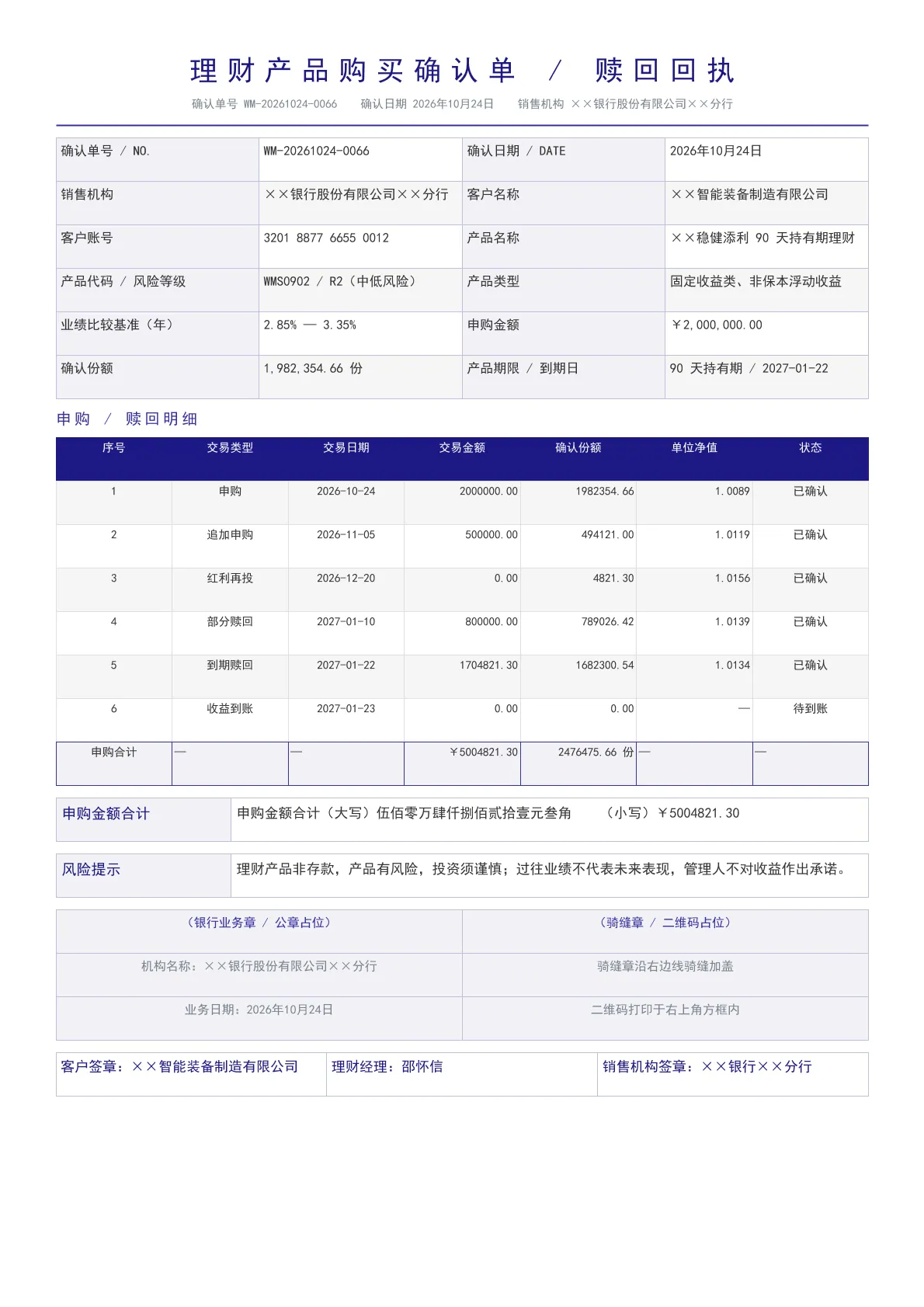
输出规格
- PDF 页数
- 1
- 图表类型
- Template
- 模板行数
- 171
- 源码行数
- 209
Java 源码 · JQuickBiz148WealthPurchaseConfirm.java
以下代码即生成上方 PDF 的完整测试类,可直接复制运行;Maven 依赖见快速开始章节。
/*
 * Licensed under the Apache License, Version 2.0 (the "License");
 * you may not use this file except in compliance with the License.
 * You may obtain a copy of the License at
 *
 *     http://www.apache.org/licenses/LICENSE-2.0
 *
 * Unless required by applicable law or agreed to in writing, software
 * distributed under the License is distributed on an "AS IS" BASIS,
 * WITHOUT WARRANTIES OR CONDITIONS OF ANY KIND, either express or implied.
 * See the License for the specific language governing permissions and
 * limitations under the License.
 *
 * Copyright (c) [2025-2099] Martin ([email protected])
 */
package com.github.paohaijiao.biz.bank;

import com.github.paohaijiao.config.JPdfConfig;
import com.github.paohaijiao.executor.JQuickPdfFactory;

import java.io.File;
import java.io.IOException;
import java.math.BigDecimal;
import java.nio.file.Files;
import java.util.Arrays;
import java.util.LinkedHashMap;
import java.util.Map;

/**
 * 单据 148:理财产品购买确认单 / 赎回回执(bank 领域第 9 项)。
 *
 * <p>本类为独立可运行 Demo:自带 {@code main} 方法、不依赖任何公共工具类或实体类,
 * 数据以 key-value 形式通过 {@link JQuickPdfFactory#bindAll(Map)} 注入,
 * 版式全部落在模板文件 {@code demo/biz/bank/148_wealth_purchase_confirm.txt} 中。</p>
 *
 * <p>视觉主题「群青·密排·典式」:主色 #3732A3、辅色 #916427、浅底 #F1F1F6;
 * 版式为 classic 抬头 + grid2 信息区 + compact 明细表 + card 签章区 + plain 落款,
 * 与同领域其它单据互不重样。</p>
 *
 * <p>理财购买确认单 / 赎回回执:产品名称与风险等级、业绩比较基准、</p>
 * <p>申购赎回交易明细(金额、份额、单位净值)与风险提示、销售机构签章栏。</p>
 *
 * <p>运行后输出:{@code D:/test/pdf/148_wealth_purchase_confirm.pdf}。</p>
 *
 * @author Martin
 * @version 1.0.0
 */
public class JQuickBiz148WealthPurchaseConfirm {

    private static final String PDF_DIR = "D:/test/pdf/";
    private static final String OUT_FILE = PDF_DIR + "148_wealth_purchase_confirm.pdf";
    private static final String TEMPLATE = "demo/biz/bank/148_wealth_purchase_confirm.txt";

    /** 模板固定明细行数,不足时补空行,避免占位符原样输出。 */
    private static final int ITEM_ROWS = 6;

    public static void main(String[] args) throws IOException {
        new File(PDF_DIR).mkdirs();

        // ---------- 1. 数据(无实体类,直接 bind)----------
        String[][] items = {
                {"1", "申购", "2026-10-24", "2000000.00", "1982354.66", "1.0089", "已确认"},
                {"2", "追加申购", "2026-11-05", "500000.00", "494121.00", "1.0119", "已确认"},
                {"3", "红利再投", "2026-12-20", "0.00", "4821.30", "1.0156", "已确认"},
                {"4", "部分赎回", "2027-01-10", "800000.00", "789026.42", "1.0139", "已确认"},
                {"5", "到期赎回", "2027-01-22", "1704821.30", "1682300.54", "1.0134", "已确认"},
                {"6", "收益到账", "2027-01-23", "0.00", "0.00", "—", "待到账"}
        };

        Map<String, Object> data = new LinkedHashMap<String, Object>();
        data.put("confirmNo", "WM-20261024-0066");
        data.put("confirmDate", "2026年10月24日");
        data.put("bankName", "××银行股份有限公司××分行");
        data.put("customerName", "××智能装备制造有限公司");
        data.put("customerAccount", "3201 8877 6655 0012");
        data.put("productName", "××稳健添利 90 天持有期理财");
        data.put("productCode", "WMS0902 / R2(中低风险)");
        data.put("productType", "固定收益类、非保本浮动收益");
        data.put("benchmark", "2.85% — 3.35%");
        data.put("purchaseAmount", "¥2,000,000.00");
        data.put("confirmShare", "1,982,354.66 份");
        data.put("maturityInfo", "90 天持有期 / 2027-01-22");
        data.put("riskNote", "理财产品非存款,产品有风险,投资须谨慎;过往业绩不代表未来表现,管理人不对收益作出承诺。");
        data.put("customerSign", "××智能装备制造有限公司");
        data.put("operator", "邵怀信");
        data.put("bankSign", "××银行××分行");

        // 明细逐格展开,并累计金额
        BigDecimal itemTotal = BigDecimal.ZERO;
        for (int i = 0; i < ITEM_ROWS; i++) {
            int n = i + 1;
            if (i >= items.length) {
                data.put("itemName" + n, "—");
                data.put("itemSpec" + n, "—");
                data.put("itemUnit" + n, "—");
                data.put("itemQty" + n, "—");
                data.put("itemPrice" + n, "—");
                data.put("itemAmount" + n, "—");
                data.put("itemTax" + n, "—");
                continue;
            }
            data.put("itemName" + n, items[i][0]);
            data.put("itemSpec" + n, items[i][1]);
            data.put("itemUnit" + n, items[i][2]);
            itemTotal = itemTotal.add(new BigDecimal(items[i][3]));
            data.put("itemQty" + n, items[i][3]);
            data.put("itemPrice" + n, items[i][4]);
            data.put("itemAmount" + n, items[i][5]);
            data.put("itemTax" + n, items[i][6]);
        }

        data.put("totalAmount", itemTotal.setScale(2, BigDecimal.ROUND_HALF_UP).toPlainString());
        data.put("totalAmountInWords", toChineseAmount(itemTotal));

        data.put("shareTotal", new BigDecimal("2476475.66").setScale(2, BigDecimal.ROUND_HALF_UP).toPlainString());

        data.put("totalLine", "申购金额合计(大写)" + toChineseAmount(itemTotal) + "  (小写)¥" + itemTotal.setScale(2, BigDecimal.ROUND_HALF_UP).toPlainString());

        // ---------- 2. 渲染 ----------
        JPdfConfig config = new JPdfConfig();
        config.getLayoutConfig().setFlexLayout(true);
        config.getDoc().setMargins(Arrays.asList(36, 36, 36, 36));
        config.getFontConfig().setDefaultFontName("Noto Sans CJK SC");
        config.getHeaderConfig().setEnabled(true);
        config.getHeaderConfig().setText("××银行××分行 理财购买确认单 WM-20261024-0066");
        config.getHeaderConfig().setFontSize(8f);
        config.getHeaderConfig().setHeight(32);
        config.getFooterConfig().setEnabled(true);
        config.getFooterConfig().setFontSize(8);
        config.getFooterConfig().setPageNumberFormat("— %d —");

        JQuickPdfFactory factory = new JQuickPdfFactory(config);
        factory.bindAll(data);
        byte[] pdf = factory.executeResource(TEMPLATE);
        Files.write(new File(OUT_FILE).toPath(), pdf);
        System.out.println("已生成:" + OUT_FILE + "(" + pdf.length + " 字节)");
    }

    /** 人民币金额转票据大写(元角分,末尾补「整」)。 */
    private static String toChineseAmount(BigDecimal amount) {
        String[] digits = {"零", "壹", "贰", "叁", "肆", "伍", "陆", "柒", "捌", "玖"};
        String[] units = {"", "拾", "佰", "仟"};
        String[] sections = {"", "万", "亿", "万亿"};
        long cents = amount.setScale(2, BigDecimal.ROUND_HALF_UP)
                .movePointRight(2).longValue();
        if (cents == 0) {
            return "零元整";
        }
        long yuan = cents / 100;
        int jiao = (int) (cents % 100 / 10);
        int fen = (int) (cents % 10);
        StringBuilder sb = new StringBuilder();
        if (yuan > 0) {
            sb.append(toChineseSection(yuan, digits, units, sections)).append("元");
        }
        if (jiao == 0 && fen == 0) {
            sb.append("整");
        } else {
            if (jiao > 0) {
                sb.append(digits[jiao]).append("角");
            } else if (yuan > 0) {
                sb.append("零");
            }
            if (fen > 0) {
                sb.append(digits[fen]).append("分");
            }
        }
        return sb.toString();
    }

    /** 整数部分按四位分节转大写。 */
    private static String toChineseSection(long value, String[] digits, String[] units, String[] sections) {
        StringBuilder sb = new StringBuilder();
        int sectionIndex = 0;
        boolean needZero = false;
        while (value > 0) {
            int section = (int) (value % 10000);
            StringBuilder part = new StringBuilder();
            int unitIndex = 0;
            boolean zeroInSection = false;
            int temp = section;
            while (temp > 0) {
                int digit = temp % 10;
                if (digit == 0) {
                    zeroInSection = true;
                } else {
                    if (zeroInSection || (needZero && part.length() == 0 && sb.length() > 0)) {
                        part.insert(0, digits[0]);
                    }
                    part.insert(0, units[unitIndex]);
                    part.insert(0, digits[digit]);
                    zeroInSection = false;
                    needZero = false;
                }
                unitIndex++;
                temp /= 10;
            }
            if (part.length() > 0) {
                part.append(sections[sectionIndex]);
            }
            sb.insert(0, part);
            needZero = section < 1000 && section > 0;
            value /= 10000;
            sectionIndex++;
        }
        return sb.toString();
    }
}
最小调用(3 行)
不想读完整测试类?核心就是这三行:绑定图表 SVG,执行模板,拿到 PDF 字节流。可直接复制到你的项目里。
// config 可省略;svg 来自 JChartRendererFactory.renderChart(...),见下方完整源码
byte[] pdf = new JQuickPdfFactory(config).executeResource("demo/biz/bank/148_wealth_purchase_confirm.txt");
模板文件 · 148_wealth_purchase_confirm.txt
类 HTML + 内联 CSS 的模板语法,绑定数据后渲染为 PDF。下方为完整模板,可直接复制,也可下载原始文件。
<pdf>
<body>
  // 148 理财产品购买确认单 / 赎回回执(bank 领域第 9 项) 视觉主题:群青·密排·典式
  // 版式组合:抬头=classic 信息区=grid2 明细表=compact 段落=box 签章=card 落款=plain
  // 主色 #3732A3 辅色 #916427 浅底 #F1F1F6
  // 理财购买确认单与赎回回执:产品代码、风险等级、业绩基准、份额与净值。

  // 抬头:classic
  <h1 style="fontSize:18pt; bold:true; color:#1D1885; textAlignment:center; characterSpacing:6pt">'理财产品购买确认单 / 赎回回执'</h1>
  <p style="fontSize:7.5pt; color:#78838C; textAlignment:center; marginBottom:3px">'确认单号 '${confirmNo}'  确认日期 '${confirmDate}'  销售机构 '${bankName}</p>
  <lineSeparator style="color:#3732A3; thickness:1.5f; marginBottom:8px"></lineSeparator>

  // 信息区:grid2
  <table style="width:100%; fontSize:8.5pt; marginBottom:8px">
    <tr>
      <td style="width:16%; padding:4px; backgroundColor:#F1F1F6; bold:true; border:1px solid #C1C0D5">'确认单号 / NO.'</td>
      <td style="width:34%; padding:4px; border:1px solid #C1C0D5">${confirmNo}</td>
      <td style="width:16%; padding:4px; backgroundColor:#F1F1F6; bold:true; border:1px solid #C1C0D5">'确认日期 / DATE'</td>
      <td style="padding:4px; border:1px solid #C1C0D5">${confirmDate}</td>
    </tr>
    <tr>
      <td style="width:16%; padding:4px; backgroundColor:#F1F1F6; bold:true; border:1px solid #C1C0D5">'销售机构'</td>
      <td style="width:34%; padding:4px; border:1px solid #C1C0D5">${bankName}</td>
      <td style="width:16%; padding:4px; backgroundColor:#F1F1F6; bold:true; border:1px solid #C1C0D5">'客户名称'</td>
      <td style="padding:4px; border:1px solid #C1C0D5">${customerName}</td>
    </tr>
    <tr>
      <td style="width:16%; padding:4px; backgroundColor:#F1F1F6; bold:true; border:1px solid #C1C0D5">'客户账号'</td>
      <td style="width:34%; padding:4px; border:1px solid #C1C0D5">${customerAccount}</td>
      <td style="width:16%; padding:4px; backgroundColor:#F1F1F6; bold:true; border:1px solid #C1C0D5">'产品名称'</td>
      <td style="padding:4px; border:1px solid #C1C0D5">${productName}</td>
    </tr>
    <tr>
      <td style="width:16%; padding:4px; backgroundColor:#F1F1F6; bold:true; border:1px solid #C1C0D5">'产品代码 / 风险等级'</td>
      <td style="width:34%; padding:4px; border:1px solid #C1C0D5">${productCode}</td>
      <td style="width:16%; padding:4px; backgroundColor:#F1F1F6; bold:true; border:1px solid #C1C0D5">'产品类型'</td>
      <td style="padding:4px; border:1px solid #C1C0D5">${productType}</td>
    </tr>
    <tr>
      <td style="width:16%; padding:4px; backgroundColor:#F1F1F6; bold:true; border:1px solid #C1C0D5">'业绩比较基准(年)'</td>
      <td style="width:34%; padding:4px; border:1px solid #C1C0D5">${benchmark}</td>
      <td style="width:16%; padding:4px; backgroundColor:#F1F1F6; bold:true; border:1px solid #C1C0D5">'申购金额'</td>
      <td style="padding:4px; border:1px solid #C1C0D5">${purchaseAmount}</td>
    </tr>
    <tr>
      <td style="width:16%; padding:4px; backgroundColor:#F1F1F6; bold:true; border:1px solid #C1C0D5">'确认份额'</td>
      <td style="width:34%; padding:4px; border:1px solid #C1C0D5">${confirmShare}</td>
      <td style="width:16%; padding:4px; backgroundColor:#F1F1F6; bold:true; border:1px solid #C1C0D5">'产品期限 / 到期日'</td>
      <td style="padding:4px; border:1px solid #C1C0D5">${maturityInfo}</td>
    </tr>
  </table>

  <p style="fontSize:10pt; bold:true; color:#3732A3; marginBottom:3px; characterSpacing:2pt">'申购 / 赎回明细'</p>
  <table style="width:100%; fontSize:7.5pt; marginBottom:8px">
    <tr>
      <th style="width:7%; padding:2px; backgroundColor:#1D1885; color:white; bold:true; textAlign:center; border:1px solid #1D1885">'序号'</th>
      <th style="width:14%; padding:2px; backgroundColor:#1D1885; color:white; bold:true; textAlign:center; border:1px solid #1D1885">'交易类型'</th>
      <th style="width:13%; padding:2px; backgroundColor:#1D1885; color:white; bold:true; textAlign:center; border:1px solid #1D1885">'交易日期'</th>
      <th style="width:15%; padding:2px; backgroundColor:#1D1885; color:white; bold:true; textAlign:center; border:1px solid #1D1885">'交易金额'</th>
      <th style="width:15%; padding:2px; backgroundColor:#1D1885; color:white; bold:true; textAlign:center; border:1px solid #1D1885">'确认份额'</th>
      <th style="width:12%; padding:2px; backgroundColor:#1D1885; color:white; bold:true; textAlign:center; border:1px solid #1D1885">'单位净值'</th>
      <th style="padding:2px; backgroundColor:#1D1885; color:white; bold:true; textAlign:center; border:1px solid #1D1885">'状态'</th>
    </tr>
    <tr>
      <td style="padding:2px; textAlign:center; border:1px solid #DFDFE5">${itemName1}</td>
      <td style="padding:2px; textAlign:center; border:1px solid #DFDFE5">${itemSpec1}</td>
      <td style="padding:2px; textAlign:center; border:1px solid #DFDFE5">${itemUnit1}</td>
      <td style="padding:2px; textAlign:right; border:1px solid #DFDFE5">${itemQty1}</td>
      <td style="padding:2px; textAlign:right; border:1px solid #DFDFE5">${itemPrice1}</td>
      <td style="padding:2px; textAlign:right; border:1px solid #DFDFE5">${itemAmount1}</td>
      <td style="padding:2px; textAlign:center; border:1px solid #DFDFE5">${itemTax1}</td>
    </tr>
    <tr>
      <td style="padding:2px; textAlign:center; border:1px solid #DFDFE5">${itemName2}</td>
      <td style="padding:2px; textAlign:center; border:1px solid #DFDFE5">${itemSpec2}</td>
      <td style="padding:2px; textAlign:center; border:1px solid #DFDFE5">${itemUnit2}</td>
      <td style="padding:2px; textAlign:right; border:1px solid #DFDFE5">${itemQty2}</td>
      <td style="padding:2px; textAlign:right; border:1px solid #DFDFE5">${itemPrice2}</td>
      <td style="padding:2px; textAlign:right; border:1px solid #DFDFE5">${itemAmount2}</td>
      <td style="padding:2px; textAlign:center; border:1px solid #DFDFE5">${itemTax2}</td>
    </tr>
    <tr>
      <td style="padding:2px; textAlign:center; border:1px solid #DFDFE5">${itemName3}</td>
      <td style="padding:2px; textAlign:center; border:1px solid #DFDFE5">${itemSpec3}</td>
      <td style="padding:2px; textAlign:center; border:1px solid #DFDFE5">${itemUnit3}</td>
      <td style="padding:2px; textAlign:right; border:1px solid #DFDFE5">${itemQty3}</td>
      <td style="padding:2px; textAlign:right; border:1px solid #DFDFE5">${itemPrice3}</td>
      <td style="padding:2px; textAlign:right; border:1px solid #DFDFE5">${itemAmount3}</td>
      <td style="padding:2px; textAlign:center; border:1px solid #DFDFE5">${itemTax3}</td>
    </tr>
    <tr>
      <td style="padding:2px; textAlign:center; border:1px solid #DFDFE5">${itemName4}</td>
      <td style="padding:2px; textAlign:center; border:1px solid #DFDFE5">${itemSpec4}</td>
      <td style="padding:2px; textAlign:center; border:1px solid #DFDFE5">${itemUnit4}</td>
      <td style="padding:2px; textAlign:right; border:1px solid #DFDFE5">${itemQty4}</td>
      <td style="padding:2px; textAlign:right; border:1px solid #DFDFE5">${itemPrice4}</td>
      <td style="padding:2px; textAlign:right; border:1px solid #DFDFE5">${itemAmount4}</td>
      <td style="padding:2px; textAlign:center; border:1px solid #DFDFE5">${itemTax4}</td>
    </tr>
    <tr>
      <td style="padding:2px; textAlign:center; border:1px solid #DFDFE5">${itemName5}</td>
      <td style="padding:2px; textAlign:center; border:1px solid #DFDFE5">${itemSpec5}</td>
      <td style="padding:2px; textAlign:center; border:1px solid #DFDFE5">${itemUnit5}</td>
      <td style="padding:2px; textAlign:right; border:1px solid #DFDFE5">${itemQty5}</td>
      <td style="padding:2px; textAlign:right; border:1px solid #DFDFE5">${itemPrice5}</td>
      <td style="padding:2px; textAlign:right; border:1px solid #DFDFE5">${itemAmount5}</td>
      <td style="padding:2px; textAlign:center; border:1px solid #DFDFE5">${itemTax5}</td>
    </tr>
    <tr>
      <td style="padding:2px; textAlign:center; border:1px solid #DFDFE5">${itemName6}</td>
      <td style="padding:2px; textAlign:center; border:1px solid #DFDFE5">${itemSpec6}</td>
      <td style="padding:2px; textAlign:center; border:1px solid #DFDFE5">${itemUnit6}</td>
      <td style="padding:2px; textAlign:right; border:1px solid #DFDFE5">${itemQty6}</td>
      <td style="padding:2px; textAlign:right; border:1px solid #DFDFE5">${itemPrice6}</td>
      <td style="padding:2px; textAlign:right; border:1px solid #DFDFE5">${itemAmount6}</td>
      <td style="padding:2px; textAlign:center; border:1px solid #DFDFE5">${itemTax6}</td>
    </tr>
    <tr>
      <td style="padding:2px; bold:true; backgroundColor:#F1F1F6; textAlign:center; border:1px solid #3732A3">'申购合计'</td>
      <td style="padding:2px; backgroundColor:#F1F1F6; border:1px solid #3732A3">'—'</td>
      <td style="padding:2px; backgroundColor:#F1F1F6; border:1px solid #3732A3">'—'</td>
      <td style="padding:2px; bold:true; backgroundColor:#F1F1F6; textAlign:right; border:1px solid #3732A3">'¥'${totalAmount}</td>
      <td style="padding:2px; bold:true; backgroundColor:#F1F1F6; textAlign:right; border:1px solid #3732A3">${shareTotal}' 份'</td>
      <td style="padding:2px; backgroundColor:#F1F1F6; border:1px solid #3732A3">'—'</td>
      <td style="padding:2px; backgroundColor:#F1F1F6; border:1px solid #3732A3">'—'</td>
    </tr>
  </table>

  // 段落:box
  <table style="width:100%; marginBottom:6px">
    <tr>
      <td style="width:150px; padding:5px; backgroundColor:#F1F1F6; bold:true; fontSize:9.5pt; color:#1D1885; border:1px solid #C1C0D5">'申购金额合计'</td>
      <td style="padding:5px; fontSize:9pt; border:1px solid #C1C0D5">${totalLine}</td>
    </tr>
  </table>
  <table style="width:100%; marginBottom:6px">
    <tr>
      <td style="width:150px; padding:5px; backgroundColor:#F1F1F6; bold:true; fontSize:9.5pt; color:#1D1885; border:1px solid #C1C0D5">'风险提示'</td>
      <td style="padding:5px; fontSize:9pt; border:1px solid #C1C0D5">${riskNote}</td>
    </tr>
  </table>

  // 签章区:card
  <!-- 签章占位区:后续加盖电子公章 / 骑缝章 / 打印二维码 -->
  <table style="width:100%; fontSize:8pt; marginBottom:8px">
    <tr>
      <td style="width:50%; padding:4px; backgroundColor:#F1F1F6; textAlign:center; color:#3732A3; border:1px solid #C1C0D5">'(银行业务章 / 公章占位)'</td>
      <td style="padding:4px; backgroundColor:#F1F1F6; textAlign:center; color:#3732A3; border:1px solid #C1C0D5">'(骑缝章 / 二维码占位)'</td>
    </tr>
    <tr>
      <td style="width:50%; padding:4px; backgroundColor:#F1F1F6; textAlign:center; color:#78838C; border:1px solid #C1C0D5">'机构名称:'${bankName}</td>
      <td style="padding:4px; backgroundColor:#F1F1F6; textAlign:center; color:#78838C; border:1px solid #C1C0D5">'骑缝章沿右边线骑缝加盖'</td>
    </tr>
    <tr>
      <td style="width:50%; padding:4px; backgroundColor:#F1F1F6; textAlign:center; color:#78838C; border:1px solid #C1C0D5">'业务日期:'${confirmDate}</td>
      <td style="padding:4px; backgroundColor:#F1F1F6; textAlign:center; color:#78838C; border:1px solid #C1C0D5">'二维码打印于右上角方框内'</td>
    </tr>
  </table>

  // 落款:plain
  <!-- 落款栏 -->
  <table style="width:100%; fontSize:9pt; marginTop:6px">
    <tr>
      <td style="width:33%; padding:4px; color:#1D1885; borderBottom:1px solid #C1C0D5">'客户签章:'${customerSign}</td>
      <td style="width:33%; padding:4px; color:#1D1885; borderBottom:1px solid #C1C0D5">'理财经理:'${operator}</td>
      <td style="padding:4px; color:#1D1885; borderBottom:1px solid #C1C0D5">'销售机构签章:'${bankSign}</td>
    </tr>
  </table>
</body>
</pdf>
同分组示例
本页 PDF、预览图、模板与源码均由 JQuick-Pdf 真实运行产出,可自由复制到你的项目中使用。