
Java 生成「全年销售出单日历热力图(销售运营)」PDF 示例(Calendar)
Calendar1 页 A4 · 63 KB
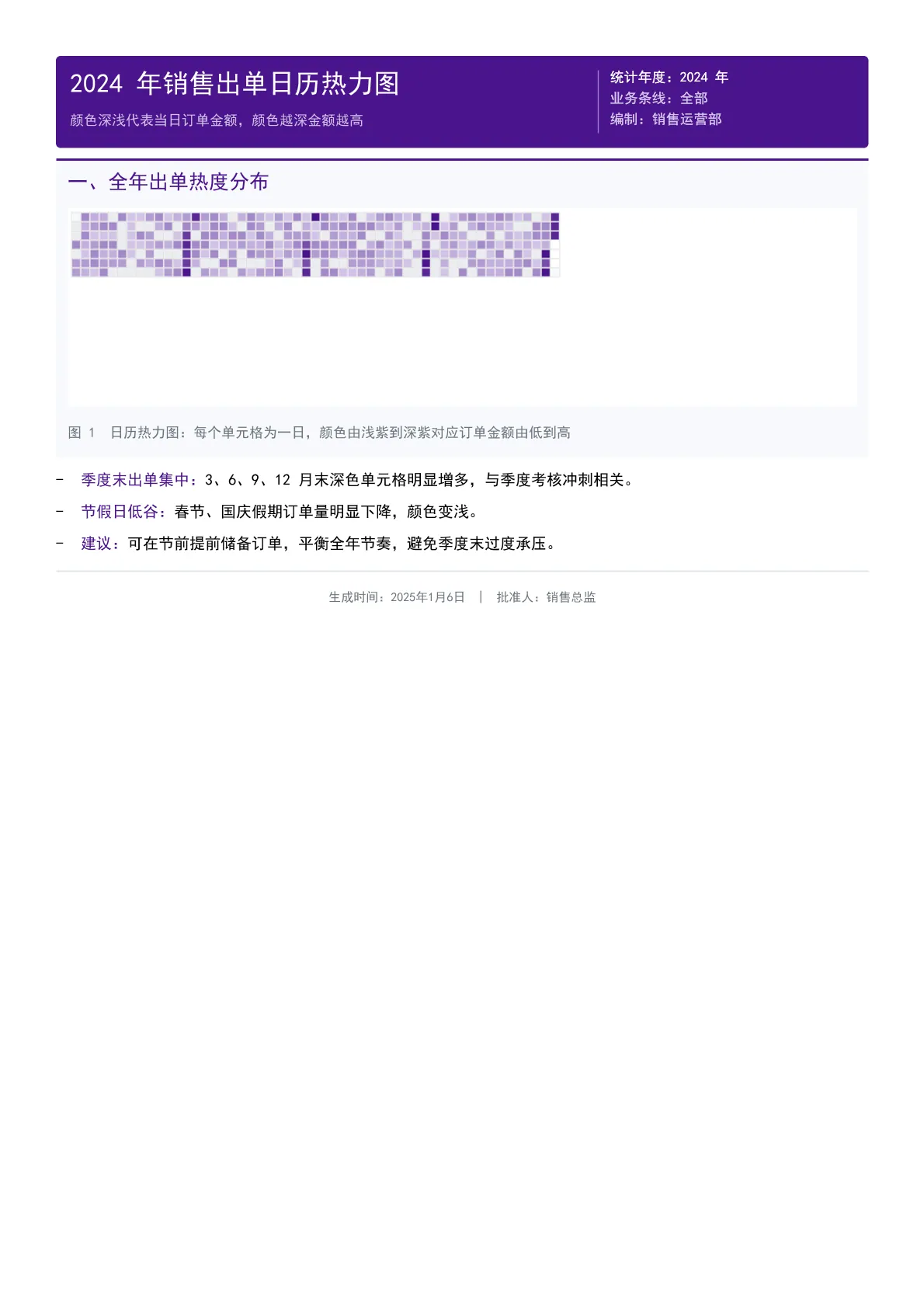
2024 全年逐日订单金额日历热力图:每个单元格为一日,浅紫到深紫对应金额由低到高,可直观看出季末出单集中、节假日低谷的节奏。
输出规格
- PDF 页数
- 1
- 图表类型
- Calendar
- 模板行数
- 36
- 源码行数
- 110
Java 源码 · JQuickBiz58CalendarTest.java
以下代码即生成上方 PDF 的完整测试类,可直接复制运行;Maven 依赖见快速开始章节。
/*
 * Licensed under the Apache License, Version 2.0 (the "License");
 * you may not use this file except in compliance with the License.
 * You may obtain a copy of the License at
 *
 *     http://www.apache.org/licenses/LICENSE-2.0
 *
 * Unless required by applicable law or agreed to in writing, software
 * distributed under the License is distributed on an "AS IS" BASIS,
 * WITHOUT WARRANTIES OR CONDITIONS OF ANY KIND, either express or implied.
 * See the License for the specific language governing permissions and
 * limitations under the License.
 *
 * Copyright (c) [2025-2099] Martin ([email protected])
 */
package com.github.paohaijiao.demo.biz;

import com.github.paohaijiao.JOption;
import com.github.paohaijiao.calendar.JCalendarOption;
import com.github.paohaijiao.config.JPdfConfig;
import com.github.paohaijiao.demo.constant.JQuickConstant;
import com.github.paohaijiao.enums.JChartType;
import com.github.paohaijiao.executor.JQuickPdfFactory;
import com.github.paohaijiao.factory.JChartRendererFactory;
import org.junit.Test;

import java.awt.Color;
import java.io.File;
import java.io.FileOutputStream;
import java.io.IOException;
import java.time.LocalDate;
import java.util.HashMap;
import java.util.Map;
import java.util.Random;

/**
 * 业务场景 Demo 58:销售出单日历热力图(销售运营)
 *
 * <p>业务场景:销售运营部门以日历热力图形式展示全年每日订单金额,颜色越深代表
 * 当日订单金额越高,便于识别销售高峰与低谷。</p>
 * <p>实际图表类型:{@link JChartType#Calendar} 日历热力图。</p>
 *
 * <p>模板:{@code report/biz/58_calendar.txt};图表以 SVG 文本形式绑定到模板的
 * {@code ${svg}} 占位符,输出到 {@code D:\test\biz\58_calendar.pdf}。</p>
 *
 * <p>图表尺寸说明:图表按 700pt 宽的横版比例设计;模板中 {@code <svg>}
 * 只声明宽度、不声明高度,宽度被页面自动收窄时高度会按原比例同步缩放。</p>
 *
 * @author Martin
 * @version 1.0.0
 */
public class JQuickBiz58CalendarTest {

    public static final String path = JQuickConstant.path;

    @Test
    public void biz58Calendar() throws IOException {
        // 构造 2024 年全年每日订单金额数据
        // calculateColor 中 ratio = value/10,因此需要将数据压缩到 0-10 区间
        // 否则所有值都会变成最深色,看不出差异
        Map<LocalDate, Integer> data = new HashMap<>();
        Random random = new Random(88);
        LocalDate start = LocalDate.of(2024, 1, 1);
        LocalDate end = LocalDate.of(2024, 12, 31);
        for (LocalDate date = start; !date.isAfter(end); date = date.plusDays(1)) {
            // 基础值 0-4 分(对应 30-150 万)
            int base = random.nextInt(5);
            int month = date.getMonthValue();
            int day = date.getDayOfMonth();
            // 季度末冲刺:3/6/9/12 月最后 5 天为 7-10 分(深色)
            if ((month == 3 || month == 6 || month == 9 || month == 12) && day >= 26) {
                base = 7 + random.nextInt(4);
            }
            // 节假日低谷:春节、国庆为 0-1 分(最浅色)
            if ((month == 2 && day >= 10 && day <= 17) || (month == 10 && day >= 1 && day <= 7)) {
                base = random.nextInt(2);
            }
            data.put(date, base);
        }

        JCalendarOption calendarOption = new JCalendarOption(
                "2024 年销售出单日历热力图", "颜色越深代表当日订单金额越高(单位:万元)",
                2024, data,
                new Color(225, 215, 240),  // 起始色(浅紫)
                new Color(74, 20, 140),   // 结束色(深紫)
                new Color(220, 220, 220), // 网格色
                new Color(51, 51, 51),    // 文字色
                14, 6                     // cellSize, margin
        );

        JOption option = new JOption();
        option.setJCalendarOption(calendarOption);

        String svg = JChartRendererFactory.renderChart(JChartType.Calendar, option);

        File dir = new File(path + "biz");
        if (!dir.exists()) {
            dir.mkdirs();
        }
        FileOutputStream fileOutputStream = new FileOutputStream(path + "biz/58_calendar.pdf");
        JPdfConfig config = new JPdfConfig();
        config.getLayoutConfig().setFlexLayout(true);
        JQuickPdfFactory factory = new JQuickPdfFactory(config);
        factory.bind("svg", svg);
        byte[] bytes = factory.executeResource("report/biz/58_calendar.txt");
        fileOutputStream.write(bytes);
        fileOutputStream.close();
    }
}
最小调用(3 行)
不想读完整测试类?核心就是这三行:绑定图表 SVG,执行模板,拿到 PDF 字节流。可直接复制到你的项目里。
// config 可省略;svg 来自 JChartRendererFactory.renderChart(...),见下方完整源码
factory.bind("svg", svg);
byte[] pdf = new JQuickPdfFactory(config).executeResource("report/biz/58_calendar.txt");
模板文件 · 58_calendar.txt
类 HTML + 内联 CSS 的模板语法,绑定数据后渲染为 PDF。下方为完整模板,可直接复制,也可下载原始文件。
<pdf>
<body>
  // 58 日历热力图 Demo:以日历形式展示某指标在一年中每日的分布(颜色深浅代表数值大小)
  <div style="background:#4A148C; padding:12px; borderRadius:4px; marginBottom:10px; keepTogether:true">
    <div style="display:flex; justifyContent:space-between">
      <div style="width:320px">
        <h1 style="color:white; fontSize:17; bold:true; marginBottom:3px">'2024 年销售出单日历热力图'</h1>
        <p style="color:#D1C4E9; fontSize:9">'颜色深浅代表当日订单金额,颜色越深金额越高'</p>
      </div>
      <div style="width:220px; textAlignment:right; borderLeft:1px solid #9575CD; paddingLeft:10px">
        <p style="color:white; fontSize:9">'统计年度:2024 年'</p>
        <p style="color:#D1C4E9; fontSize:9">'业务条线:全部'</p>
        <p style="color:#D1C4E9; fontSize:9">'编制:销售运营部'</p>
      </div>
    </div>
  </div>

  <div style="marginBottom:10px; padding:10px; backgroundColor:#F7F9FC; borderRadius:4px; borderTop:2px solid #4A148C">
    <h2 style="color:#4A148C; marginBottom:6px; fontSize:13; bold:true">'一、全年出单热度分布'</h2>
    <div style="display:flex; justifyContent:center">
      <svg style="width:700pt">${svg}</svg>
    </div>
    <p style="fontSize:9; color:#6c757d; italic:true; marginTop:6px">'图 1  日历热力图:每个单元格为一日,颜色由浅紫到深紫对应订单金额由低到高'</p>
  </div>

  <list style="listStyleType:disc; paddingLeft:16px; fontSize:10">
    <li style="marginBottom:6px"><span style="bold:true; color:#4A148C">'季度末出单集中:'</span>'3、6、9、12 月末深色单元格明显增多,与季度考核冲刺相关。'</li>
    <li style="marginBottom:6px"><span style="bold:true; color:#4A148C">'节假日低谷:'</span>'春节、国庆假期订单量明显下降,颜色变浅。'</li>
    <li style="marginBottom:6px"><span style="bold:true; color:#4A148C">'建议:'</span>'可在节前提前储备订单,平衡全年节奏,避免季度末过度承压。'</li>
  </list>

  <lineSeparator style="strokeColor:#DCE3EC"></lineSeparator>
  <p style="color:#6c757d; fontSize:8; textAlignment:center; marginTop:6px">'生成时间:2025年1月6日 | 批准人:销售总监'</p>
</body>
</pdf>
同分组示例
本页 PDF、预览图、模板与源码均由 JQuick-Pdf 真实运行产出,可自由复制到你的项目中使用。