
Java 生成「离职证明」PDF 示例(Template)
Template1 页 A4 · 33 KB
标准制式公文离职证明,单页即打即用。
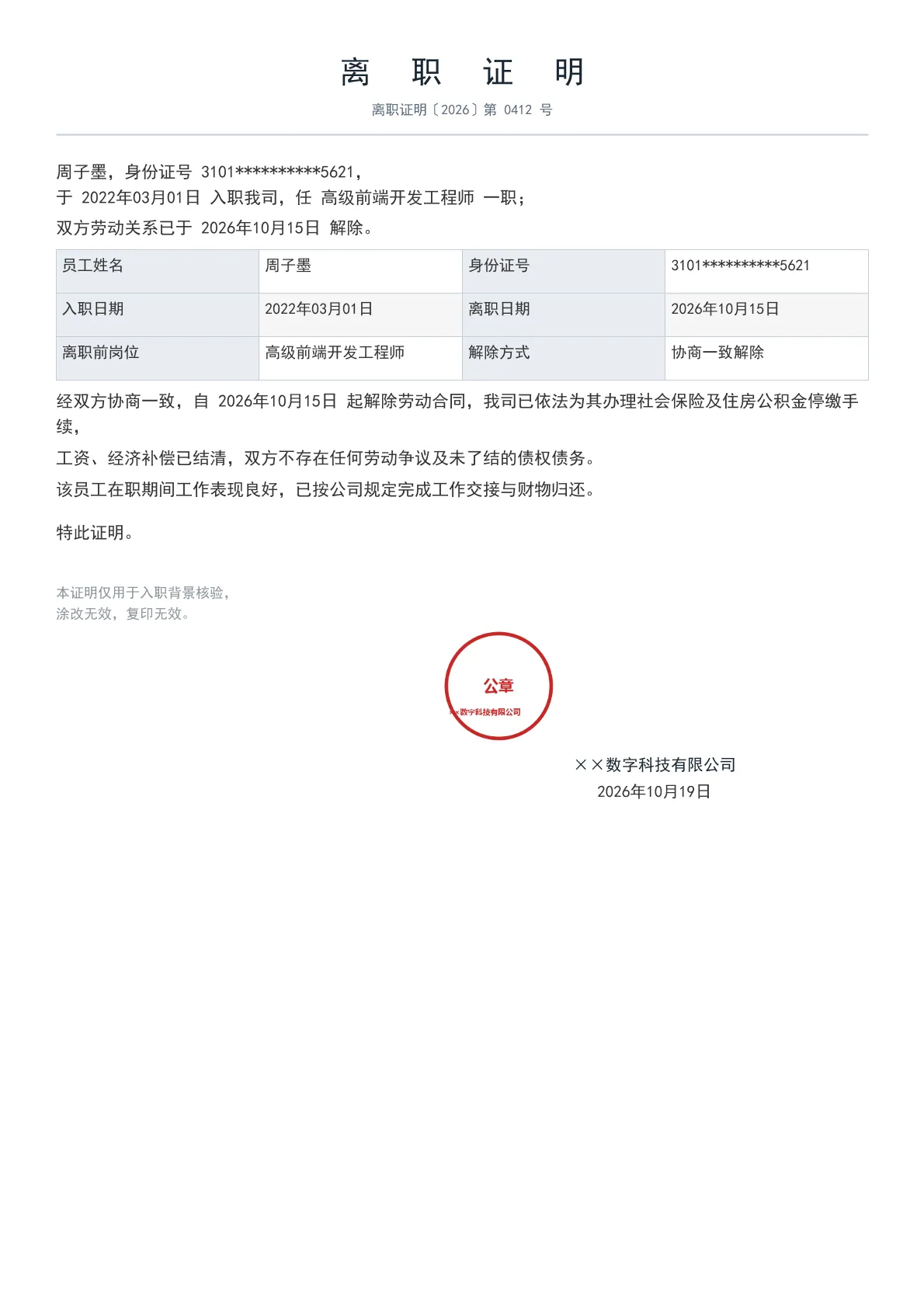
输出规格
- PDF 页数
- 1
- 图表类型
- Template
- 模板行数
- 56
- 源码行数
- 100
Java 源码 · JQuickBiz75ResignationCert.java
以下代码即生成上方 PDF 的完整测试类,可直接复制运行;Maven 依赖见快速开始章节。
/*
 * Licensed under the Apache License, Version 2.0 (the "License");
 * you may not use this file except in compliance with the License.
 * You may obtain a copy of the License at
 *
 *     http://www.apache.org/licenses/LICENSE-2.0
 *
 * Unless required by applicable law or agreed to in writing, software
 * distributed under the License is distributed on an "AS IS" BASIS,
 * WITHOUT WARRANTIES OR CONDITIONS OF ANY KIND, either express or implied.
 * See the License for the specific language governing permissions and
 * limitations under the License.
 *
 * Copyright (c) [2025-2099] Martin ([email protected])
 */
package com.github.paohaijiao.biz.scenario;

import com.github.paohaijiao.config.JPdfConfig;
import com.github.paohaijiao.executor.JQuickPdfFactory;

import javax.imageio.ImageIO;
import java.awt.*;
import java.awt.image.BufferedImage;
import java.io.File;
import java.io.IOException;
import java.util.Arrays;
import java.util.LinkedHashMap;
import java.util.Map;

public class JQuickBiz75ResignationCert {

    private static final String PDF_DIR = "D:/test/pdf/";
    private static final String IMG_DIR = "D:/test/image/";
    private static final String OUT_FILE = PDF_DIR + "75_resignation_cert.pdf";
    private static final String TEMPLATE = "report/biz/75_resignation_cert.txt";

    public static void main(String[] args) throws IOException {
        new File(PDF_DIR).mkdirs();
        new File(IMG_DIR).mkdirs();

        // ---------- 1. 生成公章图片(模板按字面量路径引用)----------
        generateSeal(IMG_DIR + "75_seal.png", "××数字科技有限公司");

        // ---------- 2. 组织数据(普通 Map,无实体类)----------
        String employeeName = "周子墨";
        String idCard = "3101**********5621";
        String entryDate = "2022年03月01日";
        String leaveDate = "2026年10月15日";
        String position = "高级前端开发工程师";
        String companyName = "××数字科技有限公司";

        Map<String, Object> data = new LinkedHashMap<String, Object>();
        data.put("certNo", "离职证明〔2026〕第 0412 号");
        data.put("employeeName", employeeName);
        data.put("idCard", idCard);
        data.put("entryDate", entryDate);
        data.put("leaveDate", leaveDate);
        data.put("position", position);
        data.put("terminateReason", "协商一致解除");
        data.put("companyName", companyName);
        data.put("issueDate", "2026年10月19日");
        // 长句在 Java 侧组装为单条纯文本(模板中变量只能承载纯文本)
        data.put("line1", employeeName + ",身份证号 " + idCard + ",");
        data.put("line2", "于 " + entryDate + " 入职我司,任 " + position + " 一职;");
        data.put("line3", "双方劳动关系已于 " + leaveDate + " 解除。");
        data.put("line4", "经双方协商一致,自 " + leaveDate
                + " 起解除劳动合同,我司已依法为其办理社会保险及住房公积金停缴手续,");

        // ---------- 3. 渲染 ----------
        JPdfConfig config = new JPdfConfig();
        config.getLayoutConfig().setFlexLayout(true);
        config.getDoc().setMargins(Arrays.asList(60, 72, 60, 72));
        config.getFooterConfig().setEnabled(false);

        JQuickPdfFactory factory = new JQuickPdfFactory(config);
        factory.bindAll(data);
        byte[] pdf = factory.executeResource(TEMPLATE);
        java.nio.file.Files.write(new File(OUT_FILE).toPath(), pdf);
        System.out.println("已生成:" + OUT_FILE);
    }

    /** 生成单位公章(圆环 + 单位名 + 「公章」字样)。 */
    private static void generateSeal(String path, String orgName) throws IOException {
        int size = 200;
        BufferedImage image = new BufferedImage(size, size, BufferedImage.TYPE_INT_ARGB);
        Graphics2D g = image.createGraphics();
        g.setRenderingHint(RenderingHints.KEY_ANTIALIASING, RenderingHints.VALUE_ANTIALIAS_ON);
        Color red = new Color(0xC6, 0x28, 0x28);
        g.setColor(red);
        g.setStroke(new BasicStroke(6f));
        g.drawOval(10, 10, size - 20, size - 20);
        g.setFont(new Font("Microsoft YaHei", Font.BOLD, 13));
        g.drawString(orgName, 14, size / 2 + 50);
        g.setFont(new Font("Microsoft YaHei", Font.BOLD, 26));
        g.drawString("公章", size / 2 - 26, size / 2 + 9);
        g.dispose();
        ImageIO.write(image, "png", new File(path));
    }
}
最小调用(3 行)
不想读完整测试类?核心就是这三行:绑定图表 SVG,执行模板,拿到 PDF 字节流。可直接复制到你的项目里。
// config 可省略;svg 来自 JChartRendererFactory.renderChart(...),见下方完整源码
byte[] pdf = new JQuickPdfFactory(config).executeResource("report/biz/75_resignation_cert.txt");
模板文件 · 75_resignation_cert.txt
类 HTML + 内联 CSS 的模板语法,绑定数据后渲染为 PDF。下方为完整模板,可直接复制,也可下载原始文件。
<pdf>
<body>

  <h1 style="fontSize:20pt; bold:true; color:#1A2733; textAlignment:center; characterSpacing:8pt">'离 职 证 明'</h1>
  <p style="fontSize:9pt; color:#5A6B7C; textAlignment:center; marginBottom:4px">${certNo}</p>
  <lineSeparator style="strokeColor:#C3CDD8"></lineSeparator>

  <!-- 声明正文 -->
  <p style="fontSize:11pt; color:#333333; textIndent:22pt; marginTop:14px; lineHeight:1.9">${line1}</p>
  <p style="fontSize:11pt; color:#333333; textIndent:22pt; marginBottom:4px">${line2}</p>
  <p style="fontSize:11pt; color:#333333; textIndent:22pt; marginBottom:4px">${line3}</p>

  <!-- 核验信息表 -->
  <table style="width:100%; fontSize:10pt; marginTop:12px; marginBottom:12px">
    <tr>
      <td style="width:26%; padding:5px; backgroundColor:#E8EDF2; bold:true; border:1px solid #C3CDD8">'员工姓名'</td>
      <td style="padding:5px; border:1px solid #C3CDD8">${employeeName}</td>
      <td style="width:26%; padding:5px; backgroundColor:#E8EDF2; bold:true; border:1px solid #C3CDD8">'身份证号'</td>
      <td style="padding:5px; border:1px solid #C3CDD8">${idCard}</td>
    </tr>
    <tr>
      <td style="padding:5px; backgroundColor:#E8EDF2; bold:true; border:1px solid #C3CDD8">'入职日期'</td>
      <td style="padding:5px; border:1px solid #C3CDD8">${entryDate}</td>
      <td style="padding:5px; backgroundColor:#E8EDF2; bold:true; border:1px solid #C3CDD8">'离职日期'</td>
      <td style="padding:5px; border:1px solid #C3CDD8">${leaveDate}</td>
    </tr>
    <tr>
      <td style="padding:5px; backgroundColor:#E8EDF2; bold:true; border:1px solid #C3CDD8">'离职前岗位'</td>
      <td style="padding:5px; border:1px solid #C3CDD8">${position}</td>
      <td style="padding:5px; backgroundColor:#E8EDF2; bold:true; border:1px solid #C3CDD8">'解除方式'</td>
      <td style="padding:5px; border:1px solid #C3CDD8">${terminateReason}</td>
    </tr>
  </table>

  <!-- 解除说明 -->
  <p style="fontSize:11pt; color:#333333; textIndent:22pt; marginBottom:5px">${line4}</p>
  <p style="fontSize:11pt; color:#333333; textIndent:22pt; marginBottom:5px">'工资、经济补偿已结清,双方不存在任何劳动争议及未了结的债权债务。'</p>
  <p style="fontSize:11pt; color:#333333; textIndent:22pt; marginBottom:5px">'该员工在职期间工作表现良好,已按公司规定完成工作交接与财物归还。'</p>
  <p style="fontSize:11pt; color:#333333; textIndent:22pt; marginTop:10px; marginBottom:5px">'特此证明。'</p>

  <!-- 落款 + 公章 -->
  <div style="display:flex; justifyContent:space-between; marginTop:26px">
    <div style="width:44%">
      <p style="fontSize:9pt; color:#8a939b">'本证明仅用于入职背景核验,'</p>
      <p style="fontSize:9pt; color:#8a939b">'涂改无效,复印无效。'</p>
    </div>
    <div style="width:48%; paddingLeft:330px">
      <image src='D:/test/image/75_seal.png' style="width:100px; height:100px"></image>
      <p style="fontSize:10.5pt; bold:true; color:#1A2733; textAlignment:center">${companyName}</p>
      <p style="fontSize:10.5pt; color:#333333; textAlignment:center; marginTop:2px">${issueDate}</p>
    </div>
  </div>

</body>
</pdf>
同分组示例
本页 PDF、预览图、模板与源码均由 JQuick-Pdf 真实运行产出,可自由复制到你的项目中使用。