
Java 生成「个人简历」PDF 示例(Template)
Template1 页 A4 · 40 KB
单栏全宽 A4 简历:深蓝信息横条 + 自我评价、工作、项目、教育四段经历,模板 + bind 数据注入生成。
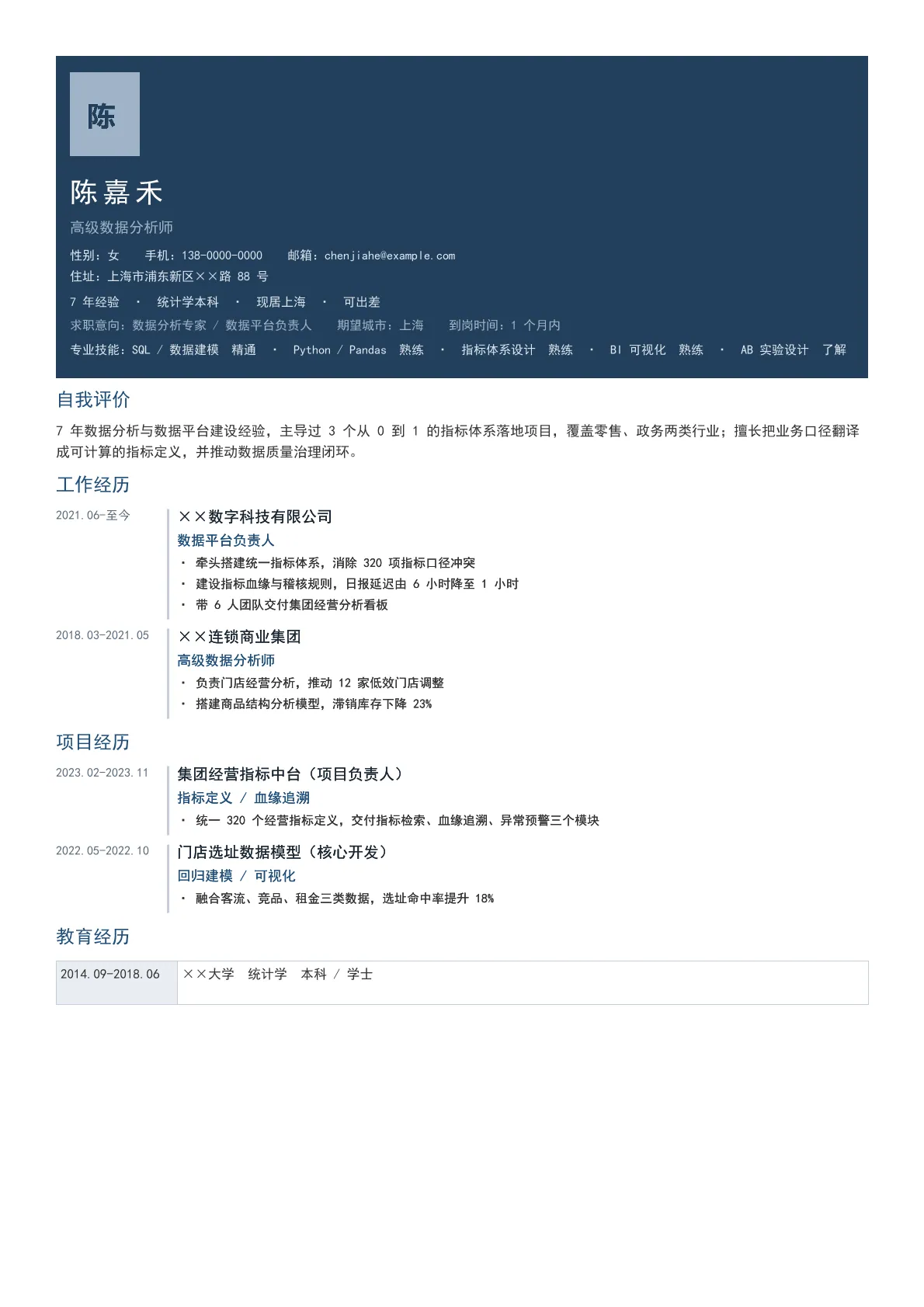
输出规格
- PDF 页数
- 1
- 图表类型
- Template
- 模板行数
- 75
- 源码行数
- 134
Java 源码 · JQuickBiz69Resume.java
以下代码即生成上方 PDF 的完整测试类,可直接复制运行;Maven 依赖见快速开始章节。
/*
 * Licensed under the Apache License, Version 2.0 (the "License");
 * you may not use this file except in compliance with the License.
 * You may obtain a copy of the License at
 *
 *     http://www.apache.org/licenses/LICENSE-2.0
 *
 * Unless required by applicable law or agreed to in writing, software
 * distributed under the License is distributed on an "AS IS" BASIS,
 * WITHOUT WARRANTIES OR CONDITIONS OF ANY KIND, either express or implied.
 * See the License for the specific language governing permissions and
 * limitations under the License.
 *
 * Copyright (c) [2025-2099] Martin ([email protected])
 */
package com.github.paohaijiao.biz.scenario;

import com.github.paohaijiao.config.JPdfConfig;
import com.github.paohaijiao.executor.JQuickPdfFactory;

import javax.imageio.ImageIO;
import java.awt.*;
import java.awt.image.BufferedImage;
import java.io.File;
import java.io.FileOutputStream;
import java.io.IOException;
import java.util.Arrays;
import java.util.LinkedHashMap;
import java.util.Map;

public class JQuickBiz69Resume {

    private static final String PDF_DIR = "D:/test/pdf/";
    private static final String IMG_DIR = "D:/test/image/";
    private static final String OUT_FILE = PDF_DIR + "69_resume.pdf";
    private static final String TEMPLATE = "report/biz/69_resume.txt";

    public static void main(String[] args) throws IOException {
        new File(PDF_DIR).mkdirs();
        new File(IMG_DIR).mkdirs();

        // ---------- 1. 图片:头像占位图 ----------
        generateAvatar(IMG_DIR + "69_avatar.png");

        // ---------- 2. 数据(普通 Map,无实体类)----------
        Map<String, Object> data = new LinkedHashMap<String, Object>();
        data.put("name", "陈嘉禾");
        data.put("jobTitle", "高级数据分析师");
        data.put("gender", "女");
        data.put("phone", "138-0000-0000");
        data.put("email", "[email protected]");
        data.put("address", "上海市浦东新区××路 88 号");
        data.put("expectLine", "求职意向:数据分析专家 / 数据平台负责人  期望城市:上海  到岗时间:1 个月内");
        data.put("tagLine", "7 年经验 · 统计学本科 · 现居上海 · 可出差");
        data.put("selfEvaluation", "7 年数据分析与数据平台建设经验,主导过 3 个从 0 到 1 的指标体系落地项目,"
                + "覆盖零售、政务两类行业;擅长把业务口径翻译成可计算的指标定义,并推动数据质量治理闭环。");

        // 专业技能:逐条 bind 为 skill1~5
        String[] skills = {
                "SQL / 数据建模 精通",
                "Python / Pandas 熟练",
                "指标体系设计 熟练",
                "BI 可视化 熟练",
                "AB 实验设计 了解"
        };
        for (int i = 0; i < skills.length; i++) {
            data.put("skill" + (i + 1), skills[i]);
        }

        // 工作经历:2 段
        data.put("workPeriod1", "2021.06-至今");
        data.put("workTitle1", "××数字科技有限公司");
        data.put("workSubtitle1", "数据平台负责人");
        data.put("workDetail11", "牵头搭建统一指标体系,消除 320 项指标口径冲突");
        data.put("workDetail12", "建设指标血缘与稽核规则,日报延迟由 6 小时降至 1 小时");
        data.put("workDetail13", "带 6 人团队交付集团经营分析看板");

        data.put("workPeriod2", "2018.03-2021.05");
        data.put("workTitle2", "××连锁商业集团");
        data.put("workSubtitle2", "高级数据分析师");
        data.put("workDetail21", "负责门店经营分析,推动 12 家低效门店调整");
        data.put("workDetail22", "搭建商品结构分析模型,滞销库存下降 23%");

        // 项目经历:2 段
        data.put("projectPeriod1", "2023.02-2023.11");
        data.put("projectTitle1", "集团经营指标中台(项目负责人)");
        data.put("projectSubtitle1", "指标定义 / 血缘追溯");
        data.put("projectDetail11", "统一 320 个经营指标定义,交付指标检索、血缘追溯、异常预警三个模块");

        data.put("projectPeriod2", "2022.05-2022.10");
        data.put("projectTitle2", "门店选址数据模型(核心开发)");
        data.put("projectSubtitle2", "回归建模 / 可视化");
        data.put("projectDetail21", "融合客流、竞品、租金三类数据,选址命中率提升 18%");

        // 教育经历
        data.put("eduPeriod1", "2014.09-2018.06");
        data.put("eduTitle1", "××大学");
        data.put("eduSubtitle1", "统计学 本科 / 学士");

        // ---------- 3. 渲染 ----------
        JPdfConfig config = new JPdfConfig();
        // 经历条目的「时间 + 内容」时间轴用 display:flex 实现,必须开启 flex 行布局
        config.getLayoutConfig().setFlexLayout(true);
        config.getDoc().setMargins(Arrays.asList(36, 36, 36, 36));
        config.getFooterConfig().setEnabled(true);
        config.getFooterConfig().setFontSize(8);
        config.getFooterConfig().setPageNumberFormat("第 %d 页");

        JQuickPdfFactory factory = new JQuickPdfFactory(config);
        factory.bindAll(data);
        byte[] pdf = factory.executeResource(TEMPLATE);

        FileOutputStream out = new FileOutputStream(OUT_FILE);
        out.write(pdf);
        out.close();
        System.out.println("已生成:" + OUT_FILE);
    }

    /**
     * 生成头像占位图(120×150 纯色块 + 姓氏),业务中替换为真实照片路径即可。
     */
    private static void generateAvatar(String path) throws IOException {
        BufferedImage image = new BufferedImage(120, 150, BufferedImage.TYPE_INT_RGB);
        Graphics2D g = image.createGraphics();
        g.setColor(new Color(0x9F, 0xB3, 0xC8));
        g.fillRect(0, 0, 120, 150);
        g.setColor(new Color(0x23, 0x40, 0x5C));
        g.setFont(new Font("Microsoft YaHei", Font.BOLD, 48));
        g.drawString("陈", 30, 95);
        g.dispose();
        ImageIO.write(image, "png", new File(path));
    }
}
最小调用(3 行)
不想读完整测试类?核心就是这三行:绑定图表 SVG,执行模板,拿到 PDF 字节流。可直接复制到你的项目里。
// config 可省略;svg 来自 JChartRendererFactory.renderChart(...),见下方完整源码
byte[] pdf = new JQuickPdfFactory(config).executeResource("report/biz/69_resume.txt");
模板文件 · 69_resume.txt
类 HTML + 内联 CSS 的模板语法,绑定数据后渲染为 PDF。下方为完整模板,可直接复制,也可下载原始文件。
<pdf>
<body>

  <!-- 顶部深蓝横条 -->
  <div style="backgroundColor:#23405C; padding:14px 12px; marginBottom:10px">
    <image src='D:/test/image/69_avatar.png' style="width:60px; height:72px"></image>
    <p style="color:white; fontSize:18pt; bold:true; characterSpacing:3pt; marginTop:8px">${name}</p>
    <p style="color:#9FB3C8; fontSize:9.5pt; marginBottom:6px">${jobTitle}</p>
    <p style="color:#DCE6F0; fontSize:8pt; marginBottom:2px">'性别:'${gender}'  手机:'${phone}'  邮箱:'${email}</p>
    <p style="color:#DCE6F0; fontSize:8pt; marginBottom:2px">'住址:'${address}</p>
    <p style="color:#DCE6F0; fontSize:8pt; marginTop:4px">${tagLine}</p>
    <p style="color:#9FB3C8; fontSize:8pt; marginTop:4px">${expectLine}</p>
    <p style="color:#DCE6F0; fontSize:8pt; marginTop:5px">'专业技能:'${skill1}' · '${skill2}' · '${skill3}' · '${skill4}' · '${skill5}</p>
  </div>

  <!-- 自我评价 -->
  <p style="fontSize:12pt; bold:true; color:#1F4E79; borderLeft:4px solid #1F4E79; paddingLeft:6px; marginBottom:5px">'自我评价'</p>
  <p style="fontSize:9pt; color:#333333; marginBottom:8px">${selfEvaluation}</p>

  <!-- 工作经历(时间轴 flex:96+376=472,固定 px 宽) -->
  <p style="fontSize:12pt; bold:true; color:#1F4E79; borderLeft:4px solid #1F4E79; paddingLeft:6px; marginBottom:5px">'工作经历'</p>

  <div style="display:flex; justifyContent:flex-start; marginBottom:8px">
    <div style="width:96px"><p style="fontSize:8pt; bold:true; color:#5A6B7C">${workPeriod1}</p></div>
    <div style="width:376px; borderLeft:2px solid #C3CDD8; paddingLeft:8px">
      <p style="fontSize:10pt; bold:true; color:#1A2733; marginBottom:1px">${workTitle1}</p>
      <p style="fontSize:9pt; color:#1F4E79; marginBottom:2px">${workSubtitle1}</p>
      <p style="fontSize:8pt; color:#333333; marginBottom:2px">'· '${workDetail11}</p>
      <p style="fontSize:8pt; color:#333333; marginBottom:2px">'· '${workDetail12}</p>
      <p style="fontSize:8pt; color:#333333; marginBottom:2px">'· '${workDetail13}</p>
    </div>
  </div>

  <div style="display:flex; justifyContent:flex-start; marginBottom:8px">
    <div style="width:96px"><p style="fontSize:8pt; bold:true; color:#5A6B7C">${workPeriod2}</p></div>
    <div style="width:376px; borderLeft:2px solid #C3CDD8; paddingLeft:8px">
      <p style="fontSize:10pt; bold:true; color:#1A2733; marginBottom:1px">${workTitle2}</p>
      <p style="fontSize:9pt; color:#1F4E79; marginBottom:2px">${workSubtitle2}</p>
      <p style="fontSize:8pt; color:#333333; marginBottom:2px">'· '${workDetail21}</p>
      <p style="fontSize:8pt; color:#333333; marginBottom:2px">'· '${workDetail22}</p>
    </div>
  </div>

  <!-- 项目经历 -->
  <p style="fontSize:12pt; bold:true; color:#1F4E79; borderLeft:4px solid #1F4E79; paddingLeft:6px; marginBottom:5px; marginTop:4px">'项目经历'</p>

  <div style="display:flex; justifyContent:flex-start; marginBottom:8px">
    <div style="width:96px"><p style="fontSize:8pt; bold:true; color:#5A6B7C">${projectPeriod1}</p></div>
    <div style="width:376px; borderLeft:2px solid #C3CDD8; paddingLeft:8px">
      <p style="fontSize:10pt; bold:true; color:#1A2733; marginBottom:1px">${projectTitle1}</p>
      <p style="fontSize:9pt; color:#1F4E79; marginBottom:2px">${projectSubtitle1}</p>
      <p style="fontSize:8pt; color:#333333; marginBottom:2px">'· '${projectDetail11}</p>
    </div>
  </div>

  <div style="display:flex; justifyContent:flex-start; marginBottom:8px">
    <div style="width:96px"><p style="fontSize:8pt; bold:true; color:#5A6B7C">${projectPeriod2}</p></div>
    <div style="width:376px; borderLeft:2px solid #C3CDD8; paddingLeft:8px">
      <p style="fontSize:10pt; bold:true; color:#1A2733; marginBottom:1px">${projectTitle2}</p>
      <p style="fontSize:9pt; color:#1F4E79; marginBottom:2px">${projectSubtitle2}</p>
      <p style="fontSize:8pt; color:#333333; marginBottom:2px">'· '${projectDetail21}</p>
    </div>
  </div>

  <!-- 教育经历 -->
  <p style="fontSize:12pt; bold:true; color:#1F4E79; borderLeft:4px solid #1F4E79; paddingLeft:6px; marginBottom:5px; marginTop:4px">'教育经历'</p>
  <table style="width:100%; fontSize:8.5pt">
    <tr>
      <td style="width:104px; padding:4px; backgroundColor:#E8EDF2; bold:true; border:1px solid #C3CDD8">${eduPeriod1}</td>
      <td style="padding:4px; border:1px solid #C3CDD8">${eduTitle1}' '${eduSubtitle1}</td>
    </tr>
  </table>
</body>
</pdf>
同分组示例
本页 PDF、预览图、模板与源码均由 JQuick-Pdf 真实运行产出,可自由复制到你的项目中使用。