
May 2024 lunar calendar (HR & administration) — generate this PDF with Java (Lunar)
Lunar1 页 A4 · 229 KB
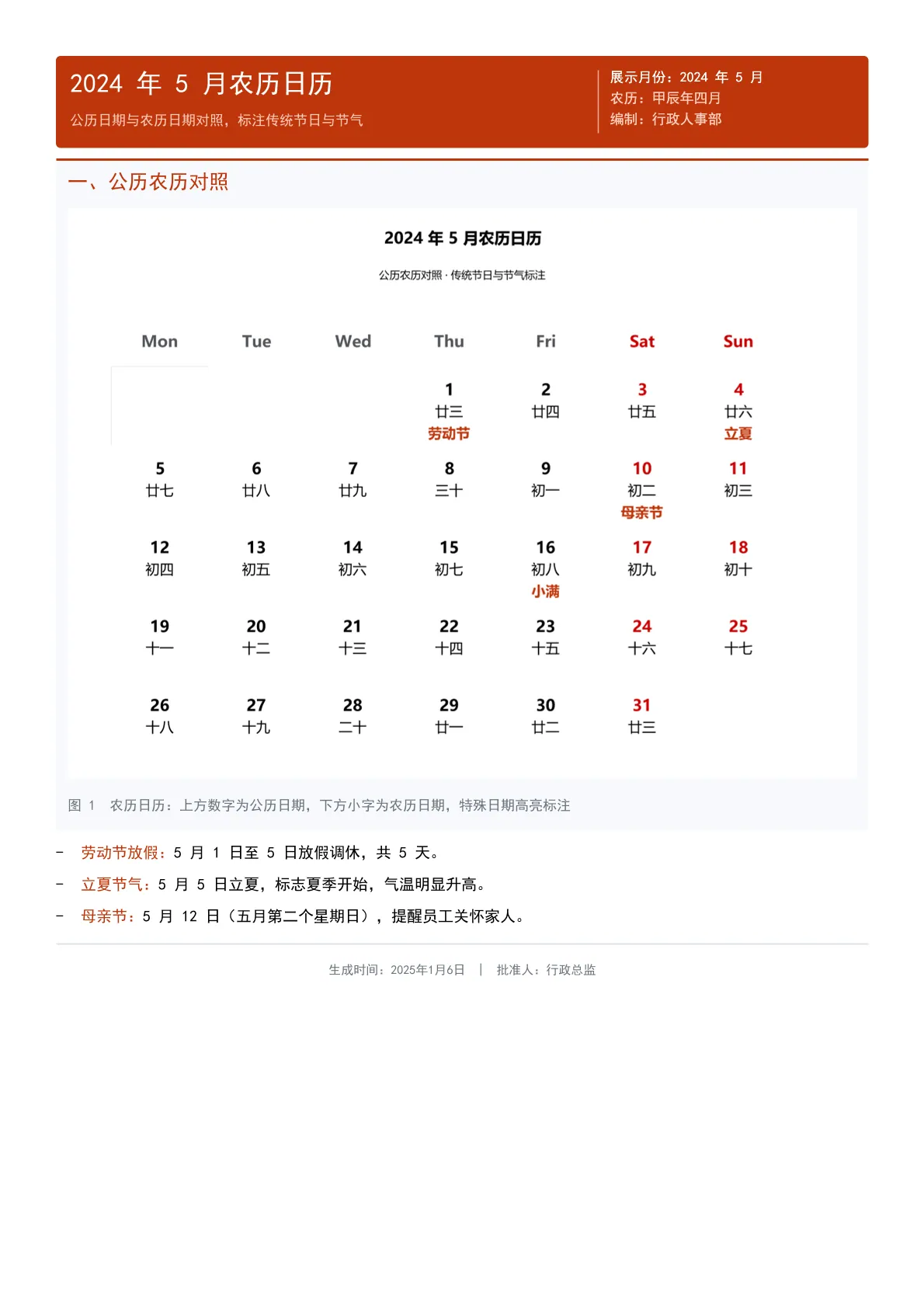
A Gregorian-lunar monthly calendar: the Gregorian date sits above the lunar date in every cell, Labor Day, Mother's Day and the Grain Buds solar term are highlighted, weekends are shown in red, and holiday and term notes follow below.
Output specs
- PDF pages
- 1
- Chart type
- Lunar
- Template lines
- 36
- Source lines
- 116
Java source · JQuickBiz63LunarTest.java
This is the complete test class that produced the PDF above — copy it and run as-is; see the quick-start section for the Maven dependency.
/*
 * Licensed under the Apache License, Version 2.0 (the "License");
 * you may not use this file except in compliance with the License.
 * You may obtain a copy of the License at
 *
 *     http://www.apache.org/licenses/LICENSE-2.0
 *
 * Unless required by applicable law or agreed to in writing, software
 * distributed under the License is distributed on an "AS IS" BASIS,
 * WITHOUT WARRANTIES OR CONDITIONS OF ANY KIND, either express or implied.
 * See the License for the specific language governing permissions and
 * limitations under the License.
 *
 * Copyright (c) [2025-2099] Martin ([email protected])
 */
package com.github.paohaijiao.demo.biz;

import com.github.paohaijiao.JTitle;
import com.github.paohaijiao.config.JPdfConfig;
import com.github.paohaijiao.demo.constant.JQuickConstant;
import com.github.paohaijiao.enums.JChartType;
import com.github.paohaijiao.executor.JQuickPdfFactory;
import com.github.paohaijiao.factory.JChartRendererFactory;
import com.github.paohaijiao.lunar.LunarCalendarOption;
import org.junit.Test;

import java.awt.Color;
import java.io.File;
import java.io.FileOutputStream;
import java.io.IOException;
import java.util.ArrayList;
import java.util.List;

/**
 * 业务场景 Demo 63:2024 年 5 月农历日历(行政人事)
 *
 * <p>业务场景:行政人事部制作公历农历对照日历,标注传统节日与节气,
 * 便于员工安排工作与假期。</p>
 * <p>实际图表类型:{@link JChartType#Lunar} 农历日历图。</p>
 *
 * <p>模板:{@code report/biz/63_lunar.txt};图表以 SVG 文本形式绑定到模板的
 * {@code ${svg}} 占位符,输出到 {@code D:\test\biz\63_lunar.pdf}。</p>
 *
 * <p>图表尺寸说明:图表按 700pt 宽的横版比例设计;模板中 {@code <svg>}
 * 只声明宽度、不声明高度,宽度被页面自动收窄时高度会按原比例同步缩放。</p>
 *
 * @author Martin
 * @version 1.0.0
 */
public class JQuickBiz63LunarTest {

    public static final String path = JQuickConstant.path;

    @Test
    public void biz63Lunar() throws IOException {
        // 2024 年 5 月共 31 天,5 月 1 日为星期三(第 1 行第 4 列,row=0, col=3)
        List<LunarCalendarOption.DayData> dayData = new ArrayList<>();
        String[] lunarDays = {
                "廿三", "廿四", "廿五", "廿六", "廿七", "廿八", "廿九",
                "三十", "初一", "初二", "初三", "初四", "初五", "初六",
                "初七", "初八", "初九", "初十", "十一", "十二", "十三",
                "十四", "十五", "十六", "十七", "十八", "十九", "二十",
                "廿一", "廿二", "廿三"
        };
        // 5 月 1 日是周三,起始列 col=3
        int col = 3;
        int row = 0;
        for (int day = 1; day <= 31; day++) {
            dayData.add(new LunarCalendarOption.DayData(day, lunarDays[day - 1], row, col));
            col++;
            if (col >= 7) {
                col = 0;
                row++;
            }
        }

        List<LunarCalendarOption.SpecialDay> specialDays = new ArrayList<>();
        specialDays.add(new LunarCalendarOption.SpecialDay("劳动节", 0, 3));  // 5/1
        specialDays.add(new LunarCalendarOption.SpecialDay("立夏", 0, 6));    // 5/5
        specialDays.add(new LunarCalendarOption.SpecialDay("母亲节", 1, 5));  // 5/12
        specialDays.add(new LunarCalendarOption.SpecialDay("小满", 2, 4));    // 5/21

        LunarCalendarOption.CalendarDataConfig dataConfig = new LunarCalendarOption.CalendarDataConfig()
                .setDayDataList(dayData)
                .setSpecialDays(specialDays)
                .setWeekDays(new String[]{"Mon", "Tue", "Wed", "Thu", "Fri", "Sat", "Sun"})
                .setRows(5)
                .setCols(7);

        LunarCalendarOption.ColorConfig colorConfig = new LunarCalendarOption.ColorConfig()
                .setBackgroundColor(Color.white)
                .setSpecialDayColor(new Color(191, 54, 12));

        JTitle title = new JTitle();
        title.setText("2024 年 5 月农历日历");
        title.setSubtext("公历农历对照 · 传统节日与节气标注");

        LunarCalendarOption option = LunarCalendarOption.of("2024", "5月", colorConfig, title, dataConfig);

        String svg = JChartRendererFactory.renderChart(JChartType.Lunar, option);

        File dir = new File(path + "biz");
        if (!dir.exists()) {
            dir.mkdirs();
        }
        FileOutputStream fileOutputStream = new FileOutputStream(path + "biz/63_lunar.pdf");
        JPdfConfig config = new JPdfConfig();
        config.getLayoutConfig().setFlexLayout(true);
        JQuickPdfFactory factory = new JQuickPdfFactory(config);
        factory.bind("svg", svg);
        byte[] bytes = factory.executeResource("report/biz/63_lunar.txt");
        fileOutputStream.write(bytes);
        fileOutputStream.close();
    }
}
Minimal invocation (3 lines)
Skip the full test class — the core is these three lines: bind the chart SVG, execute the template, get the PDF bytes. Copy them straight into your project.
// config 可省略;svg 来自 JChartRendererFactory.renderChart(...),见下方完整源码
factory.bind("svg", svg);
byte[] pdf = new JQuickPdfFactory(config).executeResource("report/biz/63_lunar.txt");
Template file · 63_lunar.txt
An HTML-like template with inline CSS that renders to PDF once bound to data. The full template is below — copy it or download the raw file.
<pdf>
<body>
  // 63 农历日历 Demo:展示公历与农历对照、传统节日、节气等信息
  <div style="background:#BF360C; padding:12px; borderRadius:4px; marginBottom:10px; keepTogether:true">
    <div style="display:flex; justifyContent:space-between">
      <div style="width:320px">
        <h1 style="color:white; fontSize:17; bold:true; marginBottom:3px">'2024 年 5 月农历日历'</h1>
        <p style="color:#FFCCBC; fontSize:9">'公历日期与农历日期对照,标注传统节日与节气'</p>
      </div>
      <div style="width:220px; textAlignment:right; borderLeft:1px solid #FFAB91; paddingLeft:10px">
        <p style="color:white; fontSize:9">'展示月份:2024 年 5 月'</p>
        <p style="color:#FFCCBC; fontSize:9">'农历:甲辰年四月'</p>
        <p style="color:#FFCCBC; fontSize:9">'编制:行政人事部'</p>
      </div>
    </div>
  </div>

  <div style="marginBottom:10px; padding:10px; backgroundColor:#F7F9FC; borderRadius:4px; borderTop:2px solid #BF360C">
    <h2 style="color:#BF360C; marginBottom:6px; fontSize:13; bold:true">'一、公历农历对照'</h2>
    <div style="display:flex; justifyContent:center">
      <svg style="width:700pt">${svg}</svg>
    </div>
    <p style="fontSize:9; color:#6c757d; italic:true; marginTop:6px">'图 1  农历日历:上方数字为公历日期,下方小字为农历日期,特殊日期高亮标注'</p>
  </div>

  <list style="listStyleType:disc; paddingLeft:16px; fontSize:10">
    <li style="marginBottom:6px"><span style="bold:true; color:#BF360C">'劳动节放假:'</span>'5 月 1 日至 5 日放假调休,共 5 天。'</li>
    <li style="marginBottom:6px"><span style="bold:true; color:#BF360C">'立夏节气:'</span>'5 月 5 日立夏,标志夏季开始,气温明显升高。'</li>
    <li style="marginBottom:6px"><span style="bold:true; color:#BF360C">'母亲节:'</span>'5 月 12 日(五月第二个星期日),提醒员工关怀家人。'</li>
  </list>

  <lineSeparator style="strokeColor:#DCE3EC"></lineSeparator>
  <p style="color:#6c757d; fontSize:8; textAlignment:center; marginTop:6px">'生成时间:2025年1月6日 | 批准人:行政总监'</p>
</body>
</pdf>
More demos in this group
The PDF, preview image, template and source code on this page were all produced by a real JQuick-Pdf run and are free to copy into your own project.