
Weekly report — generate this PDF with Java (LineBar)
LineBar2 页 A4 · 154 KB
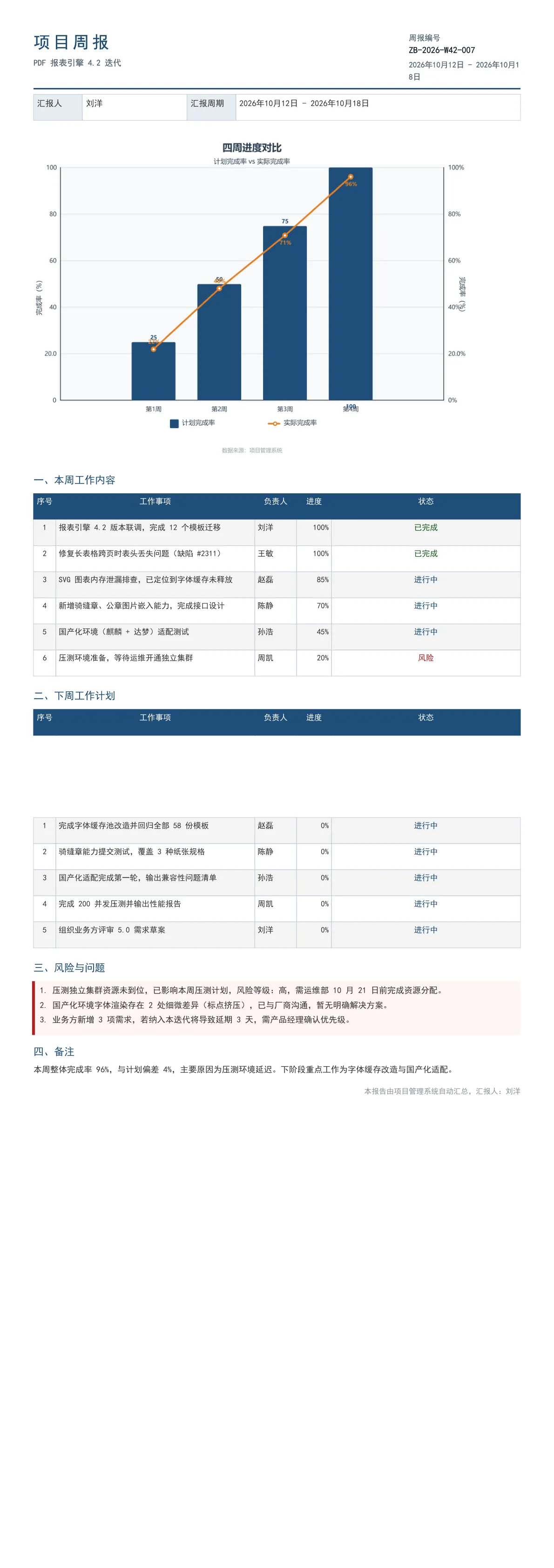
Weekly report with an SVG line/bar chart and automatic multi-page pagination.
Output specs
- PDF pages
- 2
- Chart type
- LineBar
- Template lines
- 148
- Source lines
- 130
Java source · JQuickBiz77WeeklyReport.java
This is the complete test class that produced the PDF above — copy it and run as-is; see the quick-start section for the Maven dependency.
/*
 * Licensed under the Apache License, Version 2.0 (the "License");
 * you may not use this file except in compliance with the License.
 * You may obtain a copy of the License at
 *
 *     http://www.apache.org/licenses/LICENSE-2.0
 *
 * Unless required by applicable law or agreed to in writing, software
 * distributed under the License is distributed on an "AS IS" BASIS,
 * WITHOUT WARRANTIES OR CONDITIONS OF ANY KIND, either express or implied.
 * See the License for the specific language governing permissions and
 * limitations under the License.
 *
 * Copyright (c) [2025-2099] Martin ([email protected])
 */
package com.github.paohaijiao.biz.scenario;

import com.github.paohaijiao.JOption;
import com.github.paohaijiao.combol.JComboLineBarChartData;
import com.github.paohaijiao.config.JPdfConfig;
import com.github.paohaijiao.enums.JChartType;
import com.github.paohaijiao.executor.JQuickPdfFactory;
import com.github.paohaijiao.factory.JChartRendererFactory;

import java.awt.Color;
import java.io.File;
import java.io.FileOutputStream;
import java.util.ArrayList;
import java.util.Arrays;
import java.util.LinkedHashMap;
import java.util.List;
import java.util.Map;

public class JQuickBiz77WeeklyReport {

    private static final String PDF_DIR = "D:/test/pdf/";
    private static final String OUT_FILE = PDF_DIR + "77_weekly_report.pdf";
    private static final String TEMPLATE = "report/biz/77_weekly_report.txt";

    public static void main(String[] args) throws Exception {
        new File(PDF_DIR).mkdirs();

        // ---------- 1. 组织数据(普通 Map,无实体类)----------
        Map<String, Object> data = new LinkedHashMap<String, Object>();
        data.put("reportNo", "ZB-2026-W42-007");
        data.put("projectName", "PDF 报表引擎 4.2 迭代");
        data.put("reporter", "刘洋");
        data.put("period", "2026年10月12日 - 2026年10月18日");

        // 本周任务:逐条 bind 为 twN_name / twN_owner / twN_progress / twN_status
        List<String[]> thisWeek = new ArrayList<String[]>();
        thisWeek.add(new String[]{"报表引擎 4.2 版本联调,完成 12 个模板迁移", "刘洋", "100%", "已完成"});
        thisWeek.add(new String[]{"修复长表格跨页时表头丢失问题(缺陷 #2311)", "王敏", "100%", "已完成"});
        thisWeek.add(new String[]{"SVG 图表内存泄漏排查,已定位到字体缓存未释放", "赵磊", "85%", "进行中"});
        thisWeek.add(new String[]{"新增骑缝章、公章图片嵌入能力,完成接口设计", "陈静", "70%", "进行中"});
        thisWeek.add(new String[]{"国产化环境(麒麟 + 达梦)适配测试", "孙浩", "45%", "进行中"});
        thisWeek.add(new String[]{"压测环境准备,等待运维开通独立集群", "周凯", "20%", "风险"});
        bindTasks(data, "tw", thisWeek);

        // 下周计划:逐条 bind 为 nwN_xxx
        List<String[]> nextWeek = new ArrayList<String[]>();
        nextWeek.add(new String[]{"完成字体缓存池改造并回归全部 58 份模板", "赵磊", "0%", "进行中"});
        nextWeek.add(new String[]{"骑缝章能力提交测试,覆盖 3 种纸张规格", "陈静", "0%", "进行中"});
        nextWeek.add(new String[]{"国产化适配完成第一轮,输出兼容性问题清单", "孙浩", "0%", "进行中"});
        nextWeek.add(new String[]{"完成 200 并发压测并输出性能报告", "周凯", "0%", "进行中"});
        nextWeek.add(new String[]{"组织业务方评审 5.0 需求草案", "刘洋", "0%", "进行中"});
        bindTasks(data, "nw", nextWeek);

        // 风险与问题
        data.put("risk1", "1. 压测独立集群资源未到位,已影响本周压测计划,风险等级:高,需运维部 10 月 21 日前完成资源分配。");
        data.put("risk2", "2. 国产化环境字体渲染存在 2 处细微差异(标点挤压),已与厂商沟通,暂无明确解决方案。");
        data.put("risk3", "3. 业务方新增 3 项需求,若纳入本迭代将导致延期 3 天,需产品经理确认优先级。");

        data.put("remark", "本周整体完成率 96%,与计划偏差 4%,主要原因为压测环境延迟。下阶段重点工作为字体缓存改造与国产化适配。");

        // ---------- 2. 渲染 ----------
        JPdfConfig config = new JPdfConfig();
        config.getLayoutConfig().setFlexLayout(true);
        config.getDoc().setMargins(Arrays.asList(50, 50, 55, 50));
        config.getFooterConfig().setEnabled(true);
        config.getFooterConfig().setFontSize(8);
        config.getFooterConfig().setPageNumberFormat("第 %d 页");

        JQuickPdfFactory factory = new JQuickPdfFactory(config);
        // 注入 SVG 图表
        factory.bind("progressSvg", buildProgressSvg());
        factory.bindAll(data);
        byte[] pdf = factory.executeResource(TEMPLATE);

        FileOutputStream out = new FileOutputStream(OUT_FILE);
        out.write(pdf);
        out.close();
        System.out.println("已生成:" + OUT_FILE);
    }

    /** 任务数组按 prefix1_name 等形式逐条 bind(模板逐行引用)。 */
    private static void bindTasks(Map<String, Object> data, String prefix, List<String[]> tasks) {
        String[] keys = {"name", "owner", "progress", "status"};
        for (int i = 0; i < tasks.size(); i++) {
            for (int j = 0; j < keys.length; j++) {
                data.put(prefix + (i + 1) + "_" + keys[j], tasks.get(i)[j]);
            }
        }
    }

    /**
     * 构建进度图表:柱为「计划完成率」,折线为「实际完成率」,双序列共用百分比量纲。
     * 图表 API 类不是实体类,渲染为 SVG 字符串后 bind 为变量。
     */
    private static String buildProgressSvg() {
        JComboLineBarChartData chartData = JComboLineBarChartData.builder()
                .title("四周进度对比", "计划完成率 vs 实际完成率")
                .barData(Arrays.asList(25.0, 50.0, 75.0, 100.0))
                .lineData(Arrays.asList(22.0, 48.0, 71.0, 96.0))
                .xAxisLabels(Arrays.asList("第1周", "第2周", "第3周", "第4周"))
                .barColor(new Color(0x1F, 0x4E, 0x79))
                .lineColor(new Color(0xE6, 0x7E, 0x22))
                .leftAxisTitle("完成率(%)")
                .rightAxisTitle("完成率(%)")
                .barLegendText("计划完成率")
                .lineLegendText("实际完成率")
                .footerText("数据来源:项目管理系统")
                .build();

        JOption option = new JOption();
        option.setData(chartData);
        return JChartRendererFactory.renderChart(JChartType.LineBar, option);
    }
}
Minimal invocation (3 lines)
Skip the full test class — the core is these three lines: bind the chart SVG, execute the template, get the PDF bytes. Copy them straight into your project.
// config 可省略;svg 来自 JChartRendererFactory.renderChart(...),见下方完整源码
factory.bind("progressSvg", buildProgressSvg());
byte[] pdf = new JQuickPdfFactory(config).executeResource("report/biz/77_weekly_report.txt");
Template file · 77_weekly_report.txt
An HTML-like template with inline CSS that renders to PDF once bound to data. The full template is below — copy it or download the raw file.
<pdf>
<body>

  // ---------- 页头 ----------
  <div style="display:flex; justifyContent:space-between; borderBottom:2px solid #1F4E79; paddingBottom:6px; marginBottom:8px">
    <div style="width:330px">
      <h1 style="fontSize:18pt; bold:true; color:#1F4E79; characterSpacing:3pt">'项目周报'</h1>
      <p style="fontSize:9pt; color:#5A6B7C">${projectName}</p>
    </div>
    <div style="width:160px; textAlignment:right">
      <p style="fontSize:8.5pt; color:#5A6B7C">'周报编号'</p>
      <p style="fontSize:9.5pt; bold:true; color:#1A2733">${reportNo}</p>
      <p style="fontSize:8.5pt; color:#5A6B7C; marginTop:3px">${period}</p>
    </div>
  </div>

  <table style="width:100%; fontSize:9pt">
    <tr>
      <td style="width:70px; padding:5px; backgroundColor:#E8EDF2; bold:true; border:1px solid #C3CDD8">'汇报人'</td>
      <td style="width:150px; padding:5px; border:1px solid #C3CDD8">${reporter}</td>
      <td style="width:70px; padding:5px; backgroundColor:#E8EDF2; bold:true; border:1px solid #C3CDD8">'汇报周期'</td>
      <td style="padding:5px; border:1px solid #C3CDD8">${period}</td>
    </tr>
  </table>

  // ---------- SVG 进度图(变量由 Java 侧 bind,svg 变量可用) ----------
  <div style="marginTop:6px">
    <svg style="width:470pt">${progressSvg}</svg>
  </div>

  // ---------- 一、本周工作内容 ----------
  <h2 style="fontSize:11pt; bold:true; color:#1F4E79; borderLeft:3px solid #1F4E79; paddingLeft:6px; marginTop:10px; marginBottom:5px">'一、本周工作内容'</h2>
  <table style="width:100%; fontSize:8.5pt">
    <tr>
      <th style="width:32px; padding:4px; backgroundColor:#1F4E79; color:white; textAlign:center; border:1px solid #1F4E79">'序号'</th>
      <th style="width:285px; padding:4px; backgroundColor:#1F4E79; color:white; textAlign:center; border:1px solid #1F4E79">'工作事项'</th>
      <th style="width:60px; padding:4px; backgroundColor:#1F4E79; color:white; textAlign:center; border:1px solid #1F4E79">'负责人'</th>
      <th style="width:50px; padding:4px; backgroundColor:#1F4E79; color:white; textAlign:center; border:1px solid #1F4E79">'进度'</th>
      <th style="padding:4px; backgroundColor:#1F4E79; color:white; textAlign:center; border:1px solid #1F4E79">'状态'</th>
    </tr>
    <tr>
      <td style="padding:4px; textAlign:center; border:1px solid #C3CDD8">'1'</td>
      <td style="padding:4px; border:1px solid #C3CDD8">${tw1_name}</td>
      <td style="padding:4px; border:1px solid #C3CDD8">${tw1_owner}</td>
      <td style="padding:4px; textAlign:right; border:1px solid #C3CDD8">${tw1_progress}</td>
      <td style="padding:4px; textAlign:center; bold:true; color:#1B5E20; border:1px solid #C3CDD8">${tw1_status}</td>
    </tr>
    <tr>
      <td style="padding:4px; textAlign:center; border:1px solid #C3CDD8">'2'</td>
      <td style="padding:4px; border:1px solid #C3CDD8">${tw2_name}</td>
      <td style="padding:4px; border:1px solid #C3CDD8">${tw2_owner}</td>
      <td style="padding:4px; textAlign:right; border:1px solid #C3CDD8">${tw2_progress}</td>
      <td style="padding:4px; textAlign:center; bold:true; color:#1B5E20; border:1px solid #C3CDD8">${tw2_status}</td>
    </tr>
    <tr>
      <td style="padding:4px; textAlign:center; border:1px solid #C3CDD8">'3'</td>
      <td style="padding:4px; border:1px solid #C3CDD8">${tw3_name}</td>
      <td style="padding:4px; border:1px solid #C3CDD8">${tw3_owner}</td>
      <td style="padding:4px; textAlign:right; border:1px solid #C3CDD8">${tw3_progress}</td>
      <td style="padding:4px; textAlign:center; bold:true; color:#1F4E79; border:1px solid #C3CDD8">${tw3_status}</td>
    </tr>
    <tr>
      <td style="padding:4px; textAlign:center; border:1px solid #C3CDD8">'4'</td>
      <td style="padding:4px; border:1px solid #C3CDD8">${tw4_name}</td>
      <td style="padding:4px; border:1px solid #C3CDD8">${tw4_owner}</td>
      <td style="padding:4px; textAlign:right; border:1px solid #C3CDD8">${tw4_progress}</td>
      <td style="padding:4px; textAlign:center; bold:true; color:#1F4E79; border:1px solid #C3CDD8">${tw4_status}</td>
    </tr>
    <tr>
      <td style="padding:4px; textAlign:center; border:1px solid #C3CDD8">'5'</td>
      <td style="padding:4px; border:1px solid #C3CDD8">${tw5_name}</td>
      <td style="padding:4px; border:1px solid #C3CDD8">${tw5_owner}</td>
      <td style="padding:4px; textAlign:right; border:1px solid #C3CDD8">${tw5_progress}</td>
      <td style="padding:4px; textAlign:center; bold:true; color:#1F4E79; border:1px solid #C3CDD8">${tw5_status}</td>
    </tr>
    <tr>
      <td style="padding:4px; textAlign:center; border:1px solid #C3CDD8">'6'</td>
      <td style="padding:4px; border:1px solid #C3CDD8">${tw6_name}</td>
      <td style="padding:4px; border:1px solid #C3CDD8">${tw6_owner}</td>
      <td style="padding:4px; textAlign:right; border:1px solid #C3CDD8">${tw6_progress}</td>
      <td style="padding:4px; textAlign:center; bold:true; color:#B71C1C; border:1px solid #C3CDD8">${tw6_status}</td>
    </tr>
  </table>

  // ---------- 二、下周工作计划 ----------
  <h2 style="fontSize:11pt; bold:true; color:#1F4E79; borderLeft:3px solid #1F4E79; paddingLeft:6px; marginTop:10px; marginBottom:5px">'二、下周工作计划'</h2>
  <table style="width:100%; fontSize:8.5pt">
    <tr>
      <th style="width:32px; padding:4px; backgroundColor:#1F4E79; color:white; textAlign:center; border:1px solid #1F4E79">'序号'</th>
      <th style="width:285px; padding:4px; backgroundColor:#1F4E79; color:white; textAlign:center; border:1px solid #1F4E79">'工作事项'</th>
      <th style="width:60px; padding:4px; backgroundColor:#1F4E79; color:white; textAlign:center; border:1px solid #1F4E79">'负责人'</th>
      <th style="width:50px; padding:4px; backgroundColor:#1F4E79; color:white; textAlign:center; border:1px solid #1F4E79">'进度'</th>
      <th style="padding:4px; backgroundColor:#1F4E79; color:white; textAlign:center; border:1px solid #1F4E79">'状态'</th>
    </tr>
    <tr>
      <td style="padding:4px; textAlign:center; border:1px solid #C3CDD8">'1'</td>
      <td style="padding:4px; border:1px solid #C3CDD8">${nw1_name}</td>
      <td style="padding:4px; border:1px solid #C3CDD8">${nw1_owner}</td>
      <td style="padding:4px; textAlign:right; border:1px solid #C3CDD8">${nw1_progress}</td>
      <td style="padding:4px; textAlign:center; bold:true; color:#1F4E79; border:1px solid #C3CDD8">${nw1_status}</td>
    </tr>
    <tr>
      <td style="padding:4px; textAlign:center; border:1px solid #C3CDD8">'2'</td>
      <td style="padding:4px; border:1px solid #C3CDD8">${nw2_name}</td>
      <td style="padding:4px; border:1px solid #C3CDD8">${nw2_owner}</td>
      <td style="padding:4px; textAlign:right; border:1px solid #C3CDD8">${nw2_progress}</td>
      <td style="padding:4px; textAlign:center; bold:true; color:#1F4E79; border:1px solid #C3CDD8">${nw2_status}</td>
    </tr>
    <tr>
      <td style="padding:4px; textAlign:center; border:1px solid #C3CDD8">'3'</td>
      <td style="padding:4px; border:1px solid #C3CDD8">${nw3_name}</td>
      <td style="padding:4px; border:1px solid #C3CDD8">${nw3_owner}</td>
      <td style="padding:4px; textAlign:right; border:1px solid #C3CDD8">${nw3_progress}</td>
      <td style="padding:4px; textAlign:center; bold:true; color:#1F4E79; border:1px solid #C3CDD8">${nw3_status}</td>
    </tr>
    <tr>
      <td style="padding:4px; textAlign:center; border:1px solid #C3CDD8">'4'</td>
      <td style="padding:4px; border:1px solid #C3CDD8">${nw4_name}</td>
      <td style="padding:4px; border:1px solid #C3CDD8">${nw4_owner}</td>
      <td style="padding:4px; textAlign:right; border:1px solid #C3CDD8">${nw4_progress}</td>
      <td style="padding:4px; textAlign:center; bold:true; color:#1F4E79; border:1px solid #C3CDD8">${nw4_status}</td>
    </tr>
    <tr>
      <td style="padding:4px; textAlign:center; border:1px solid #C3CDD8">'5'</td>
      <td style="padding:4px; border:1px solid #C3CDD8">${nw5_name}</td>
      <td style="padding:4px; border:1px solid #C3CDD8">${nw5_owner}</td>
      <td style="padding:4px; textAlign:right; border:1px solid #C3CDD8">${nw5_progress}</td>
      <td style="padding:4px; textAlign:center; bold:true; color:#1F4E79; border:1px solid #C3CDD8">${nw5_status}</td>
    </tr>
  </table>

  // ---------- 三、风险与问题 ----------
  <h2 style="fontSize:11pt; bold:true; color:#1F4E79; borderLeft:3px solid #1F4E79; paddingLeft:6px; marginTop:10px; marginBottom:5px">'三、风险与问题'</h2>
  <div style="borderLeft:4px solid #B71C1C; background:#FFF5F5; padding:7px 9px; marginBottom:6px">
    <p style="fontSize:9pt; color:#333333; marginBottom:3px">${risk1}</p>
    <p style="fontSize:9pt; color:#333333; marginBottom:3px">${risk2}</p>
    <p style="fontSize:9pt; color:#333333; marginBottom:3px">${risk3}</p>
  </div>

  // ---------- 四、备注 ----------
  <h2 style="fontSize:11pt; bold:true; color:#1F4E79; borderLeft:3px solid #1F4E79; paddingLeft:6px; marginTop:10px; marginBottom:5px">'四、备注'</h2>
  <p style="fontSize:9pt; color:#333333; marginBottom:4px">${remark}</p>

  <p style="fontSize:8pt; color:#8a939b; textAlignment:right; marginTop:10px">'本报告由项目管理系统自动汇总,汇报人:'${reporter}</p>

</body>
</pdf>
More demos in this group
The PDF, preview image, template and source code on this page were all produced by a real JQuick-Pdf run and are free to copy into your own project.