
Business quotation — generate this PDF with Java (Template)
Template1 页 A4 · 42 KB
Quotation sheet with an itemised table, page numbers, an e-seal and bold amounts.
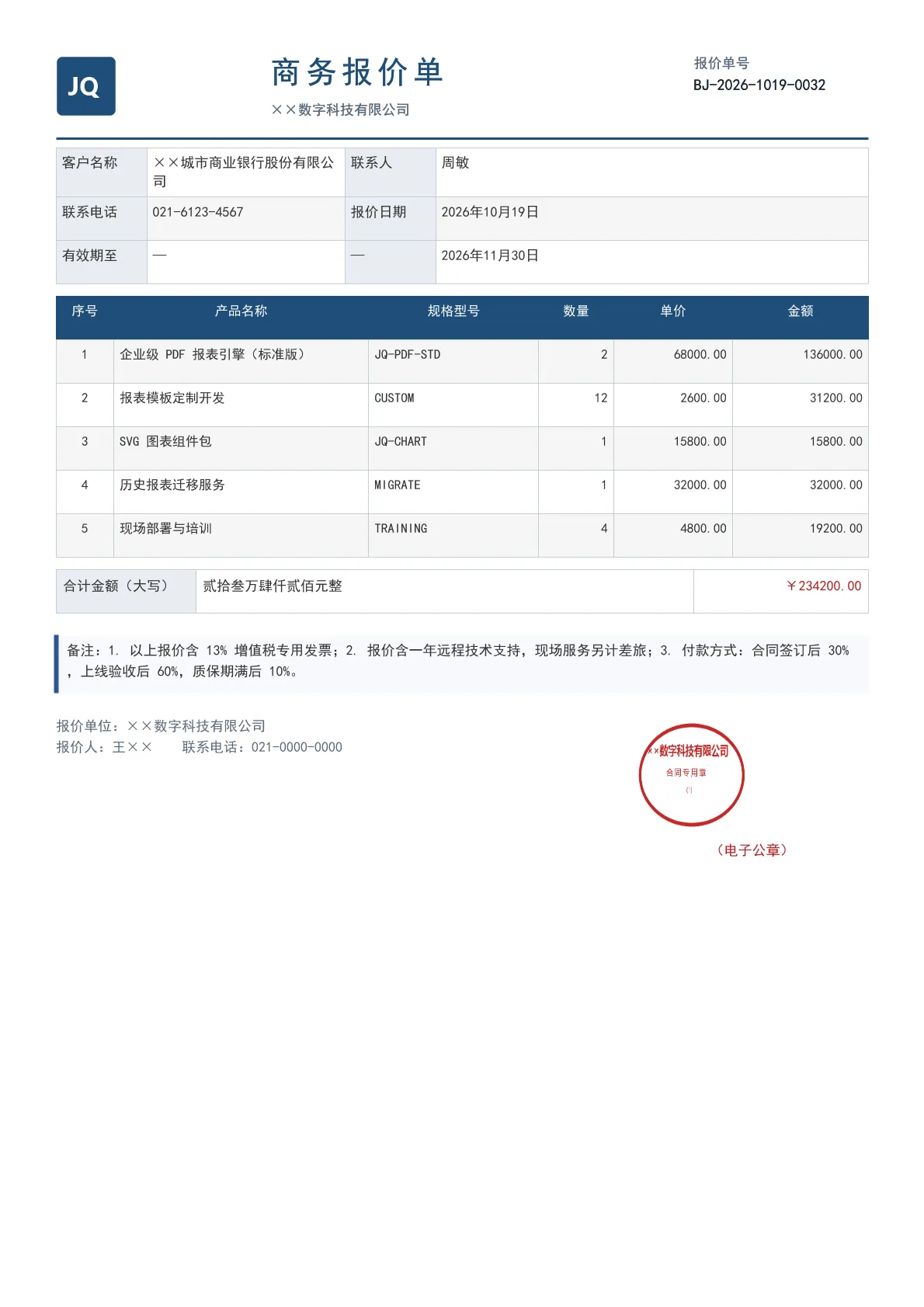
Output specs
- PDF pages
- 1
- Chart type
- Template
- Template lines
- 113
- Source lines
- 185
Java source · JQuickBiz71Quotation.java
This is the complete test class that produced the PDF above — copy it and run as-is; see the quick-start section for the Maven dependency.
/*
 * Licensed under the Apache License, Version 2.0 (the "License");
 * you may not use this file except in compliance with the License.
 * You may obtain a copy of the License at
 *
 *     http://www.apache.org/licenses/LICENSE-2.0
 *
 * Unless required by applicable law or agreed to in writing, software
 * distributed under the License is distributed on an "AS IS" BASIS,
 * WITHOUT WARRANTIES OR CONDITIONS OF ANY KIND, either express or implied.
 * See the License for the specific language governing permissions and
 * limitations under the License.
 *
 * Copyright (c) [2025-2099] Martin ([email protected])
 */
package com.github.paohaijiao.biz.scenario;

import com.github.paohaijiao.config.JPdfConfig;
import com.github.paohaijiao.executor.JQuickPdfFactory;

import javax.imageio.ImageIO;
import java.awt.*;
import java.awt.image.BufferedImage;
import java.io.File;
import java.io.FileOutputStream;
import java.io.IOException;
import java.math.BigDecimal;
import java.math.RoundingMode;
import java.util.Arrays;
import java.util.LinkedHashMap;
import java.util.Map;

public class JQuickBiz71Quotation {

    private static final String PDF_DIR = "D:/test/pdf/";
    private static final String IMG_DIR = "D:/test/image/";
    private static final String OUT_FILE = PDF_DIR + "71_quotation.pdf";
    private static final String TEMPLATE = "report/biz/71_quotation.txt";

    public static void main(String[] args) throws IOException {
        new File(PDF_DIR).mkdirs();
        new File(IMG_DIR).mkdirs();

        // ---------- 1. 图片:logo + 椭圆合同专用章 ----------
        generateLogo(IMG_DIR + "71_logo.png");
        generateSeal(IMG_DIR + "71_seal.png", "××数字科技有限公司");

        // ---------- 2. 数据(普通 Map,无实体类)----------
        Map<String, Object> data = new LinkedHashMap<String, Object>();
        data.put("quoteNo", "BJ-2026-1019-0032");
        data.put("customer", "××城市商业银行股份有限公司");
        data.put("contact", "周敏");
        data.put("phone", "021-6123-4567");
        data.put("quoteDate", "2026年10月19日");
        data.put("validUntil", "2026年11月30日");

        // 明细逐行 bind 为 itemNameN / itemSpecN / itemQtyN / itemPriceN / itemAmountN
        String[][] items = {
                {"企业级 PDF 报表引擎(标准版)", "JQ-PDF-STD", "2", "68000.00"},
                {"报表模板定制开发", "CUSTOM", "12", "2600.00"},
                {"SVG 图表组件包", "JQ-CHART", "1", "15800.00"},
                {"历史报表迁移服务", "MIGRATE", "1", "32000.00"},
                {"现场部署与培训", "TRAINING", "4", "4800.00"}
        };
        BigDecimal total = BigDecimal.ZERO;
        for (int i = 0; i < items.length; i++) {
            BigDecimal unitPrice = new BigDecimal(items[i][3]);
            BigDecimal amount = unitPrice.multiply(new BigDecimal(items[i][2])).setScale(2, RoundingMode.HALF_UP);
            total = total.add(amount);
            String suffix = String.valueOf(i + 1);
            data.put("itemName" + suffix, items[i][0]);
            data.put("itemSpec" + suffix, items[i][1]);
            data.put("itemQty" + suffix, items[i][2]);
            data.put("itemPrice" + suffix, unitPrice.toPlainString());
            data.put("itemAmount" + suffix, amount.toPlainString());
        }

        data.put("totalAmount", total.setScale(2, RoundingMode.HALF_UP).toPlainString());
        data.put("totalWords", amountInWords(total));
        data.put("remark", "1. 以上报价含 13% 增值税专用发票;2. 报价含一年远程技术支持,现场服务另计差旅;"
                + "3. 付款方式:合同签订后 30%,上线验收后 60%,质保期满后 10%。");

        // ---------- 3. 渲染 ----------
        JPdfConfig config = new JPdfConfig();
        config.getLayoutConfig().setFlexLayout(true);
        config.getDoc().setMargins(Arrays.asList(45, 45, 55, 45));
        config.getFooterConfig().setEnabled(true);
        config.getFooterConfig().setFontSize(8);
        config.getFooterConfig().setPageNumberFormat("第 %d 页");

        JQuickPdfFactory factory = new JQuickPdfFactory(config);
        factory.bindAll(data);
        byte[] pdf = factory.executeResource(TEMPLATE);

        FileOutputStream out = new FileOutputStream(OUT_FILE);
        out.write(pdf);
        out.close();
        System.out.println("已生成:" + OUT_FILE);
    }

    /**
     * 金额转人民币大写,例如 42070.00 → 肆万贰仟零柒拾元整。
     */
    public static String amountInWords(BigDecimal amount) {
        String[] digits = {"零", "壹", "贰", "叁", "肆", "伍", "陆", "柒", "捌", "玖"};
        String[] units = {"", "拾", "佰", "仟"};
        String[] groups = {"", "万", "亿", "万亿"};
        long value = amount.setScale(0, RoundingMode.HALF_UP).longValue();
        String yuan = String.valueOf(value);
        StringBuilder result = new StringBuilder();
        int groupIndex = 0;
        boolean needZero = false;
        while (yuan.length() > 0) {
            int end = Math.max(0, yuan.length() - 4);
            String group = yuan.substring(end);
            yuan = yuan.substring(0, end);
            StringBuilder part = new StringBuilder();
            int groupValue = Integer.parseInt(group);
            if (groupValue == 0) {
                if (result.length() > 0) {
                    needZero = true;
                }
                groupIndex++;
                continue;
            }
            for (int i = 0; i < group.length(); i++) {
                int d = group.charAt(i) - '0';
                int pos = group.length() - 1 - i;
                if (d == 0) {
                    if (part.length() > 0 && !part.toString().endsWith("零")) {
                        part.append("零");
                    }
                } else {
                    part.append(digits[d]).append(units[pos]);
                }
            }
            String text = part.toString();
            if (text.endsWith("零")) {
                text = text.substring(0, text.length() - 1);
            }
            if (needZero && result.length() > 0) {
                result.insert(0, "零");
            }
            result.insert(0, text + groups[groupIndex]);
            needZero = false;
            groupIndex++;
        }
        return (result.length() == 0 ? "零" : result.toString()) + "元整";
    }

    private static void generateLogo(String path) throws IOException {
        BufferedImage image = new BufferedImage(104, 104, BufferedImage.TYPE_INT_ARGB);
        Graphics2D g = image.createGraphics();
        g.setRenderingHint(RenderingHints.KEY_ANTIALIASING, RenderingHints.VALUE_ANTIALIAS_ON);
        g.setColor(new Color(0x1F, 0x4E, 0x79));
        g.fillRoundRect(2, 2, 100, 100, 18, 18);
        g.setColor(Color.WHITE);
        g.setFont(new Font("Microsoft YaHei", Font.BOLD, 42));
        g.drawString("JQ", 20, 68);
        g.dispose();
        ImageIO.write(image, "png", new File(path));
    }

    /** 生成椭圆形合同专用章。 */
    private static void generateSeal(String path, String orgName) throws IOException {
        int w = 260;
        int h = 180;
        BufferedImage image = new BufferedImage(w, h, BufferedImage.TYPE_INT_ARGB);
        Graphics2D g = image.createGraphics();
        g.setRenderingHint(RenderingHints.KEY_ANTIALIASING, RenderingHints.VALUE_ANTIALIAS_ON);
        Color red = new Color(0xC6, 0x28, 0x28);
        g.setColor(red);
        g.setStroke(new BasicStroke(6f));
        g.drawOval(10, 10, w - 20, h - 20);
        g.setFont(new Font("Microsoft YaHei", Font.BOLD, 20));
        g.drawString(orgName, 26, 58);
        g.setFont(new Font("Microsoft YaHei", Font.PLAIN, 15));
        g.drawString("合 同 专 用 章", 72, 92);
        g.setFont(new Font("Microsoft YaHei", Font.PLAIN, 11));
        g.drawString("(1)", w / 2 - 12, 118);
        g.dispose();
        ImageIO.write(image, "png", new File(path));
    }
}
Minimal invocation (3 lines)
Skip the full test class — the core is these three lines: bind the chart SVG, execute the template, get the PDF bytes. Copy them straight into your project.
// config 可省略;svg 来自 JChartRendererFactory.renderChart(...),见下方完整源码
byte[] pdf = new JQuickPdfFactory(config).executeResource("report/biz/71_quotation.txt");
Template file · 71_quotation.txt
An HTML-like template with inline CSS that renders to PDF once bound to data. The full template is below — copy it or download the raw file.
<pdf>
<body>
  <div style="display:flex; justifyContent:space-between; borderBottom:2px solid #1F4E79; paddingBottom:8px; marginBottom:8px">
    <div style="width:120px">
      <image src='D:/test/image/71_logo.png' style="width:52px; height:52px"></image>
    </div>
    <div style="width:300px">
      <h1 style="fontSize:20pt; bold:true; color:#1F4E79; characterSpacing:3pt">'商务报价单'</h1>
      <p style="fontSize:9pt; color:#5A6B7C">'××数字科技有限公司'</p>
    </div>
    <div style="width:150px; textAlignment:right">
      <p style="fontSize:9pt; color:#5A6B7C">'报价单号'</p>
      <p style="fontSize:10pt; bold:true; color:#1A2733">${quoteNo}</p>
    </div>
  </div>

  <table style="width:100%; fontSize:9pt; marginBottom:8px">
    <tr>
      <td style="width:78px; padding:5px; backgroundColor:#E8EDF2; bold:true; border:1px solid #C3CDD8">'客户名称'</td>
      <td style="width:170px; padding:5px; border:1px solid #C3CDD8">${customer}</td>
      <td style="width:78px; padding:5px; backgroundColor:#E8EDF2; bold:true; border:1px solid #C3CDD8">'联系人'</td>
      <td style="padding:5px; border:1px solid #C3CDD8">${contact}</td>
    </tr>
    <tr>
      <td style="padding:5px; backgroundColor:#E8EDF2; bold:true; border:1px solid #C3CDD8">'联系电话'</td>
      <td style="padding:5px; border:1px solid #C3CDD8">${phone}</td>
      <td style="padding:5px; backgroundColor:#E8EDF2; bold:true; border:1px solid #C3CDD8">'报价日期'</td>
      <td style="padding:5px; border:1px solid #C3CDD8">${quoteDate}</td>
    </tr>
    <tr>
      <td style="padding:5px; backgroundColor:#E8EDF2; bold:true; border:1px solid #C3CDD8">'有效期至'</td>
      <td style="padding:5px; border:1px solid #C3CDD8">'—'</td>
      <td style="padding:5px; backgroundColor:#E8EDF2; bold:true; border:1px solid #C3CDD8">'—'</td>
      <td style="padding:5px; border:1px solid #C3CDD8">${validUntil}</td>
    </tr>
  </table>

  <table style="width:100%; fontSize:8.5pt">
    <tr>
      <th style="padding:5px; backgroundColor:#1F4E79; color:white; textAlign:center; border:1px solid #1F4E79; width:34px">'序号'</th>
      <th style="padding:5px; backgroundColor:#1F4E79; color:white; textAlign:center; border:1px solid #1F4E79; width:150px">'产品名称'</th>
      <th style="padding:5px; backgroundColor:#1F4E79; color:white; textAlign:center; border:1px solid #1F4E79; width:100px">'规格型号'</th>
      <th style="padding:5px; backgroundColor:#1F4E79; color:white; textAlign:center; border:1px solid #1F4E79; width:44px">'数量'</th>
      <th style="padding:5px; backgroundColor:#1F4E79; color:white; textAlign:center; border:1px solid #1F4E79; width:70px">'单价'</th>
      <th style="padding:5px; backgroundColor:#1F4E79; color:white; textAlign:center; border:1px solid #1F4E79; width:80px">'金额'</th>
    </tr>
    <tr>
      <td style="padding:5px; textAlign:center; border:1px solid #C3CDD8">'1'</td>
      <td style="padding:5px; border:1px solid #C3CDD8">${itemName1}</td>
      <td style="padding:5px; border:1px solid #C3CDD8">${itemSpec1}</td>
      <td style="padding:5px; textAlign:right; border:1px solid #C3CDD8">${itemQty1}</td>
      <td style="padding:5px; textAlign:right; border:1px solid #C3CDD8">${itemPrice1}</td>
      <td style="padding:5px; textAlign:right; border:1px solid #C3CDD8; bold:true">${itemAmount1}</td>
    </tr>
    <tr>
      <td style="padding:5px; textAlign:center; border:1px solid #C3CDD8">'2'</td>
      <td style="padding:5px; border:1px solid #C3CDD8">${itemName2}</td>
      <td style="padding:5px; border:1px solid #C3CDD8">${itemSpec2}</td>
      <td style="padding:5px; textAlign:right; border:1px solid #C3CDD8">${itemQty2}</td>
      <td style="padding:5px; textAlign:right; border:1px solid #C3CDD8">${itemPrice2}</td>
      <td style="padding:5px; textAlign:right; border:1px solid #C3CDD8; bold:true">${itemAmount2}</td>
    </tr>
    <tr>
      <td style="padding:5px; textAlign:center; border:1px solid #C3CDD8">'3'</td>
      <td style="padding:5px; border:1px solid #C3CDD8">${itemName3}</td>
      <td style="padding:5px; border:1px solid #C3CDD8">${itemSpec3}</td>
      <td style="padding:5px; textAlign:right; border:1px solid #C3CDD8">${itemQty3}</td>
      <td style="padding:5px; textAlign:right; border:1px solid #C3CDD8">${itemPrice3}</td>
      <td style="padding:5px; textAlign:right; border:1px solid #C3CDD8; bold:true">${itemAmount3}</td>
    </tr>
    <tr>
      <td style="padding:5px; textAlign:center; border:1px solid #C3CDD8">'4'</td>
      <td style="padding:5px; border:1px solid #C3CDD8">${itemName4}</td>
      <td style="padding:5px; border:1px solid #C3CDD8">${itemSpec4}</td>
      <td style="padding:5px; textAlign:right; border:1px solid #C3CDD8">${itemQty4}</td>
      <td style="padding:5px; textAlign:right; border:1px solid #C3CDD8">${itemPrice4}</td>
      <td style="padding:5px; textAlign:right; border:1px solid #C3CDD8; bold:true">${itemAmount4}</td>
    </tr>
    <tr>
      <td style="padding:5px; textAlign:center; border:1px solid #C3CDD8">'5'</td>
      <td style="padding:5px; border:1px solid #C3CDD8">${itemName5}</td>
      <td style="padding:5px; border:1px solid #C3CDD8">${itemSpec5}</td>
      <td style="padding:5px; textAlign:right; border:1px solid #C3CDD8">${itemQty5}</td>
      <td style="padding:5px; textAlign:right; border:1px solid #C3CDD8">${itemPrice5}</td>
      <td style="padding:5px; textAlign:right; border:1px solid #C3CDD8; bold:true">${itemAmount5}</td>
    </tr>
  </table>

  <table style="width:100%; fontSize:9pt; marginTop:4px">
    <tr>
      <td style="padding:6px; backgroundColor:#E8EDF2; bold:true; border:1px solid #C3CDD8; width:120px">'合计金额(大写)'</td>
      <td style="padding:6px; border:1px solid #C3CDD8">${totalWords}</td>
      <td style="padding:6px; border:1px solid #C3CDD8; textAlign:right; width:150px; color:#B71C1C; bold:true">'¥'${totalAmount}</td>
    </tr>
  </table>

  <div style="borderLeft:4px solid #2F5597; background:#F7F9FC; padding:7px 9px; marginTop:8px">
    <p style="fontSize:9pt; color:#333333">'备注:'${remark}</p>
  </div>

  <div style="display:flex; justifyContent:space-between; marginTop:22px">
    <div style="width:300px">
      <p style="fontSize:9pt; color:#5A6B7C">'报价单位:××数字科技有限公司'</p>
      <p style="fontSize:9pt; color:#5A6B7C">'报价人:王××  联系电话:021-0000-0000'</p>
    </div>
    <div style="width:200px; textAlignment:center">
      <image src='D:/test/image/71_seal.png' style="width:96px; height:96px"></image>
      <p style="fontSize:9pt; color:#B71C1C; textAlignment:center">'(电子公章)'</p>
    </div>
  </div>
</body>
</pdf>
More demos in this group
The PDF, preview image, template and source code on this page were all produced by a real JQuick-Pdf run and are free to copy into your own project.