
Bank cheque — generate this PDF with Java (Template)
Template1 页 A4 · 30 KB
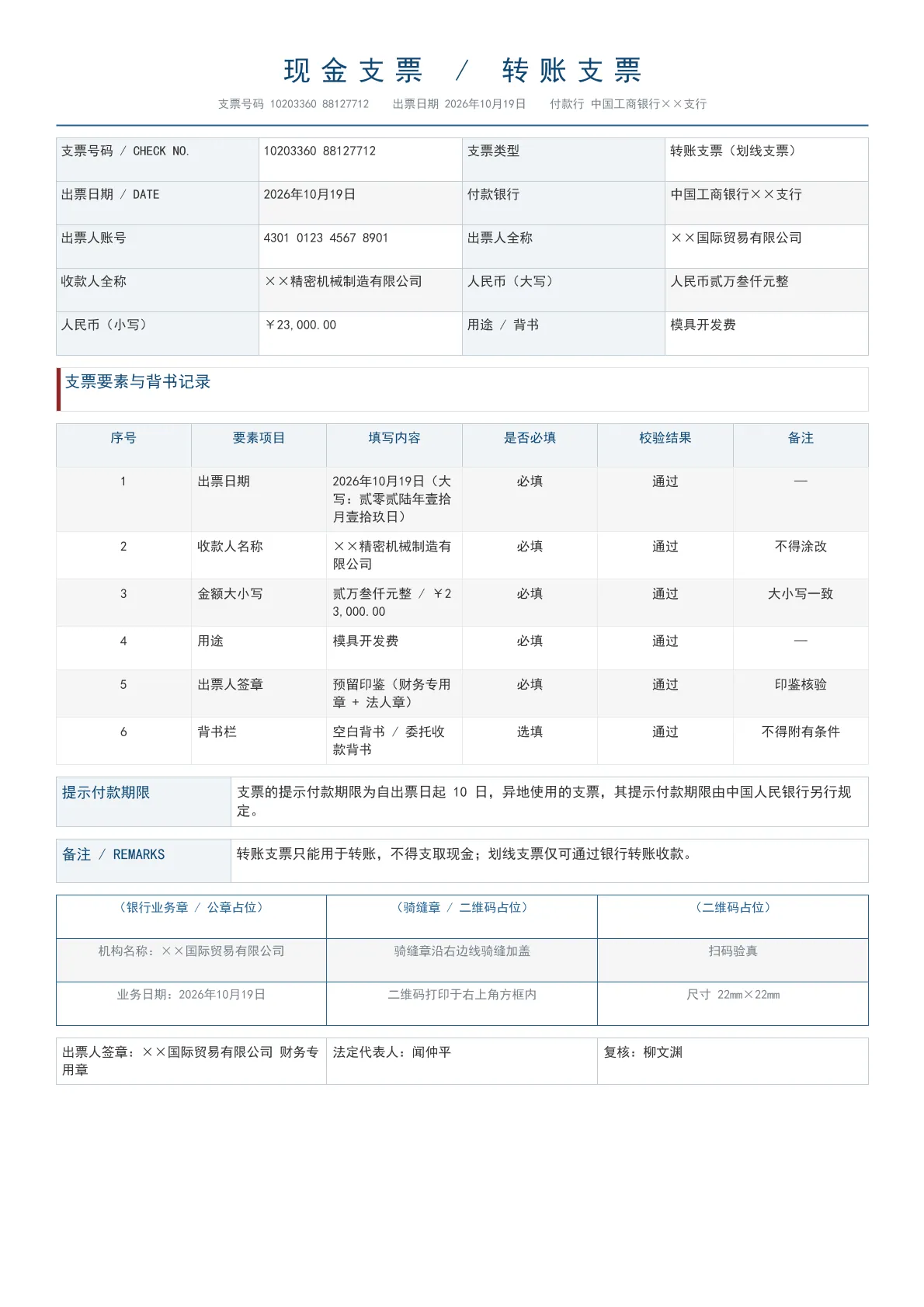
Cash / transfer cheque sample.
Output specs
- PDF pages
- 1
- Chart type
- Template
- Template lines
- 157
- Source lines
- 126
Java source · JQuickBiz142BankCheck.java
This is the complete test class that produced the PDF above — copy it and run as-is; see the quick-start section for the Maven dependency.
/*
 * Licensed under the Apache License, Version 2.0 (the "License");
 * you may not use this file except in compliance with the License.
 * You may obtain a copy of the License at
 *
 *     http://www.apache.org/licenses/LICENSE-2.0
 *
 * Unless required by applicable law or agreed to in writing, software
 * distributed under the License is distributed on an "AS IS" BASIS,
 * WITHOUT WARRANTIES OR CONDITIONS OF ANY KIND, either express or implied.
 * See the License for the specific language governing permissions and
 * limitations under the License.
 *
 * Copyright (c) [2025-2099] Martin ([email protected])
 */
package com.github.paohaijiao.biz.bank;

import com.github.paohaijiao.config.JPdfConfig;
import com.github.paohaijiao.executor.JQuickPdfFactory;

import java.io.File;
import java.io.IOException;
import java.nio.file.Files;
import java.util.Arrays;
import java.util.LinkedHashMap;
import java.util.Map;

/**
 * 单据 142:现金支票 / 转账支票(bank 领域第 3 项)。
 *
 * <p>本类为独立可运行 Demo:自带 {@code main} 方法、不依赖任何公共工具类或实体类,
 * 数据以 key-value 形式通过 {@link JQuickPdfFactory#bindAll(Map)} 注入,
 * 版式全部落在模板文件 {@code demo/biz/bank/142_bank_check.txt} 中。</p>
 *
 * <p>视觉主题「靛蓝·疏朗·典式」:主色 #256496、辅色 #912729、浅底 #F0F4F7;
 * 版式为 classic 抬头 + strip 信息区 + airy 明细表 + three 签章区 + table 落款,
 * 与同领域其它单据互不重样。</p>
 *
 * <p>现金支票 / 转账支票:支票号码与类型、付款银行与出票人账号、</p>
 * <p>收款人与大小写金额、用途与背书记录、出票人预留印鉴栏。</p>
 *
 * <p>运行后输出:{@code D:/test/pdf/142_bank_check.pdf}。</p>
 *
 * @author Martin
 * @version 1.0.0
 */
public class JQuickBiz142BankCheck {

    private static final String PDF_DIR = "D:/test/pdf/";
    private static final String OUT_FILE = PDF_DIR + "142_bank_check.pdf";
    private static final String TEMPLATE = "demo/biz/bank/142_bank_check.txt";

    /** 模板固定明细行数,不足时补空行,避免占位符原样输出。 */
    private static final int ITEM_ROWS = 6;

    public static void main(String[] args) throws IOException {
        new File(PDF_DIR).mkdirs();

        // ---------- 1. 数据(无实体类,直接 bind)----------
        String[][] items = {
                {"1", "出票日期", "2026年10月19日(大写:贰零贰陆年壹拾月壹拾玖日)", "必填", "通过", "—"},
                {"2", "收款人名称", "××精密机械制造有限公司", "必填", "通过", "不得涂改"},
                {"3", "金额大小写", "贰万叁仟元整 / ¥23,000.00", "必填", "通过", "大小写一致"},
                {"4", "用途", "模具开发费", "必填", "通过", "—"},
                {"5", "出票人签章", "预留印鉴(财务专用章 + 法人章)", "必填", "通过", "印鉴核验"},
                {"6", "背书栏", "空白背书 / 委托收款背书", "选填", "通过", "不得附有条件"}
        };

        Map<String, Object> data = new LinkedHashMap<String, Object>();
        data.put("checkNo", "10203360 88127712");
        data.put("checkType", "转账支票(划线支票)");
        data.put("issueDate", "2026年10月19日");
        data.put("payerBank", "中国工商银行××支行");
        data.put("payerAccount", "4301 0123 4567 8901");
        data.put("payerName", "××国际贸易有限公司");
        data.put("payeeName", "××精密机械制造有限公司");
        data.put("amountInWords", "人民币贰万叁仟元整");
        data.put("amount", "¥23,000.00");
        data.put("usage", "模具开发费");
        data.put("validNote", "支票的提示付款期限为自出票日起 10 日,异地使用的支票,其提示付款期限由中国人民银行另行规定。");
        data.put("remark", "转账支票只能用于转账,不得支取现金;划线支票仅可通过银行转账收款。");
        data.put("payerSign", "××国际贸易有限公司 财务专用章");
        data.put("legalSign", "闻仲平");
        data.put("reviewer", "柳文渊");

        // 明细逐格展开
        for (int i = 0; i < ITEM_ROWS; i++) {
            int n = i + 1;
            if (i >= items.length) {
                data.put("itemName" + n, "—");
                data.put("itemSpec" + n, "—");
                data.put("itemUnit" + n, "—");
                data.put("itemQty" + n, "—");
                data.put("itemPrice" + n, "—");
                data.put("itemAmount" + n, "—");
                continue;
            }
            data.put("itemName" + n, items[i][0]);
            data.put("itemSpec" + n, items[i][1]);
            data.put("itemUnit" + n, items[i][2]);
            data.put("itemQty" + n, items[i][3]);
            data.put("itemPrice" + n, items[i][4]);
            data.put("itemAmount" + n, items[i][5]);
        }

        // ---------- 2. 渲染 ----------
        JPdfConfig config = new JPdfConfig();
        config.getLayoutConfig().setFlexLayout(true);
        config.getDoc().setMargins(Arrays.asList(44, 44, 44, 44));
        config.getFontConfig().setDefaultFontName("Noto Sans CJK SC");
        config.getHeaderConfig().setEnabled(true);
        config.getHeaderConfig().setText("中国工商银行××支行 转账支票 10203360 88127712");
        config.getHeaderConfig().setFontSize(8f);
        config.getHeaderConfig().setHeight(34);
        config.getFooterConfig().setEnabled(true);
        config.getFooterConfig().setFontSize(8);
        config.getFooterConfig().setPageNumberFormat("— %d —");

        JQuickPdfFactory factory = new JQuickPdfFactory(config);
        factory.bindAll(data);
        byte[] pdf = factory.executeResource(TEMPLATE);
        Files.write(new File(OUT_FILE).toPath(), pdf);
        System.out.println("已生成:" + OUT_FILE + "(" + pdf.length + " 字节)");
    }
}
Minimal invocation (3 lines)
Skip the full test class — the core is these three lines: bind the chart SVG, execute the template, get the PDF bytes. Copy them straight into your project.
// config 可省略;svg 来自 JChartRendererFactory.renderChart(...),见下方完整源码
byte[] pdf = new JQuickPdfFactory(config).executeResource("demo/biz/bank/142_bank_check.txt");
Template file · 142_bank_check.txt
An HTML-like template with inline CSS that renders to PDF once bound to data. The full template is below — copy it or download the raw file.
<pdf>
<body>
  // 142 现金支票 / 转账支票(bank 领域第 3 项) 视觉主题:靛蓝·疏朗·典式
  // 版式组合:抬头=classic 信息区=strip 明细表=airy 段落=box 签章=three 落款=table
  // 主色 #256496 辅色 #912729 浅底 #F0F4F7
  // 现金支票与转账支票:出票日期、收款人、大小写金额、用途与背书栏。

  // 抬头:classic
  <h1 style="fontSize:18pt; bold:true; color:#0F4774; textAlignment:center; characterSpacing:6pt">'现金支票 / 转账支票'</h1>
  <p style="fontSize:7.5pt; color:#78838C; textAlignment:center; marginBottom:3px">'支票号码 '${checkNo}'  出票日期 '${issueDate}'  付款行 '${payerBank}</p>
  <lineSeparator style="color:#256496; thickness:1.5f; marginBottom:8px"></lineSeparator>

  // 信息区:grid2
  <table style="width:100%; fontSize:8.5pt; marginBottom:8px">
    <tr>
      <td style="width:16%; padding:4px; backgroundColor:#F0F4F7; bold:true; border:1px solid #BFCCD7">'支票号码 / CHECK NO.'</td>
      <td style="width:34%; padding:4px; border:1px solid #BFCCD7">${checkNo}</td>
      <td style="width:16%; padding:4px; backgroundColor:#F0F4F7; bold:true; border:1px solid #BFCCD7">'支票类型'</td>
      <td style="padding:4px; border:1px solid #BFCCD7">${checkType}</td>
    </tr>
    <tr>
      <td style="width:16%; padding:4px; backgroundColor:#F0F4F7; bold:true; border:1px solid #BFCCD7">'出票日期 / DATE'</td>
      <td style="width:34%; padding:4px; border:1px solid #BFCCD7">${issueDate}</td>
      <td style="width:16%; padding:4px; backgroundColor:#F0F4F7; bold:true; border:1px solid #BFCCD7">'付款银行'</td>
      <td style="padding:4px; border:1px solid #BFCCD7">${payerBank}</td>
    </tr>
    <tr>
      <td style="width:16%; padding:4px; backgroundColor:#F0F4F7; bold:true; border:1px solid #BFCCD7">'出票人账号'</td>
      <td style="width:34%; padding:4px; border:1px solid #BFCCD7">${payerAccount}</td>
      <td style="width:16%; padding:4px; backgroundColor:#F0F4F7; bold:true; border:1px solid #BFCCD7">'出票人全称'</td>
      <td style="padding:4px; border:1px solid #BFCCD7">${payerName}</td>
    </tr>
    <tr>
      <td style="width:16%; padding:4px; backgroundColor:#F0F4F7; bold:true; border:1px solid #BFCCD7">'收款人全称'</td>
      <td style="width:34%; padding:4px; border:1px solid #BFCCD7">${payeeName}</td>
      <td style="width:16%; padding:4px; backgroundColor:#F0F4F7; bold:true; border:1px solid #BFCCD7">'人民币(大写)'</td>
      <td style="padding:4px; border:1px solid #BFCCD7">${amountInWords}</td>
    </tr>
    <tr>
      <td style="width:16%; padding:4px; backgroundColor:#F0F4F7; bold:true; border:1px solid #BFCCD7">'人民币(小写)'</td>
      <td style="width:34%; padding:4px; border:1px solid #BFCCD7">${amount}</td>
      <td style="width:16%; padding:4px; backgroundColor:#F0F4F7; bold:true; border:1px solid #BFCCD7">'用途 / 背书'</td>
      <td style="padding:4px; border:1px solid #BFCCD7">${usage}</td>
    </tr>
  </table>

  <table style="width:100%; marginBottom:3px">
    <tr>
      <td style="width:4px; padding:0px; backgroundColor:#912729">' '</td>
      <td style="padding:3px; bold:true; fontSize:10.5pt; color:#0F4774">'支票要素与背书记录'</td>
    </tr>
  </table>
  <table style="width:100%; fontSize:8.5pt; marginBottom:8px">
    <tr>
      <th style="width:8%; padding:5px; backgroundColor:#F0F4F7; color:#0F4774; bold:true; textAlign:center; border:1px solid #BFCCD7">'序号'</th>
      <th style="width:22%; padding:5px; backgroundColor:#F0F4F7; color:#0F4774; bold:true; textAlign:center; border:1px solid #BFCCD7">'要素项目'</th>
      <th style="width:30%; padding:5px; backgroundColor:#F0F4F7; color:#0F4774; bold:true; textAlign:center; border:1px solid #BFCCD7">'填写内容'</th>
      <th style="width:12%; padding:5px; backgroundColor:#F0F4F7; color:#0F4774; bold:true; textAlign:center; border:1px solid #BFCCD7">'是否必填'</th>
      <th style="width:12%; padding:5px; backgroundColor:#F0F4F7; color:#0F4774; bold:true; textAlign:center; border:1px solid #BFCCD7">'校验结果'</th>
      <th style="padding:5px; backgroundColor:#F0F4F7; color:#0F4774; bold:true; textAlign:center; border:1px solid #BFCCD7">'备注'</th>
    </tr>
    <tr>
      <td style="padding:5px; textAlign:center; border:1px solid #E8EBEE">${itemName1}</td>
      <td style="padding:5px; textAlign:left; border:1px solid #E8EBEE">${itemSpec1}</td>
      <td style="padding:5px; textAlign:left; border:1px solid #E8EBEE">${itemUnit1}</td>
      <td style="padding:5px; textAlign:center; border:1px solid #E8EBEE">${itemQty1}</td>
      <td style="padding:5px; textAlign:center; border:1px solid #E8EBEE">${itemPrice1}</td>
      <td style="padding:5px; textAlign:center; border:1px solid #E8EBEE">${itemAmount1}</td>
    </tr>
    <tr>
      <td style="padding:5px; textAlign:center; border:1px solid #E8EBEE">${itemName2}</td>
      <td style="padding:5px; textAlign:left; border:1px solid #E8EBEE">${itemSpec2}</td>
      <td style="padding:5px; textAlign:left; border:1px solid #E8EBEE">${itemUnit2}</td>
      <td style="padding:5px; textAlign:center; border:1px solid #E8EBEE">${itemQty2}</td>
      <td style="padding:5px; textAlign:center; border:1px solid #E8EBEE">${itemPrice2}</td>
      <td style="padding:5px; textAlign:center; border:1px solid #E8EBEE">${itemAmount2}</td>
    </tr>
    <tr>
      <td style="padding:5px; textAlign:center; border:1px solid #E8EBEE">${itemName3}</td>
      <td style="padding:5px; textAlign:left; border:1px solid #E8EBEE">${itemSpec3}</td>
      <td style="padding:5px; textAlign:left; border:1px solid #E8EBEE">${itemUnit3}</td>
      <td style="padding:5px; textAlign:center; border:1px solid #E8EBEE">${itemQty3}</td>
      <td style="padding:5px; textAlign:center; border:1px solid #E8EBEE">${itemPrice3}</td>
      <td style="padding:5px; textAlign:center; border:1px solid #E8EBEE">${itemAmount3}</td>
    </tr>
    <tr>
      <td style="padding:5px; textAlign:center; border:1px solid #E8EBEE">${itemName4}</td>
      <td style="padding:5px; textAlign:left; border:1px solid #E8EBEE">${itemSpec4}</td>
      <td style="padding:5px; textAlign:left; border:1px solid #E8EBEE">${itemUnit4}</td>
      <td style="padding:5px; textAlign:center; border:1px solid #E8EBEE">${itemQty4}</td>
      <td style="padding:5px; textAlign:center; border:1px solid #E8EBEE">${itemPrice4}</td>
      <td style="padding:5px; textAlign:center; border:1px solid #E8EBEE">${itemAmount4}</td>
    </tr>
    <tr>
      <td style="padding:5px; textAlign:center; border:1px solid #E8EBEE">${itemName5}</td>
      <td style="padding:5px; textAlign:left; border:1px solid #E8EBEE">${itemSpec5}</td>
      <td style="padding:5px; textAlign:left; border:1px solid #E8EBEE">${itemUnit5}</td>
      <td style="padding:5px; textAlign:center; border:1px solid #E8EBEE">${itemQty5}</td>
      <td style="padding:5px; textAlign:center; border:1px solid #E8EBEE">${itemPrice5}</td>
      <td style="padding:5px; textAlign:center; border:1px solid #E8EBEE">${itemAmount5}</td>
    </tr>
    <tr>
      <td style="padding:5px; textAlign:center; border:1px solid #E8EBEE">${itemName6}</td>
      <td style="padding:5px; textAlign:left; border:1px solid #E8EBEE">${itemSpec6}</td>
      <td style="padding:5px; textAlign:left; border:1px solid #E8EBEE">${itemUnit6}</td>
      <td style="padding:5px; textAlign:center; border:1px solid #E8EBEE">${itemQty6}</td>
      <td style="padding:5px; textAlign:center; border:1px solid #E8EBEE">${itemPrice6}</td>
      <td style="padding:5px; textAlign:center; border:1px solid #E8EBEE">${itemAmount6}</td>
    </tr>
  </table>

  // 段落:box
  <table style="width:100%; marginBottom:6px">
    <tr>
      <td style="width:150px; padding:5px; backgroundColor:#F0F4F7; bold:true; fontSize:9.5pt; color:#0F4774; border:1px solid #BFCCD7">'提示付款期限'</td>
      <td style="padding:5px; fontSize:9pt; border:1px solid #BFCCD7">${validNote}</td>
    </tr>
  </table>
  <table style="width:100%; marginBottom:6px">
    <tr>
      <td style="width:150px; padding:5px; backgroundColor:#F0F4F7; bold:true; fontSize:9.5pt; color:#0F4774; border:1px solid #BFCCD7">'备注 / REMARKS'</td>
      <td style="padding:5px; fontSize:9pt; border:1px solid #BFCCD7">${remark}</td>
    </tr>
  </table>

  // 签章区:three
  <!-- 签章占位区:后续加盖电子公章 / 骑缝章 / 打印二维码 -->
  <table style="width:100%; fontSize:8pt; marginBottom:8px">
    <tr>
      <td style="width:33%; padding:4px; bold:true; textAlign:center; color:#256496; border:1px dashed #256496">'(银行业务章 / 公章占位)'</td>
      <td style="width:33%; padding:4px; bold:true; textAlign:center; color:#256496; border:1px dashed #256496">'(骑缝章 / 二维码占位)'</td>
      <td style="width:33%; padding:4px; bold:true; textAlign:center; color:#256496; border:1px dashed #256496">'(二维码占位)'</td>
    </tr>
    <tr>
      <td style="width:33%; padding:4px; textAlign:center; color:#78838C; border:1px dashed #256496">'机构名称:'${payerName}</td>
      <td style="width:33%; padding:4px; textAlign:center; color:#78838C; border:1px dashed #256496">'骑缝章沿右边线骑缝加盖'</td>
      <td style="width:33%; padding:4px; textAlign:center; color:#78838C; border:1px dashed #256496">'扫码验真'</td>
    </tr>
    <tr>
      <td style="width:33%; padding:4px; textAlign:center; color:#78838C; border:1px dashed #256496">'业务日期:'${issueDate}</td>
      <td style="width:33%; padding:4px; textAlign:center; color:#78838C; border:1px dashed #256496">'二维码打印于右上角方框内'</td>
      <td style="width:33%; padding:4px; textAlign:center; color:#78838C; border:1px dashed #256496">'尺寸 22mm×22mm'</td>
    </tr>
  </table>

  // 落款:table
  <!-- 落款栏 -->
  <table style="width:100%; fontSize:8.5pt">
    <tr>
      <td style="width:33%; padding:5px; border:1px solid #BFCCD7">'出票人签章:'${payerSign}</td>
      <td style="width:33%; padding:5px; border:1px solid #BFCCD7">'法定代表人:'${legalSign}</td>
      <td style="padding:5px; border:1px solid #BFCCD7">'复核:'${reviewer}</td>
    </tr>
  </table>
</body>
</pdf>
More demos in this group
The PDF, preview image, template and source code on this page were all produced by a real JQuick-Pdf run and are free to copy into your own project.