
Key project milestone Gantt (project supervision) — generate this PDF with Java (Gantt)
Gantt1 页 A4 · 128 KB
Shows planned and actual durations of each phase in a Gantt chart to identify delayed milestones.
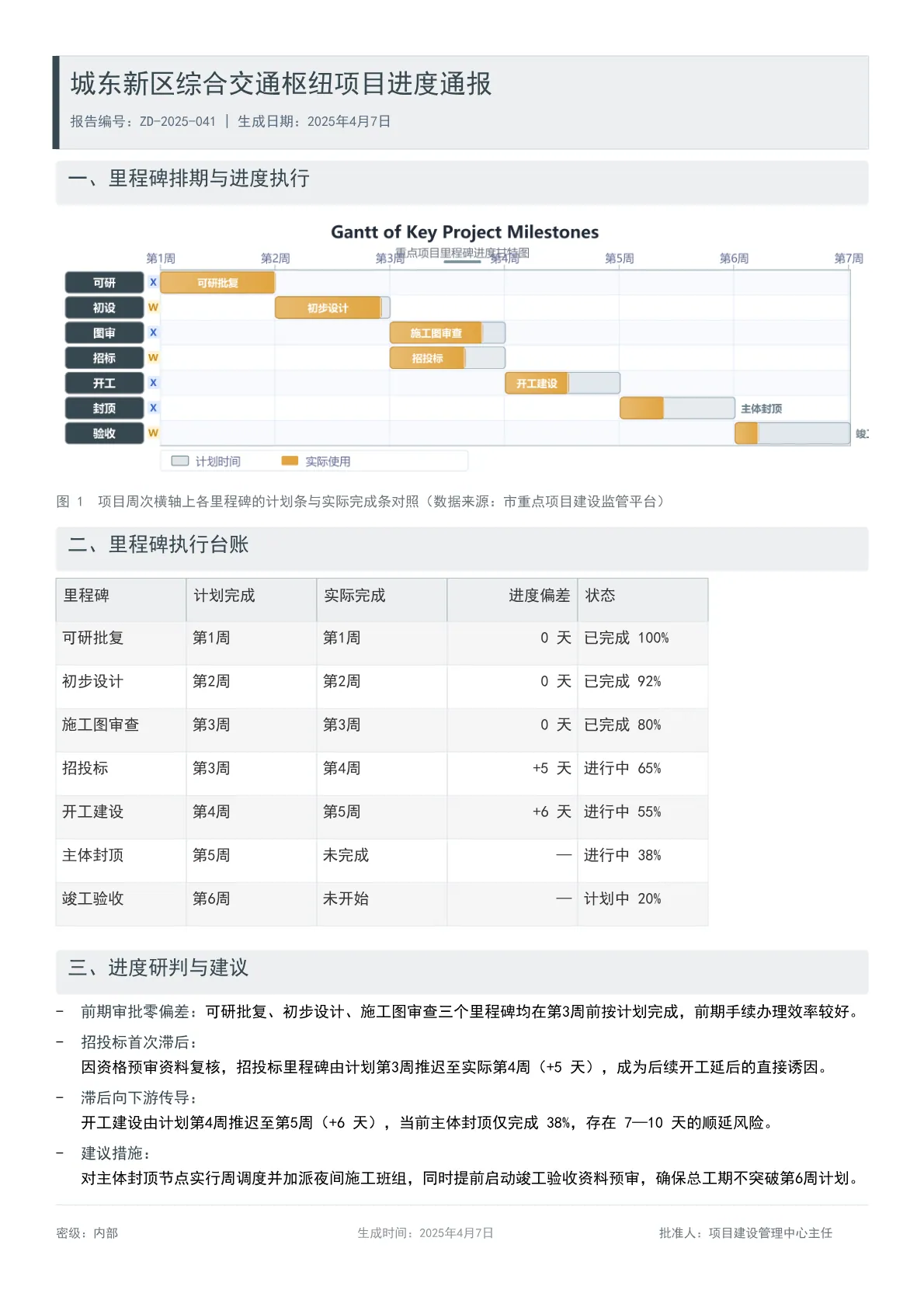
Output specs
- PDF pages
- 1
- Chart type
- Gantt
- Template lines
- 102
- Source lines
- 103
Java source · JQuickBiz46MilestoneGanttTest.java
This is the complete test class that produced the PDF above — copy it and run as-is; see the quick-start section for the Maven dependency.
/*
 * Licensed under the Apache License, Version 2.0 (the "License");
 * you may not use this file except in compliance with the License.
 * You may obtain a copy of the License at
 *
 *     http://www.apache.org/licenses/LICENSE-2.0
 *
 * Unless required by applicable law or agreed to in writing, software
 * distributed under the License is distributed on an "AS IS" BASIS,
 * WITHOUT WARRANTIES OR CONDITIONS OF ANY KIND, either express or implied.
 * See the License for the specific language governing permissions and
 * limitations under the License.
 *
 * Copyright (c) [2025-2099] Martin ([email protected])
 */
package com.github.paohaijiao.demo.biz;

import com.github.paohaijiao.JOption;
import com.github.paohaijiao.config.JPdfConfig;
import com.github.paohaijiao.demo.constant.JQuickConstant;
import com.github.paohaijiao.enums.JChartType;
import com.github.paohaijiao.executor.JQuickPdfFactory;
import com.github.paohaijiao.factory.JChartRendererFactory;
import com.github.paohaijiao.gant.JGanttOption;
import org.junit.Test;

import java.awt.Color;
import java.awt.Font;
import java.io.File;
import java.io.FileOutputStream;
import java.io.IOException;
import java.util.Arrays;

/**
 * 业务场景 Demo 46:重点项目里程碑进度甘特图(项目监管平台)
 *
 * <p>业务场景:市重点项目建设监管平台展示城东新区综合交通枢纽项目从可研批复到竣工验收的里程碑排期与进度偏差。</p>
 * <p>实际图表类型:{@link JChartType#Gantt} 甘特图(横向宽图,横轴按周,纵轴为里程碑行)。</p>
 *
 * <p>模板:{@code report/biz/46_milestone_gantt.txt};甘特图以 SVG 文本形式绑定到模板的 {@code ${svg}} 占位符,
 * 输出到 {@code D:\test\biz\46_milestone_gantt.pdf}。</p>
 *
 * <p>图表尺寸说明:甘特图渲染器画布固定 872pt × 282pt(横向宽图);横轴时间刻度共 7 个(第1周—第7周),
 * 每个刻度间隔 60 分钟单位即代表 1 周,任务条按「起始周 + 持续周数」换算。模板中 {@code <svg>} 只声明宽度、
 * 不声明高度,宽度被页面自动收窄时高度按原比例同步缩放,不会纵向拉伸变形。</p>
 *
 * @author Martin
 * @version 1.0.0
 */
public class JQuickBiz46MilestoneGanttTest {

    public static final String path = JQuickConstant.path;

    @Test
    public void biz46MilestoneGantt() throws IOException {
        JGanttOption option = new JGanttOption();
        option.setTitle(new JGanttOption.Title("Gantt of Key Project Milestones", "重点项目里程碑进度甘特图"));
        // FlightData 参数:任务编号、任务名称(行标签)、类型标记(X/W)、起始周、起始分钟、持续分钟、行序号、实际完成比例
        option.setFlightData(Arrays.asList(
                new JGanttOption.FlightData("可研批复", "可研", "X", 1, 0, 60, 0, 1.00),
                new JGanttOption.FlightData("初步设计", "初设", "W", 2, 0, 60, 1, 0.92),
                new JGanttOption.FlightData("施工图审查", "图审", "X", 3, 0, 60, 2, 0.80),
                new JGanttOption.FlightData("招投标", "招标", "W", 3, 0, 60, 3, 0.65),
                new JGanttOption.FlightData("开工建设", "开工", "X", 4, 0, 60, 4, 0.55),
                new JGanttOption.FlightData("主体封顶", "封顶", "X", 5, 0, 60, 5, 0.38),
                new JGanttOption.FlightData("竣工验收", "验收", "W", 6, 0, 60, 6, 0.20)
        ));
        // ChartStyle 参数:背景色、坐标轴色、行标签色、计划条色、实际条色、标题字体、标签字体、宽、高
        option.setChartStyle(new JGanttOption.ChartStyle(
                Color.WHITE,
                new Color(176, 190, 197),
                new Color(55, 71, 79),
                new Color(120, 144, 156),
                new Color(224, 164, 64),
                new Font("微软雅黑", Font.BOLD, 18),
                new Font("微软雅黑", Font.PLAIN, 12),
                872,
                282
        ));
        // TimeRange 参数:起始周、结束周、时间刻度标签(7 个刻度 = 6 个区间,每区间代表 1 周)
        option.setTimeRange(new JGanttOption.TimeRange(1, 7,
                new String[]{"第1周", "第2周", "第3周", "第4周", "第5周", "第6周", "第7周"}));

        JOption jOption = new JOption();
        jOption.setGanttOption(option);
        String svg = JChartRendererFactory.renderChart(JChartType.Gantt, jOption);

        File dir = new File(path + "biz");
        if (!dir.exists()) {
            dir.mkdirs();
        }
        FileOutputStream fileOutputStream = new FileOutputStream(path + "biz/46_milestone_gantt.pdf");
        JPdfConfig config = new JPdfConfig();
        // 开启 flex 行布局,使模板中的 display:flex 生效(图表居中)
        config.getLayoutConfig().setFlexLayout(true);
        JQuickPdfFactory factory = new JQuickPdfFactory(config);
        factory.bind("svg", svg);
        byte[] bytes = factory.executeResource("report/biz/46_milestone_gantt.txt");
        fileOutputStream.write(bytes);
        fileOutputStream.close();
    }
}
Minimal invocation (3 lines)
Skip the full test class — the core is these three lines: bind the chart SVG, execute the template, get the PDF bytes. Copy them straight into your project.
// config 可省略;svg 来自 JChartRendererFactory.renderChart(...),见下方完整源码
factory.bind("svg", svg);
byte[] pdf = new JQuickPdfFactory(config).executeResource("report/biz/46_milestone_gantt.txt");
Template file · 46_milestone_gantt.txt
An HTML-like template with inline CSS that renders to PDF once bound to data. The full template is below — copy it or download the raw file.
<pdf>
<body>
  <div style="background:#ECEFF1; border:1px solid #D6DEE8; borderLeft:6px solid #37474F; borderRadius:4px; padding:12px; marginBottom:10px; keepTogether:true">
    <h1 style="color:#37474F; fontSize:17; bold:true; marginBottom:4px">'城东新区综合交通枢纽项目进度通报'</h1>
    <p style="color:#5A6B7C; fontSize:9">'报告编号:ZD-2025-041 | 生成日期:2025年4月7日'</p>
  </div>

  <div style="backgroundColor:#ECEFF1; padding:6px 10px; borderRadius:3px; marginBottom:6px">
    <h2 style="color:#37474F; fontSize:13; bold:true; marginTop:0; marginBottom:0">'一、里程碑排期与进度执行'</h2>
  </div>
  <div style="display:flex; justifyContent:center">
    <svg style="width:700pt">${svg}</svg>
  </div>
  <p style="fontSize:9; color:#6c757d; italic:true; marginTop:6px">'图 1  项目周次横轴上各里程碑的计划条与实际完成条对照(数据来源:市重点项目建设监管平台)'</p>

  <div style="backgroundColor:#ECEFF1; padding:6px 10px; borderRadius:3px; marginBottom:6px; marginTop:10px">
    <h2 style="color:#37474F; fontSize:13; bold:true; marginTop:0; marginBottom:0">'二、里程碑执行台账'</h2>
  </div>
  <table style="width:560px; fontSize:10">
    <tr>
      <td style="padding:6px; bold:true; backgroundColor:#ECEFF1; borderBottom:1px solid #B0BEC5">'里程碑'</td>
      <td style="padding:6px; bold:true; backgroundColor:#ECEFF1; borderBottom:1px solid #B0BEC5">'计划完成'</td>
      <td style="padding:6px; bold:true; backgroundColor:#ECEFF1; borderBottom:1px solid #B0BEC5">'实际完成'</td>
      <td style="padding:6px; bold:true; textAlign:right; backgroundColor:#ECEFF1; borderBottom:1px solid #B0BEC5">'进度偏差'</td>
      <td style="padding:6px; bold:true; backgroundColor:#ECEFF1; borderBottom:1px solid #B0BEC5">'状态'</td>
    </tr>
    <tr>
      <td style="padding:5px; borderBottom:1px solid #E3E8EE">'可研批复'</td>
      <td style="padding:5px; borderBottom:1px solid #E3E8EE">'第1周'</td>
      <td style="padding:5px; borderBottom:1px solid #E3E8EE">'第1周'</td>
      <td style="padding:5px; textAlign:right; borderBottom:1px solid #E3E8EE">'0 天'</td>
      <td style="padding:5px; borderBottom:1px solid #E3E8EE">'已完成 100%'</td>
    </tr>
    <tr>
      <td style="padding:5px; borderBottom:1px solid #E3E8EE">'初步设计'</td>
      <td style="padding:5px; borderBottom:1px solid #E3E8EE">'第2周'</td>
      <td style="padding:5px; borderBottom:1px solid #E3E8EE">'第2周'</td>
      <td style="padding:5px; textAlign:right; borderBottom:1px solid #E3E8EE">'0 天'</td>
      <td style="padding:5px; borderBottom:1px solid #E3E8EE">'已完成 92%'</td>
    </tr>
    <tr>
      <td style="padding:5px; borderBottom:1px solid #E3E8EE">'施工图审查'</td>
      <td style="padding:5px; borderBottom:1px solid #E3E8EE">'第3周'</td>
      <td style="padding:5px; borderBottom:1px solid #E3E8EE">'第3周'</td>
      <td style="padding:5px; textAlign:right; borderBottom:1px solid #E3E8EE">'0 天'</td>
      <td style="padding:5px; borderBottom:1px solid #E3E8EE">'已完成 80%'</td>
    </tr>
    <tr>
      <td style="padding:5px; borderBottom:1px solid #E3E8EE">'招投标'</td>
      <td style="padding:5px; borderBottom:1px solid #E3E8EE">'第3周'</td>
      <td style="padding:5px; borderBottom:1px solid #E3E8EE">'第4周'</td>
      <td style="padding:5px; textAlign:right; borderBottom:1px solid #E3E8EE">'+5 天'</td>
      <td style="padding:5px; borderBottom:1px solid #E3E8EE">'进行中 65%'</td>
    </tr>
    <tr>
      <td style="padding:5px; borderBottom:1px solid #E3E8EE">'开工建设'</td>
      <td style="padding:5px; borderBottom:1px solid #E3E8EE">'第4周'</td>
      <td style="padding:5px; borderBottom:1px solid #E3E8EE">'第5周'</td>
      <td style="padding:5px; textAlign:right; borderBottom:1px solid #E3E8EE">'+6 天'</td>
      <td style="padding:5px; borderBottom:1px solid #E3E8EE">'进行中 55%'</td>
    </tr>
    <tr>
      <td style="padding:5px; borderBottom:1px solid #E3E8EE">'主体封顶'</td>
      <td style="padding:5px; borderBottom:1px solid #E3E8EE">'第5周'</td>
      <td style="padding:5px; borderBottom:1px solid #E3E8EE">'未完成'</td>
      <td style="padding:5px; textAlign:right; borderBottom:1px solid #E3E8EE">'—'</td>
      <td style="padding:5px; borderBottom:1px solid #E3E8EE">'进行中 38%'</td>
    </tr>
    <tr>
      <td style="padding:5px; borderBottom:1px solid #E3E8EE">'竣工验收'</td>
      <td style="padding:5px; borderBottom:1px solid #E3E8EE">'第6周'</td>
      <td style="padding:5px; borderBottom:1px solid #E3E8EE">'未开始'</td>
      <td style="padding:5px; textAlign:right; borderBottom:1px solid #E3E8EE">'—'</td>
      <td style="padding:5px; borderBottom:1px solid #E3E8EE">'计划中 20%'</td>
    </tr>
  </table>

  <div style="backgroundColor:#ECEFF1; padding:6px 10px; borderRadius:3px; marginBottom:6px; marginTop:10px">
    <h2 style="color:#37474F; fontSize:13; bold:true; marginTop:0; marginBottom:0">'三、进度研判与建议'</h2>
  </div>
  <list style="listStyleType:disc; paddingLeft:16px; fontSize:10">
    <li style="marginBottom:5px"><span style="bold:true; color:#37474F">'前期审批零偏差:'</span>'可研批复、初步设计、施工图审查三个里程碑均在第3周前按计划完成,前期手续办理效率较好。'</li>
    <li style="marginBottom:5px"><span style="bold:true; color:#37474F">'招投标首次滞后:'</span>'因资格预审资料复核,招投标里程碑由计划第3周推迟至实际第4周(+5 天),成为后续开工延后的直接诱因。'</li>
    <li style="marginBottom:5px"><span style="bold:true; color:#37474F">'滞后向下游传导:'</span>'开工建设由计划第4周推迟至第5周(+6 天),当前主体封顶仅完成 38%,存在 7—10 天的顺延风险。'</li>
    <li style="marginBottom:5px"><span style="bold:true; color:#37474F">'建议措施:'</span>'对主体封顶节点实行周调度并加派夜间施工班组,同时提前启动竣工验收资料预审,确保总工期不突破第6周计划。'</li>
  </list>

  <lineSeparator style="strokeColor:#DCE3EC"></lineSeparator>
  <div style="display:flex; justifyContent:space-between; marginTop:8px">
    <div style="width:180px">
      <p style="color:#6c757d; fontSize:8">'密级:内部'</p>
    </div>
    <div style="width:180px; textAlignment:center">
      <p style="color:#6c757d; fontSize:8; opacity:0.8">'生成时间:2025年4月7日'</p>
    </div>
    <div style="width:180px; textAlignment:right">
      <p style="color:#6c757d; fontSize:8">'批准人:项目建设管理中心主任'</p>
    </div>
  </div>
</body>
</pdf>
More demos in this group
The PDF, preview image, template and source code on this page were all produced by a real JQuick-Pdf run and are free to copy into your own project.