
Group revenue share treemap by segment (strategy planning) — generate this PDF with Java (TREEMAP)
TREEMAP1 页 A4 · 160 KB
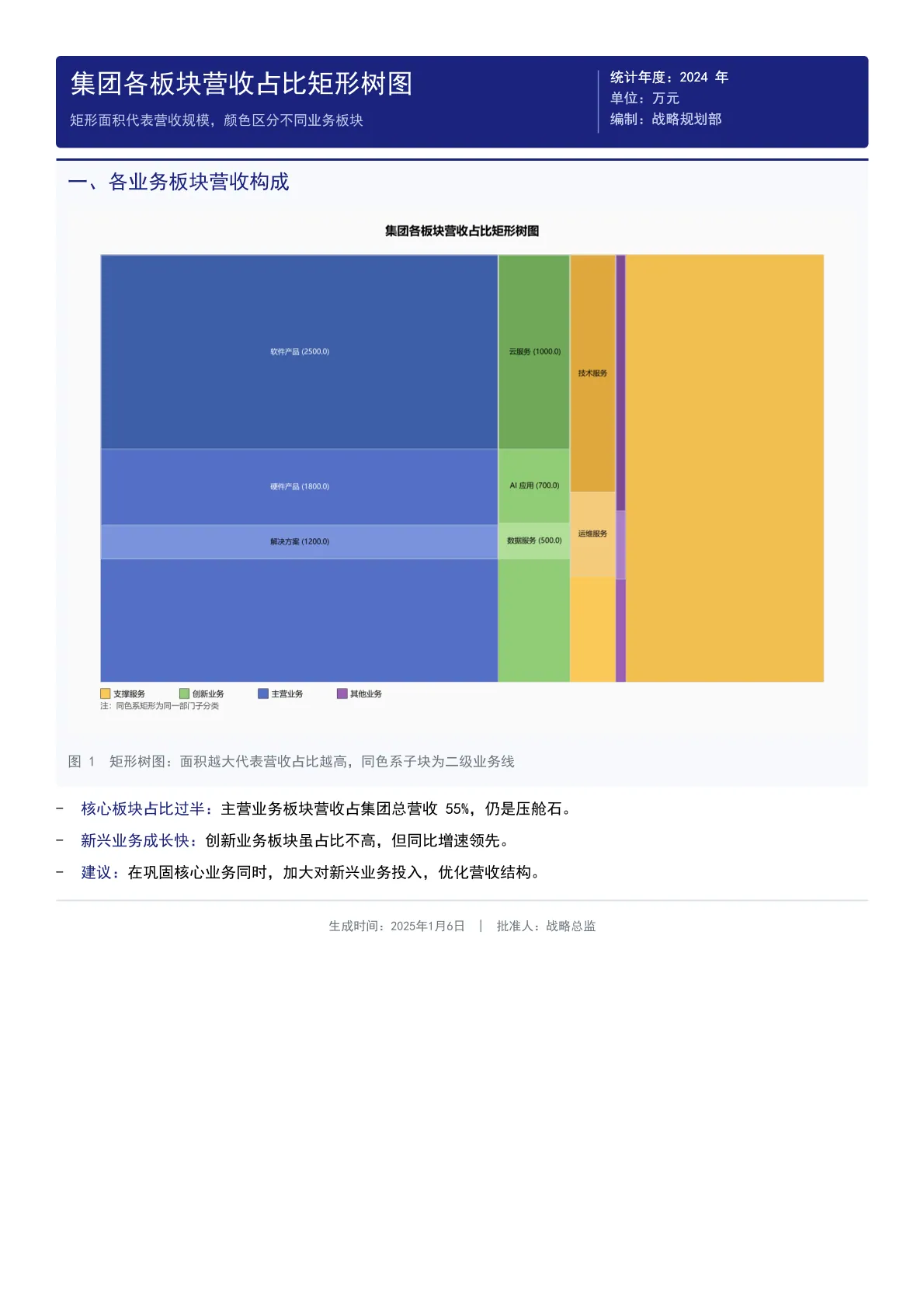
A treemap splitting group revenue across core business, innovation business, support services and other segments: area maps revenue scale, same-hue sub-blocks are second-level business lines labeled with amounts, with conclusions on the core share and emerging growth.
Output specs
- PDF pages
- 1
- Chart type
- TREEMAP
- Template lines
- 36
- Source lines
- 147
Java source · JQuickBiz68TreeMapTest.java
This is the complete test class that produced the PDF above — copy it and run as-is; see the quick-start section for the Maven dependency.
/*
 * Licensed under the Apache License, Version 2.0 (the "License");
 * you may not use this file except in compliance with the License.
 * You may obtain a copy of the License at
 *
 *     http://www.apache.org/licenses/LICENSE-2.0
 *
 * Unless required by applicable law or agreed to in writing, software
 * distributed under the License is distributed on an "AS IS" BASIS,
 * WITHOUT WARRANTIES OR CONDITIONS OF ANY KIND, either express or implied.
 * See the License for the specific language governing permissions and
 * limitations under the License.
 *
 * Copyright (c) [2025-2099] Martin ([email protected])
 */
package com.github.paohaijiao.demo.biz;

import com.github.paohaijiao.JOption;
import com.github.paohaijiao.config.JPdfConfig;
import com.github.paohaijiao.demo.constant.JQuickConstant;
import com.github.paohaijiao.enums.JChartType;
import com.github.paohaijiao.executor.JQuickPdfFactory;
import com.github.paohaijiao.factory.JChartRendererFactory;
import com.github.paohaijiao.treemap.JTreeMapNode;
import com.github.paohaijiao.treemap.TreeMapMapping;
import com.github.paohaijiao.treemap.TreeMapOption;
import org.junit.Test;

import java.awt.Color;
import java.io.File;
import java.io.FileOutputStream;
import java.io.IOException;
import java.util.HashMap;
import java.util.Map;

/**
 * 业务场景 Demo 68:集团各板块营收占比矩形树图(战略规划)
 *
 * <p>业务场景:战略规划部门以矩形树图展示集团各业务板块及子业务线的营收占比,
 * 矩形面积代表营收规模,颜色区分不同板块。</p>
 * <p>实际图表类型:{@link JChartType#TREEMAP} 矩形树图。</p>
 *
 * <p>模板:{@code report/biz/68_treemap.txt};图表以 SVG 文本形式绑定到模板的
 * {@code ${svg}} 占位符,输出到 {@code D:\test\biz\68_treemap.pdf}。</p>
 *
 * <p>图表尺寸说明:图表按 700pt × 380pt 的横版比例设计;模板中 {@code <svg>}
 * 只声明宽度、不声明高度,宽度被页面自动收窄时高度会按原比例同步缩放。</p>
 *
 * @author Martin
 * @version 1.0.0
 */
public class JQuickBiz68TreeMapTest {

    public static final String path = JQuickConstant.path;

    private static final Map<String, Color> DEPARTMENT_COLORS = new HashMap<>();
    private static final Map<String, Color> CATEGORY_COLORS = new HashMap<>();

    static {
        // 板块色:参考 ECharts 经典配色的柔和色系(蓝 / 绿 / 琥珀 / 紫),
        // 饱和度适中、观感协调,同时四个色相差异明显便于区分
        DEPARTMENT_COLORS.put("主营业务", new Color(84, 112, 198));   // #5470C6 柔和蓝
        DEPARTMENT_COLORS.put("创新业务", new Color(145, 204, 117));  // #91CC75 柔和绿
        DEPARTMENT_COLORS.put("支撑服务", new Color(250, 200, 88));   // #FAC858 柔和琥珀
        DEPARTMENT_COLORS.put("其他业务", new Color(154, 96, 180));   // #9A60B4 柔和紫

        // 子类目色:在所属板块色相上做同色系深浅渐变,整体和谐统一
        CATEGORY_COLORS.put("软件产品", new Color(62, 95, 168));
        CATEGORY_COLORS.put("硬件产品", new Color(84, 112, 198));
        CATEGORY_COLORS.put("解决方案", new Color(122, 147, 220));
        CATEGORY_COLORS.put("云服务", new Color(111, 168, 87));
        CATEGORY_COLORS.put("AI 应用", new Color(145, 204, 117));
        CATEGORY_COLORS.put("数据服务", new Color(176, 222, 151));
        CATEGORY_COLORS.put("技术服务", new Color(224, 168, 62));
        CATEGORY_COLORS.put("运维服务", new Color(245, 203, 123));
        CATEGORY_COLORS.put("投资收益", new Color(125, 74, 148));
        CATEGORY_COLORS.put("租金物业", new Color(171, 127, 196));
    }

    @Test
    public void biz68TreeMap() throws IOException {
        JTreeMapNode root = new JTreeMapNode("集团总营收", 10000);

        // 主营业务板块
        JTreeMapNode main = new JTreeMapNode("主营业务", 5500);
        main.addChild(new JTreeMapNode("软件产品", 2500));
        main.addChild(new JTreeMapNode("硬件产品", 1800));
        main.addChild(new JTreeMapNode("解决方案", 1200));

        // 创新业务板块
        JTreeMapNode innovation = new JTreeMapNode("创新业务", 2200);
        innovation.addChild(new JTreeMapNode("云服务", 1000));
        innovation.addChild(new JTreeMapNode("AI 应用", 700));
        innovation.addChild(new JTreeMapNode("数据服务", 500));

        // 支撑服务板块
        JTreeMapNode support = new JTreeMapNode("支撑服务", 1800);
        support.addChild(new JTreeMapNode("技术服务", 1000));
        support.addChild(new JTreeMapNode("运维服务", 800));

        // 其他业务板块
        JTreeMapNode other = new JTreeMapNode("其他业务", 500);
        other.addChild(new JTreeMapNode("投资收益", 300));
        other.addChild(new JTreeMapNode("租金物业", 200));

        root.addChild(main);
        root.addChild(innovation);
        root.addChild(support);
        root.addChild(other);

        TreeMapOption treemapOption = new TreeMapOption();
        treemapOption.setRoot(root);
        treemapOption.setDepartmentColors(DEPARTMENT_COLORS);
        treemapOption.setCategoryColors(CATEGORY_COLORS);
        // 部门匹配规则:按子节点名称关键字匹配到所属板块
        treemapOption.getDepartmentRules().add(new TreeMapMapping("软件", "主营业务"));
        treemapOption.getDepartmentRules().add(new TreeMapMapping("硬件", "主营业务"));
        treemapOption.getDepartmentRules().add(new TreeMapMapping("解决方案", "主营业务"));
        treemapOption.getDepartmentRules().add(new TreeMapMapping("云服务", "创新业务"));
        treemapOption.getDepartmentRules().add(new TreeMapMapping("AI", "创新业务"));
        treemapOption.getDepartmentRules().add(new TreeMapMapping("数据", "创新业务"));
        treemapOption.getDepartmentRules().add(new TreeMapMapping("技术", "支撑服务"));
        treemapOption.getDepartmentRules().add(new TreeMapMapping("运维", "支撑服务"));
        treemapOption.getDepartmentRules().add(new TreeMapMapping("投资", "其他业务"));
        treemapOption.getDepartmentRules().add(new TreeMapMapping("租金", "其他业务"));

        JOption option = new JOption();
        option.setTreemapOption(treemapOption);
        option.title("集团各板块营收占比矩形树图", "面积代表营收规模(单位:万元)");

        String svg = JChartRendererFactory.renderChart(JChartType.TREEMAP, option);

        File dir = new File(path + "biz");
        if (!dir.exists()) {
            dir.mkdirs();
        }
        FileOutputStream fileOutputStream = new FileOutputStream(path + "biz/68_treemap.pdf");
        JPdfConfig config = new JPdfConfig();
        config.getLayoutConfig().setFlexLayout(true);
        JQuickPdfFactory factory = new JQuickPdfFactory(config);
        factory.bind("svg", svg);
        byte[] bytes = factory.executeResource("report/biz/68_treemap.txt");
        fileOutputStream.write(bytes);
        fileOutputStream.close();
    }
}
Minimal invocation (3 lines)
Skip the full test class — the core is these three lines: bind the chart SVG, execute the template, get the PDF bytes. Copy them straight into your project.
// config 可省略;svg 来自 JChartRendererFactory.renderChart(...),见下方完整源码
factory.bind("svg", svg);
byte[] pdf = new JQuickPdfFactory(config).executeResource("report/biz/68_treemap.txt");
Template file · 68_treemap.txt
An HTML-like template with inline CSS that renders to PDF once bound to data. The full template is below — copy it or download the raw file.
<pdf>
<body>
  // 68 矩形树图(Treemap)Demo:以嵌套矩形面积表示层级数据的数值大小
  <div style="background:#1A237E; padding:12px; borderRadius:4px; marginBottom:10px; keepTogether:true">
    <div style="display:flex; justifyContent:space-between">
      <div style="width:320px">
        <h1 style="color:white; fontSize:17; bold:true; marginBottom:3px">'集团各板块营收占比矩形树图'</h1>
        <p style="color:#C5CAE9; fontSize:9">'矩形面积代表营收规模,颜色区分不同业务板块'</p>
      </div>
      <div style="width:220px; textAlignment:right; borderLeft:1px solid #7986CB; paddingLeft:10px">
        <p style="color:white; fontSize:9">'统计年度:2024 年'</p>
        <p style="color:#C5CAE9; fontSize:9">'单位:万元'</p>
        <p style="color:#C5CAE9; fontSize:9">'编制:战略规划部'</p>
      </div>
    </div>
  </div>

  <div style="marginBottom:10px; padding:10px; backgroundColor:#F7F9FC; borderRadius:4px; borderTop:2px solid #1A237E">
    <h2 style="color:#1A237E; marginBottom:6px; fontSize:13; bold:true">'一、各业务板块营收构成'</h2>
    <div style="display:flex; justifyContent:center">
      <svg style="width:700pt">${svg}</svg>
    </div>
    <p style="fontSize:9; color:#6c757d; italic:true; marginTop:6px">'图 1  矩形树图:面积越大代表营收占比越高,同色系子块为二级业务线'</p>
  </div>

  <list style="listStyleType:disc; paddingLeft:16px; fontSize:10">
    <li style="marginBottom:6px"><span style="bold:true; color:#1A237E">'核心板块占比过半:'</span>'主营业务板块营收占集团总营收 55%,仍是压舱石。'</li>
    <li style="marginBottom:6px"><span style="bold:true; color:#1A237E">'新兴业务成长快:'</span>'创新业务板块虽占比不高,但同比增速领先。'</li>
    <li style="marginBottom:6px"><span style="bold:true; color:#1A237E">'建议:'</span>'在巩固核心业务同时,加大对新兴业务投入,优化营收结构。'</li>
  </list>

  <lineSeparator style="strokeColor:#DCE3EC"></lineSeparator>
  <p style="color:#6c757d; fontSize:8; textAlignment:center; marginTop:6px">'生成时间:2025年1月6日 | 批准人:战略总监'</p>
</body>
</pdf>
More demos in this group
The PDF, preview image, template and source code on this page were all produced by a real JQuick-Pdf run and are free to copy into your own project.