
Export "Expense Reimbursement Form" to Excel with Java (Merge & Grouped Reports)
Merge & Grouped ReportsScene 0013
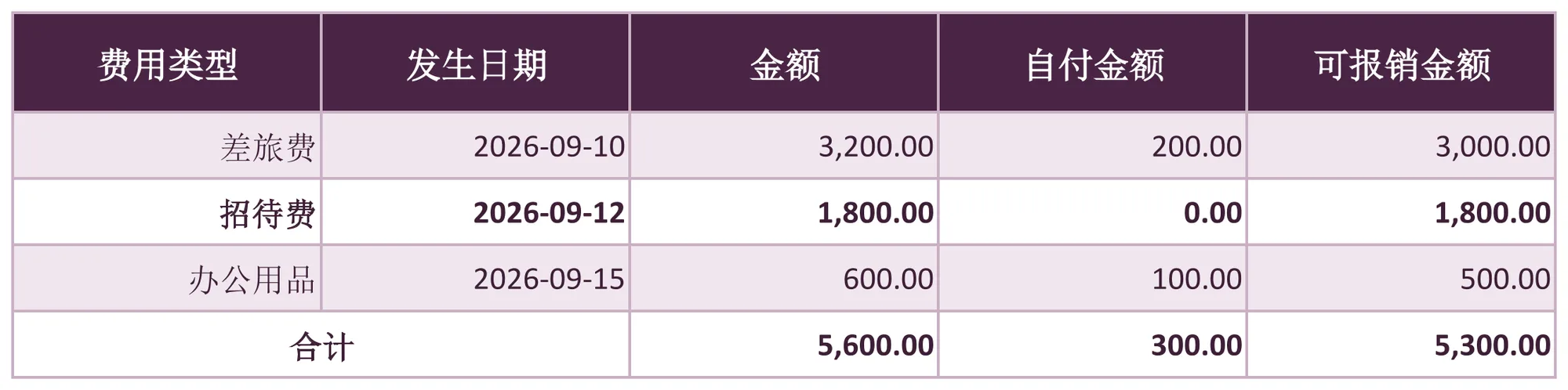
Reimbursement detail rows computing Reimbursable Amount = Amount - Self-Paid Amount, with a total row at the end. Implemented declaratively in pure XML — no Java business code required.
About this demo
This demo exports the "Expense Reimbursement Form" workbook: 1 data sheet(s); MAPPING over 5 columns (费用类型, 发生日期, 金额, 自付金额, 可报销金额), 8 formula(s), 2 style rule(s). On the Java side it builds 4 data rows and calls exportExpenseReimbursement() once — everything else is driven by the config.
It belongs to the "Merge & Grouped Reports" group: MERGE group blocks with SUBTOTAL/TOTAL rows: each group column merges into one vertical block, every group closes with a subtotal and the report ends with a grand total.
What you can copy from this page
- The complete Java test class (62 lines, runnable as-is)
- The complete XML config (27 lines: mapping, formulas, styles, charts and every other rule)
- The exported xlsx file (real output, comparable with the preview above)
Related searches: Java export Excel merged cells, Java Excel group subtotal and total rows, Apache POI merged cells export, Java grouped report export, export Expense Reimbursement Form to Excel with Java
Output specs
- Scene no.
- 0013
- Group
- Merge & Grouped Reports
- Config lines
- 27
- Source lines
- 62
Java source · Merge0013ExpenseReimbursementDemo.java
This is the complete test class that produced the Excel file above — copy it and run as-is. Java only builds the data rows; all statistics and styling live in the XML config.
package com.github.paohaijiao.biz.merge;

import com.github.paohaijiao.statement.JQuickRow;
import com.github.paohaijiao.xml.ex.JQuickExcelExportXmlParseFactory;
import com.github.paohaijiao.xml.factory.JQuickFactory;
import com.github.paohaijiao.xml.factory.JQuickXmlFactory;
import com.github.paohaijiao.xml.handler.JQuickParseHandler;
import org.junit.Test;

import java.io.File;
import java.io.FileOutputStream;
import java.io.OutputStream;
import java.text.SimpleDateFormat;
import java.util.ArrayList;
import java.util.List;

public class Merge0013ExpenseReimbursementDemo {

    private static final String XML = "jquick/biz/merge/0013_merge_expense-reimbursement.xml";

    /** 导出:3 条报销明细 + 1 行合计,回读校验公式、合计行样式与横向合并。 */
    @Test
    public void exportExpenseReimbursement() throws Exception {
        List<JQuickRow> rows = new ArrayList<>();
        rows.add(detail("差旅费", "2026-09-10", 3200.00, 200.00));
        rows.add(detail("招待费", "2026-09-12", 1800.00, 0.00));
        rows.add(detail("办公用品", "2026-09-15", 600.00, 100.00));
        rows.add(totalRow());

        File out = new File("D:/test/excel/biz/merge/0013_merge_expense-reimbursement.xlsx");
        try (OutputStream os = new FileOutputStream(out)) {
            JQuickParseHandler parser = new JQuickExcelExportXmlParseFactory("plum", rows, os);
            JQuickFactory factory = new JQuickXmlFactory(parser, XML);
            Merge0013ExpenseReimbursementService service = factory.createApi(Merge0013ExpenseReimbursementService.class);
            service.exportExpenseReimbursement("field", "value");
        }

    }

    /** 构造一条报销明细(e=可报销金额由 FORMULAS 计算,占位保列)。 */
    private static JQuickRow detail(String category, String date, double amount, double selfPaid) throws Exception {
        JQuickRow row = new JQuickRow();
        row.put("a", category);
        row.put("b", new SimpleDateFormat("yyyy-MM-dd").parse(date));
        row.put("c", amount);
        row.put("d", selfPaid);
        row.put("e", null);
        return row;
    }

    /** 合计行:只写「合计」文字,其余列以空值占位(必须补齐全部映射列)。 */
    private static JQuickRow totalRow() {
        JQuickRow row = new JQuickRow();
        row.put("a", "合计");
        row.put("b", null);
        row.put("c", null);
        row.put("d", null);
        row.put("e", null);
        return row;
    }
}
Minimal invocation (4 lines)
The core is these four lines: hand the rows to the parser, the parser to the factory, get a typed Service and call it. Copy them straight into your project.
// rows 由业务代码构造(List<JQuickRow>),os 为输出流,见下方完整源码
JQuickParseHandler parser = new JQuickExcelExportXmlParseFactory("plum", rows, os);
JQuickFactory factory = new JQuickXmlFactory(parser, XML);
Merge0013ExpenseReimbursementService service = factory.createApi(Merge0013ExpenseReimbursementService.class);
XML config · 0013_merge_expense-reimbursement.xml
Formats (FORMAT), formulas (FORMULAS) and styles (STYLE) are all declared in this XML, fully decoupled from the Java code. The full config is below — copy it as-is.
<?xml version="1.0" encoding="UTF-8"?>
<!DOCTYPE excels PUBLIC "-//PAOHAIJIAO//DTD API EXCEL 1.0//EN"
        "classpath:paohaijiao/dtd/Jquick-excel.dtd">
<excels namespace="com.github.paohaijiao.biz.merge.Merge0013ExpenseReimbursementService">

    <!-- 导出:费用报销单 -->
    <excel name="exportExpenseReimbursement" returnClass="void">
        <![CDATA[
            EXPORT WITH SHEET="费用报销单", HEADER=true,
                MAPPING={"a":"费用类型","b":"发生日期","c":"金额","d":"自付金额","e":"可报销金额"},
                FORMAT={"b":"yyyy-MM-dd","c":"#,##0.00","d":"#,##0.00","e":"#,##0.00"},
                FORMULAS={E2:'C2-D2',E3:'C3-D3',E4:'C4-D4',C5:'SUM(C2:C4)',D5:'SUM(D2:D4)',E5:'SUM(E2:E4)'},
                STYLE={ROW 5:{bold:true,fillPattern:solid_foreground,fillForegroundColor:lightYellow,alignment:right,verticalAlignment:center}},
                MERGE:{RANGE A5:B5 WITH MERGE_WITH_FIRST}
        ]]>
    </excel>

    <!-- 导入解析:读取导出的费用报销单 -->
    <excel name="importExpenseReimbursement" returnClass="java.util.List">
        <![CDATA[
            IMPORT WITH SHEET="费用报销单", HEADER=true,
                MAPPING={"费用类型":"category","发生日期":"expenseDate","金额":"amount","自付金额":"selfPaid","可报销金额":"reimbursable"}
        ]]>
    </excel>

</excels>
More demos in this group
The Excel file, preview image, XML config and source code on this page were all produced by a real JQuick-Excel run and are free to copy into your own project.