
Export "Supplier Reconciliation Detail" to Excel with Java (Styled & Formatted Reports)
Styled & Formatted ReportsScene 0082
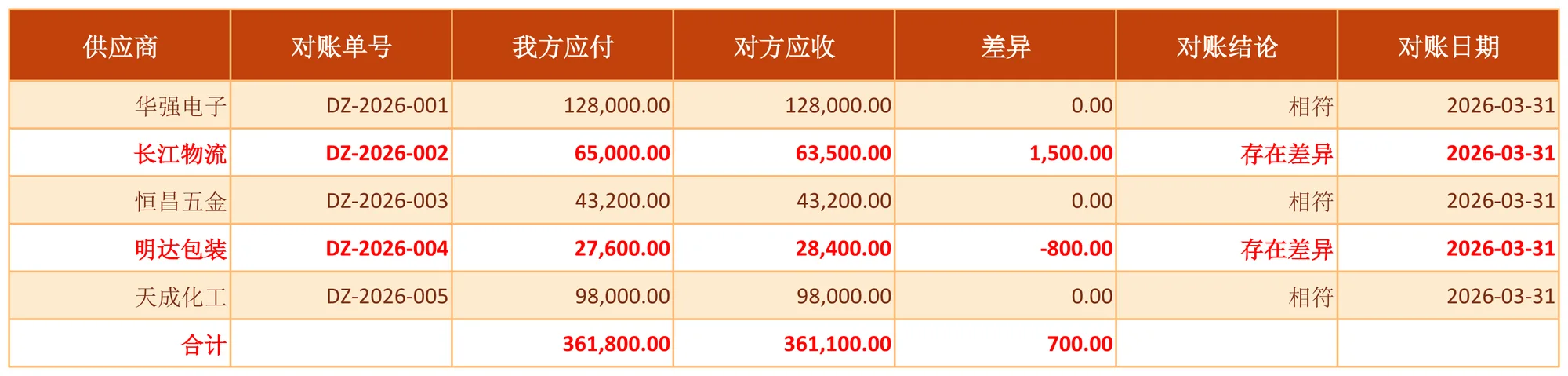
Compares Our Payable with the counterparty's receivable per supplier, computing Difference = Our Payable - Counterparty Receivable, with the last row summarizing both amounts and the total difference; suppliers with a difference are marked in red. Implemented declaratively in pure XML — no Java business code required.
About this demo
This demo exports the "Supplier Reconciliation Detail" workbook: 1 data sheet(s); MAPPING over 7 columns (供应商, 对账单号, 我方应付, 对方应收, 差异, 对账结论, 对账日期), 10 formula(s), 1 style rule(s). On the Java side it builds 6 data rows and calls exportSupplierReconciliationDetail() once — everything else is driven by the config.
It belongs to the "Styled & Formatted Reports" group: STYLE and conditional formatting: themed headers, zebra striping, highlighted total rows and threshold-based colouring of abnormal cells.
What you can copy from this page
- The complete Java test class (75 lines, runnable as-is)
- The complete XML config (32 lines: mapping, formulas, styles, charts and every other rule)
- The exported xlsx file (real output, comparable with the preview above)
Related searches: Java export Excel styles, Java Excel header style zebra rows, Apache POI CellStyle export, Java Excel conditional formatting, export Supplier Reconciliation Detail to Excel with Java
Output specs
- Scene no.
- 0082
- Group
- Styled & Formatted Reports
- Config lines
- 32
- Source lines
- 75
Java source · Style0082SupplierReconciliationDetailDemo.java
This is the complete test class that produced the Excel file above — copy it and run as-is. Java only builds the data rows; all statistics and styling live in the XML config.
package com.github.paohaijiao.biz.style;

import com.github.paohaijiao.statement.JQuickRow;
import com.github.paohaijiao.xml.ex.JQuickExcelExportXmlParseFactory;
import com.github.paohaijiao.xml.factory.JQuickFactory;
import com.github.paohaijiao.xml.factory.JQuickXmlFactory;
import com.github.paohaijiao.xml.handler.JQuickParseHandler;
import org.junit.Test;

import java.io.File;
import java.io.FileOutputStream;
import java.io.OutputStream;
import java.util.ArrayList;
import java.util.Calendar;
import java.util.Date;
import java.util.List;

public class Style0082SupplierReconciliationDetailDemo {

    private static final String XML = "jquick/biz/style/0082_style_supplier-reconciliation-detail.xml";

    /** 导出:纯 XML 完成逐行差异、合计与差异标红。 */
    @Test
    public void exportSupplierReconciliationDetail() throws Exception {
        List<JQuickRow> rows = new ArrayList<>();
        // e 留空,由 FORMULAS 计算
        rows.add(supplier("华强电子", "DZ-2026-001", 128000.00, 128000.00, "相符", date(2026, 3, 31)));
        rows.add(supplier("长江物流", "DZ-2026-002", 65000.00, 63500.00, "存在差异", date(2026, 3, 31)));
        rows.add(supplier("恒昌五金", "DZ-2026-003", 43200.00, 43200.00, "相符", date(2026, 3, 31)));
        rows.add(supplier("明达包装", "DZ-2026-004", 27600.00, 28400.00, "存在差异", date(2026, 3, 31)));
        rows.add(supplier("天成化工", "DZ-2026-005", 98000.00, 98000.00, "相符", date(2026, 3, 31)));
        // 合计占位行:两边金额与总差异留给 FORMULAS
        JQuickRow total = new JQuickRow();
        total.put("a", "合计");
        total.put("b", null);
        total.put("c", null);
        total.put("d", null);
        total.put("e", null);
        total.put("f", null);
        total.put("g", null);
        rows.add(total);

        File out = new File("D:/test/excel/biz/style/0082_style_supplier-reconciliation-detail.xlsx");
        try (OutputStream os = new FileOutputStream(out)) {
            JQuickParseHandler parser = new JQuickExcelExportXmlParseFactory("sunsetOrange", rows, os);
            JQuickFactory factory = new JQuickXmlFactory(parser, XML);
            Style0082SupplierReconciliationDetailService service = factory.createApi(Style0082SupplierReconciliationDetailService.class);
            service.exportSupplierReconciliationDetail("field", "value");
        }

    }

    /** 构造一条对账明细(a=供应商,b=对账单号,c=我方应付,d=对方应收,e 留空,f=结论,g=日期)。 */
    private static JQuickRow supplier(String supplier, String statementNo, double ourPayable,
                                      double theirReceivable, String conclusion, Date reconciliationDate) {
        JQuickRow row = new JQuickRow();
        row.put("a", supplier);
        row.put("b", statementNo);
        row.put("c", ourPayable);
        row.put("d", theirReceivable);
        row.put("e", null);
        row.put("f", conclusion);
        row.put("g", reconciliationDate);
        return row;
    }

    /** 构造日期(月份按自然月 1-12 传入)。 */
    private static Date date(int year, int month, int day) {
        Calendar c = Calendar.getInstance();
        c.clear();
        c.set(year, month - 1, day);
        return c.getTime();
    }
}
Minimal invocation (4 lines)
The core is these four lines: hand the rows to the parser, the parser to the factory, get a typed Service and call it. Copy them straight into your project.
// rows 由业务代码构造(List<JQuickRow>),os 为输出流,见下方完整源码
JQuickParseHandler parser = new JQuickExcelExportXmlParseFactory("sunsetOrange", rows, os);
JQuickFactory factory = new JQuickXmlFactory(parser, XML);
Style0082SupplierReconciliationDetailService service = factory.createApi(Style0082SupplierReconciliationDetailService.class);
XML config · 0082_style_supplier-reconciliation-detail.xml
Formats (FORMAT), formulas (FORMULAS) and styles (STYLE) are all declared in this XML, fully decoupled from the Java code. The full config is below — copy it as-is.
<?xml version="1.0" encoding="UTF-8"?>
<!DOCTYPE excels PUBLIC "-//PAOHAIJIAO//DTD API EXCEL 1.0//EN"
        "classpath:paohaijiao/dtd/Jquick-excel.dtd">
<excels namespace="com.github.paohaijiao.biz.style.Style0082SupplierReconciliationDetailService">

    <!-- 导出:供应商往来对账明细表 -->
    <excel name="exportSupplierReconciliationDetail" returnClass="void">
        <![CDATA[
            EXPORT WITH SHEET="供应商往来对账明细表", HEADER=true,
                MAPPING={"a":"供应商","b":"对账单号","c":"我方应付","d":"对方应收","e":"差异","f":"对账结论","g":"对账日期"},
                FORMAT={"c":"#,##0.00","d":"#,##0.00","e":"#,##0.00","g":"yyyy-MM-dd"},
                FORMULAS={
                    E2:'C2-D2',E3:'C3-D3',E4:'C4-D4',E5:'C5-D5',E6:'C6-D6',
                    C7:'SUM(C2:C6)',D7:'SUM(D2:D6)',E7:'C7-D7'
                },
                STYLE={
                    ROW 7:{bold:true,fillPattern:solid_foreground,fillForegroundColor:lightYellow,alignment:right,verticalAlignment:center},
                    E3:{color:red,bold:true}
                }
        ]]>
    </excel>

    <!-- 导入解析:读取导出的供应商往来对账明细表 -->
    <excel name="importSupplierReconciliationDetail" returnClass="java.util.List">
        <![CDATA[
            IMPORT WITH SHEET="供应商往来对账明细表", HEADER=true,
                MAPPING={"供应商":"supplier","对账单号":"statementNo","我方应付":"ourPayable","对方应收":"theirReceivable","差异":"difference","对账结论":"conclusion","对账日期":"reconciliationDate"}
        ]]>
    </excel>

</excels>
More demos in this group
The Excel file, preview image, XML config and source code on this page were all produced by a real JQuick-Excel run and are free to copy into your own project.