
Export "Meeting Expense Reimbursement Detail" to Excel with Java (Formula & Calculated Reports)
Formula & Calculated ReportsScene 0074
Registers venue fee / catering fee / accommodation fee per meeting, computing Total Amount = Venue Fee + Catering Fee + Accommodation Fee per row, with the last row summarizing each expense item and the total; the meeting with the highest cost is marked in red. Implemented declaratively in pure XML — no Java business code required.
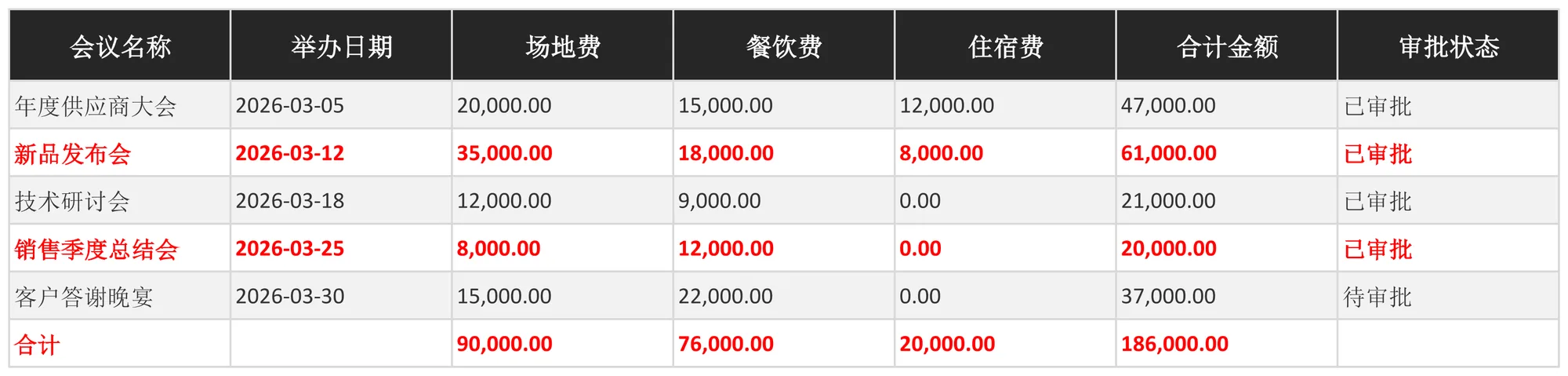
About this demo
This demo exports the "Meeting Expense Reimbursement Detail" workbook: 1 data sheet(s); MAPPING over 7 columns (会议名称, 举办日期, 场地费, 餐饮费, 住宿费, 合计金额, 审批状态), 12 formula(s), 1 style rule(s). On the Java side it builds 6 data rows and calls exportMeetingExpenseDetail() once — everything else is driven by the config.
It belongs to the "Formula & Calculated Reports" group: FORMULAS — inline expressions and aggregate functions such as Quantity × Unit Price or Balance = Receivable − Received, with SUM totals on the last row.
What you can copy from this page
- The complete Java test class (75 lines, runnable as-is)
- The complete XML config (32 lines: mapping, formulas, styles, charts and every other rule)
- The exported xlsx file (real output, comparable with the preview above)
Related searches: Java export Excel formulas, Java Excel SUM formula export, Apache POI write formula example, Java computed column export, export Meeting Expense Reimbursement Detail to Excel with Java
Output specs
- Scene no.
- 0074
- Group
- Formula & Calculated Reports
- Config lines
- 32
- Source lines
- 75
Java source · Formulas0074MeetingExpenseDetailDemo.java
This is the complete test class that produced the Excel file above — copy it and run as-is. Java only builds the data rows; all statistics and styling live in the XML config.
package com.github.paohaijiao.biz.formulas;

import com.github.paohaijiao.statement.JQuickRow;
import com.github.paohaijiao.xml.ex.JQuickExcelExportXmlParseFactory;
import com.github.paohaijiao.xml.factory.JQuickFactory;
import com.github.paohaijiao.xml.factory.JQuickXmlFactory;
import com.github.paohaijiao.xml.handler.JQuickParseHandler;
import org.junit.Test;

import java.io.File;
import java.io.FileOutputStream;
import java.io.OutputStream;
import java.util.ArrayList;
import java.util.Calendar;
import java.util.Date;
import java.util.List;

public class Formulas0074MeetingExpenseDetailDemo {

    private static final String XML = "jquick/biz/formulas/0074_formulas_meeting-expense-detail.xml";

    /** 导出:纯 XML 完成合计金额、各列汇总与最高费用标红。 */
    @Test
    public void exportMeetingExpenseDetail() throws Exception {
        List<JQuickRow> rows = new ArrayList<>();
        // f=合计金额 留空,由 FORMULAS 计算
        rows.add(meeting("年度供应商大会", date(2026, 3, 5), 20000.00, 15000.00, 12000.00, "已审批"));
        rows.add(meeting("新品发布会", date(2026, 3, 12), 35000.00, 18000.00, 8000.00, "已审批"));
        rows.add(meeting("技术研讨会", date(2026, 3, 18), 12000.00, 9000.00, 0.00, "已审批"));
        rows.add(meeting("销售季度总结会", date(2026, 3, 25), 8000.00, 12000.00, 0.00, "已审批"));
        rows.add(meeting("客户答谢晚宴", date(2026, 3, 30), 15000.00, 22000.00, 0.00, "待审批"));
        // 合计占位行:各列费用与合计留给 FORMULAS
        JQuickRow total = new JQuickRow();
        total.put("a", "合计");
        total.put("b", null);
        total.put("c", null);
        total.put("d", null);
        total.put("e", null);
        total.put("f", null);
        total.put("g", null);
        rows.add(total);

        File out = new File("D:/test/excel/biz/formulas/0074_formulas_meeting-expense-detail.xlsx");
        try (OutputStream os = new FileOutputStream(out)) {
            JQuickParseHandler parser = new JQuickExcelExportXmlParseFactory("minimalistGrey", rows, os);
            JQuickFactory factory = new JQuickXmlFactory(parser, XML);
            Formulas0074MeetingExpenseDetailService service = factory.createApi(Formulas0074MeetingExpenseDetailService.class);
            service.exportMeetingExpenseDetail("field", "value");
        }

    }

    /** 构造一场会议报销(a=会议名称,b=日期,c=场地费,d=餐饮费,e=住宿费,f=合计金额,g=审批状态)。 */
    private static JQuickRow meeting(String meetingName, Date meetingDate, double venueFee,
                                     double cateringFee, double accommodationFee, String approvalStatus) {
        JQuickRow row = new JQuickRow();
        row.put("a", meetingName);
        row.put("b", meetingDate);
        row.put("c", venueFee);
        row.put("d", cateringFee);
        row.put("e", accommodationFee);
        row.put("f", null);
        row.put("g", approvalStatus);
        return row;
    }

    /** 构造日期(月份按自然月 1-12 传入)。 */
    private static Date date(int year, int month, int day) {
        Calendar c = Calendar.getInstance();
        c.clear();
        c.set(year, month - 1, day);
        return c.getTime();
    }
}
Minimal invocation (4 lines)
The core is these four lines: hand the rows to the parser, the parser to the factory, get a typed Service and call it. Copy them straight into your project.
// rows 由业务代码构造(List<JQuickRow>),os 为输出流,见下方完整源码
JQuickParseHandler parser = new JQuickExcelExportXmlParseFactory("minimalistGrey", rows, os);
JQuickFactory factory = new JQuickXmlFactory(parser, XML);
Formulas0074MeetingExpenseDetailService service = factory.createApi(Formulas0074MeetingExpenseDetailService.class);
XML config · 0074_formulas_meeting-expense-detail.xml
Formats (FORMAT), formulas (FORMULAS) and styles (STYLE) are all declared in this XML, fully decoupled from the Java code. The full config is below — copy it as-is.
<?xml version="1.0" encoding="UTF-8"?>
<!DOCTYPE excels PUBLIC "-//PAOHAIJIAO//DTD API EXCEL 1.0//EN"
        "classpath:paohaijiao/dtd/Jquick-excel.dtd">
<excels namespace="com.github.paohaijiao.biz.formulas.Formulas0074MeetingExpenseDetailService">

    <!-- 导出:会议费用报销明细表 -->
    <excel name="exportMeetingExpenseDetail" returnClass="void">
        <![CDATA[
            EXPORT WITH SHEET="会议费用报销明细表", HEADER=true,
                MAPPING={"a":"会议名称","b":"举办日期","c":"场地费","d":"餐饮费","e":"住宿费","f":"合计金额","g":"审批状态"},
                FORMAT={"b":"yyyy-MM-dd","c":"#,##0.00","d":"#,##0.00","e":"#,##0.00","f":"#,##0.00"},
                FORMULAS={
                    F2:'C2+D2+E2',F3:'C3+D3+E3',F4:'C4+D4+E4',F5:'C5+D5+E5',F6:'C6+D6+E6',
                    C7:'SUM(C2:C6)',D7:'SUM(D2:D6)',E7:'SUM(E2:E6)',F7:'C7+D7+E7'
                },
                STYLE={
                    ROW 7:{bold:true,fillPattern:solid_foreground,fillForegroundColor:lightYellow,alignment:right,verticalAlignment:center},
                    F3:{color:red,bold:true}
                }
        ]]>
    </excel>

    <!-- 导入解析:读取导出的会议费用报销明细表 -->
    <excel name="importMeetingExpenseDetail" returnClass="java.util.List">
        <![CDATA[
            IMPORT WITH SHEET="会议费用报销明细表", HEADER=true,
                MAPPING={"会议名称":"meetingName","举办日期":"meetingDate","场地费":"venueFee","餐饮费":"cateringFee","住宿费":"accommodationFee","合计金额":"totalAmount","审批状态":"approvalStatus"}
        ]]>
    </excel>

</excels>
More demos in this group
The Excel file, preview image, XML config and source code on this page were all produced by a real JQuick-Excel run and are free to copy into your own project.