
Export "Fixed Asset Depreciation Ledger" to Excel with Java (Merge & Grouped Reports)
Merge & Grouped ReportsScene 0015
Fixed assets grouped in two levels (Asset Category → Asset Name), computing Original Value = Quantity × Unit Price and Net Value = Original Value - Accumulated Depreciation per row; a subtotal row follows each asset category and a grand total for all categories appears at the end; the asset-category column is vertically merged into one block. Java only groups and pre-processes the rows; all statistics and layout are declared in XML.
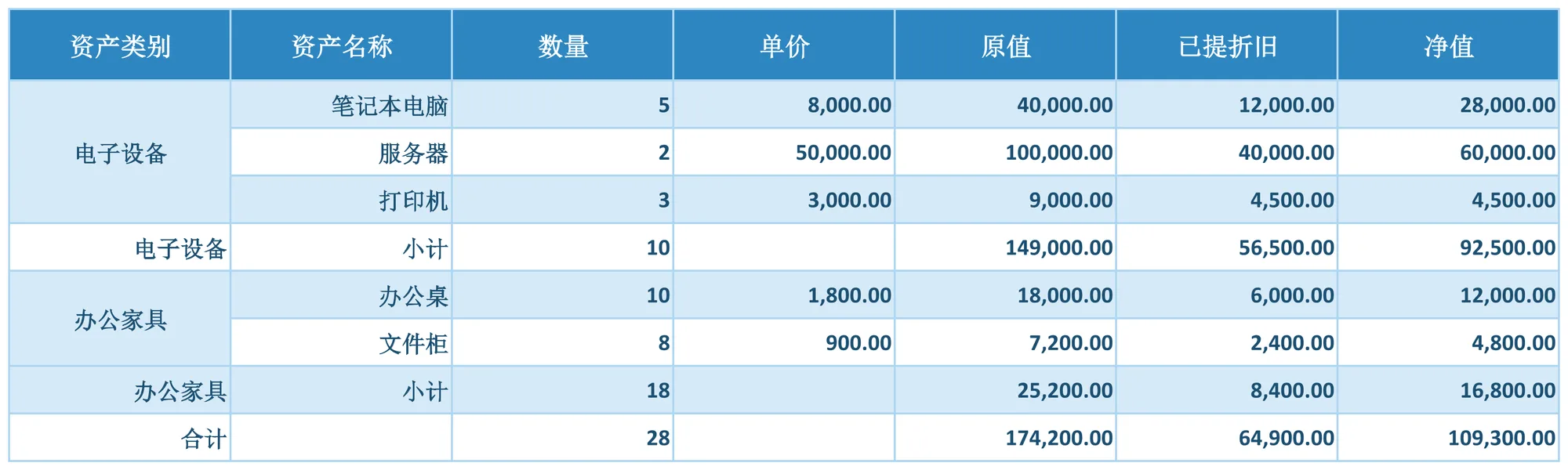
About this demo
This demo exports the "Fixed Asset Depreciation Ledger" workbook: 1 data sheet(s); MAPPING over 7 columns (资产类别, 资产名称, 数量, 单价, 原值, 已提折旧, 净值), 26 formula(s), 5 style rule(s). On the Java side it only builds the data and calls exportFixedAssetLedger() once — everything else is driven by the config.
It belongs to the "Merge & Grouped Reports" group: MERGE group blocks with SUBTOTAL/TOTAL rows: each group column merges into one vertical block, every group closes with a subtotal and the report ends with a grand total.
What you can copy from this page
- The complete Java test class (98 lines, runnable as-is)
- The complete XML config (40 lines: mapping, formulas, styles, charts and every other rule)
- The exported xlsx file (real output, comparable with the preview above)
Related searches: Java export Excel merged cells, Java Excel group subtotal and total rows, Apache POI merged cells export, Java grouped report export, export Fixed Asset Depreciation Ledger to Excel with Java
Output specs
- Scene no.
- 0015
- Group
- Merge & Grouped Reports
- Config lines
- 40
- Source lines
- 98
Java source · Merge0015FixedAssetLedgerDemo.java
This is the complete test class that produced the Excel file above — copy it and run as-is. Java only builds the data rows; all statistics and styling live in the XML config.
package com.github.paohaijiao.biz.merge;

import com.github.paohaijiao.statement.JQuickRow;
import com.github.paohaijiao.xml.ex.JQuickExcelExportXmlParseFactory;
import com.github.paohaijiao.xml.factory.JQuickFactory;
import com.github.paohaijiao.xml.factory.JQuickXmlFactory;
import com.github.paohaijiao.xml.handler.JQuickParseHandler;
import org.junit.Test;

import java.io.File;
import java.io.FileOutputStream;
import java.io.OutputStream;
import java.util.ArrayList;
import java.util.List;

public class Merge0015FixedAssetLedgerDemo {

    private static final String XML = "jquick/biz/merge/0015_merge_fixed-asset-ledger.xml";

    /** 导出:Java 分组 + 插小计行,资产类别列纵向合并,原值 / 净值由 XML FORMULAS 完成。 */
    @Test
    public void exportFixedAssetLedger() throws Exception {
        // 1. 构造扁平资产明细(Java 不做任何金额计算)
        List<JQuickRow> flat = new ArrayList<>();
        flat.add(line("电子设备", "笔记本电脑", 5, 8000.00, 12000.00));
        flat.add(line("电子设备", "服务器", 2, 50000.00, 40000.00));
        flat.add(line("电子设备", "打印机", 3, 3000.00, 4500.00));
        flat.add(line("办公家具", "办公桌", 10, 1800.00, 6000.00));
        flat.add(line("办公家具", "文件柜", 8, 900.00, 2400.00));

        // 2. Java 分组并插入小计 / 合计占位行(原值 / 净值留给 FORMULAS)
        List<JQuickRow> rows = groupWithSubtotal(flat);

        File out = new File("D:/test/excel/biz/merge/0015_merge_fixed-asset-ledger.xlsx");
        try (OutputStream os = new FileOutputStream(out)) {
            JQuickParseHandler parser = new JQuickExcelExportXmlParseFactory("skyBlue", rows, os);
            JQuickFactory factory = new JQuickXmlFactory(parser, XML);
            Merge0015FixedAssetLedgerService service = factory.createApi(Merge0015FixedAssetLedgerService.class);
            service.exportFixedAssetLedger("field", "value");
        }

    }

    /** 按资产类别分组,类别切换处插入小计行,末尾追加合计行(不做金额计算)。 */
    private static List<JQuickRow> groupWithSubtotal(List<JQuickRow> flat) {
        List<JQuickRow> out = new ArrayList<>();
        String current = null;
        for (JQuickRow r : flat) {
            String category = String.valueOf(r.get("a"));
            if (current != null && !current.equals(category)) {
                out.add(subtotalRow(current));
            }
            out.add(r);
            current = category;
        }
        if (current != null) {
            out.add(subtotalRow(current));
        }
        JQuickRow total = new JQuickRow();
        total.put("a", "合计");
        total.put("b", null);
        total.put("c", null);
        total.put("d", null);
        total.put("e", null);
        total.put("f", null);
        total.put("g", null);
        out.add(total);
        return out;
    }

    /** 小计占位行:只写资产类别与小计文字,金额留空由 FORMULAS 计算。 */
    private static JQuickRow subtotalRow(String category) {
        JQuickRow row = new JQuickRow();
        row.put("a", category);
        row.put("b", "小计");
        row.put("c", null);
        row.put("d", null);
        row.put("e", null);
        row.put("f", null);
        row.put("g", null);
        return row;
    }

    /** 构造一项资产(a=类别,b=名称,c=数量,d=单价,e/g 留空,f=已提折旧)。 */
    private static JQuickRow line(String category, String assetName, double quantity,
                                  double unitPrice, double accumulatedDepreciation) {
        JQuickRow row = new JQuickRow();
        row.put("a", category);
        row.put("b", assetName);
        row.put("c", quantity);
        row.put("d", unitPrice);
        row.put("e", null);
        row.put("f", accumulatedDepreciation);
        row.put("g", null);
        return row;
    }
}
Minimal invocation (4 lines)
The core is these four lines: hand the rows to the parser, the parser to the factory, get a typed Service and call it. Copy them straight into your project.
// rows 由业务代码构造(List<JQuickRow>),os 为输出流,见下方完整源码
JQuickParseHandler parser = new JQuickExcelExportXmlParseFactory("skyBlue", rows, os);
JQuickFactory factory = new JQuickXmlFactory(parser, XML);
Merge0015FixedAssetLedgerService service = factory.createApi(Merge0015FixedAssetLedgerService.class);
XML config · 0015_merge_fixed-asset-ledger.xml
Formats (FORMAT), formulas (FORMULAS) and styles (STYLE) are all declared in this XML, fully decoupled from the Java code. The full config is below — copy it as-is.
<?xml version="1.0" encoding="UTF-8"?>
<!DOCTYPE excels PUBLIC "-//PAOHAIJIAO//DTD API EXCEL 1.0//EN"
        "classpath:paohaijiao/dtd/Jquick-excel.dtd">
<excels namespace="com.github.paohaijiao.biz.merge.Merge0015FixedAssetLedgerService">

    <!-- 导出:固定资产折旧台账 -->
    <excel name="exportFixedAssetLedger" returnClass="void">
        <![CDATA[
            EXPORT WITH SHEET="固定资产折旧台账", HEADER=true,
                MAPPING={"a":"资产类别","b":"资产名称","c":"数量","d":"单价","e":"原值","f":"已提折旧","g":"净值"},
                FORMAT={"c":"0","d":"#,##0.00","e":"#,##0.00","f":"#,##0.00","g":"#,##0.00"},
                FORMULAS={
                    E2:'C2*D2',G2:'E2-F2',E3:'C3*D3',G3:'E3-F3',E4:'C4*D4',G4:'E4-F4',
                    C5:'SUM(C2:C4)',E5:'SUM(E2:E4)',F5:'SUM(F2:F4)',G5:'E5-F5',
                    E6:'C6*D6',G6:'E6-F6',E7:'C7*D7',G7:'E7-F7',
                    C8:'SUM(C6:C7)',E8:'SUM(E6:E7)',F8:'SUM(F6:F7)',G8:'E8-F8',
                    C9:'C5+C8',E9:'E5+E8',F9:'F5+F8',G9:'E9-F9'
                },
                STYLE={
                    ROW 5:{bold:true,fillPattern:solid_foreground,fillForegroundColor:lightYellow,alignment:right,verticalAlignment:center},
                    ROW 8:{bold:true,fillPattern:solid_foreground,fillForegroundColor:lightYellow,alignment:right,verticalAlignment:center},
                    ROW 9:{bold:true,fillPattern:solid_foreground,fillForegroundColor:lightYellow,alignment:right,verticalAlignment:center}
                },
                MERGE:{
                    RANGE A2:A4 WITH MERGE_WITH_FIRST,
                    RANGE A6:A7 WITH MERGE_WITH_FIRST
                }
        ]]>
    </excel>

    <!-- 导入解析:读取导出的固定资产折旧台账 -->
    <excel name="importFixedAssetLedger" returnClass="java.util.List">
        <![CDATA[
            IMPORT WITH SHEET="固定资产折旧台账", HEADER=true,
                MAPPING={"资产类别":"assetCategory","资产名称":"assetName","数量":"quantity","单价":"unitPrice","原值":"originalValue","已提折旧":"accumulatedDepreciation","净值":"netValue"}
        ]]>
    </excel>

</excels>
More demos in this group
The Excel file, preview image, XML config and source code on this page were all produced by a real JQuick-Excel run and are free to copy into your own project.