
Export "Customer Credit Limit Analysis" to Excel with Java (Styled & Formatted Reports)
Styled & Formatted ReportsScene 0036
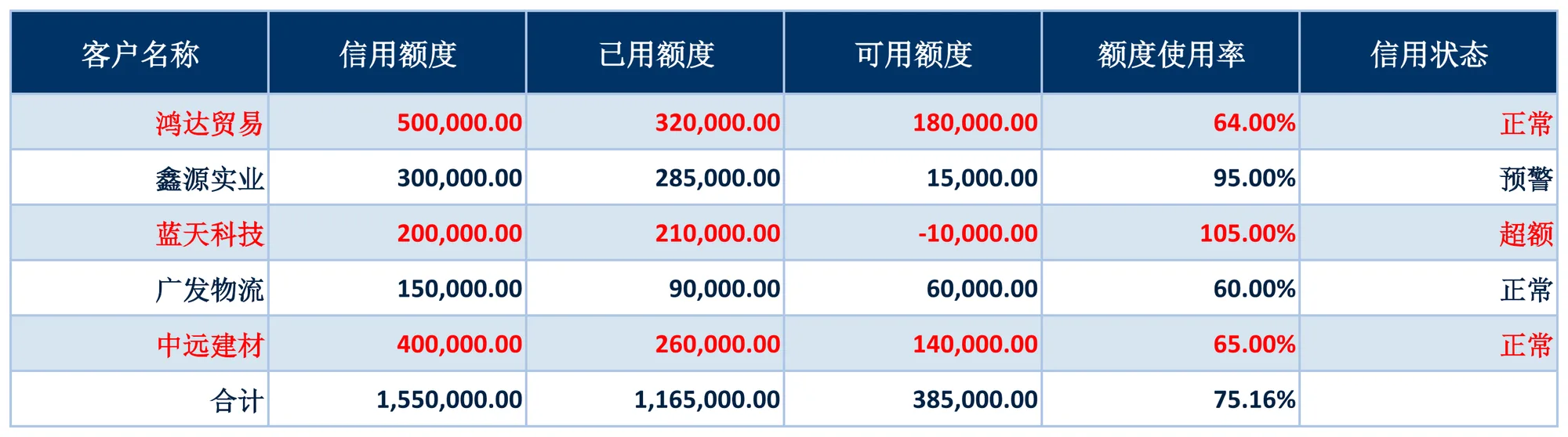
Analyzes credit limit usage per customer, computing Available Limit = Credit Limit - Used Limit and Limit Utilization = Used Limit / Credit Limit per row, with the utilization of customers over their limit marked in red as an alert, and the last row giving the overall utilization. Implemented declaratively in pure XML — no Java business code required.
About this demo
This demo exports the "Customer Credit Limit Analysis" workbook: 1 data sheet(s); MAPPING over 6 columns (客户名称, 信用额度, 已用额度, 可用额度, 额度使用率, 信用状态), 16 formula(s), 1 style rule(s). On the Java side it builds 6 data rows and calls exportCustomerCredit() once — everything else is driven by the config.
It belongs to the "Styled & Formatted Reports" group: STYLE and conditional formatting: themed headers, zebra striping, highlighted total rows and threshold-based colouring of abnormal cells.
What you can copy from this page
- The complete Java test class (61 lines, runnable as-is)
- The complete XML config (36 lines: mapping, formulas, styles, charts and every other rule)
- The exported xlsx file (real output, comparable with the preview above)
Related searches: Java export Excel styles, Java Excel header style zebra rows, Apache POI CellStyle export, Java Excel conditional formatting, export Customer Credit Limit Analysis to Excel with Java
Output specs
- Scene no.
- 0036
- Group
- Styled & Formatted Reports
- Config lines
- 36
- Source lines
- 61
Java source · Style0036CustomerCreditAnalysisDemo.java
This is the complete test class that produced the Excel file above — copy it and run as-is. Java only builds the data rows; all statistics and styling live in the XML config.
package com.github.paohaijiao.biz.style;

import com.github.paohaijiao.statement.JQuickRow;
import com.github.paohaijiao.xml.ex.JQuickExcelExportXmlParseFactory;
import com.github.paohaijiao.xml.factory.JQuickFactory;
import com.github.paohaijiao.xml.factory.JQuickXmlFactory;
import com.github.paohaijiao.xml.handler.JQuickParseHandler;
import org.junit.Test;

import java.io.File;
import java.io.FileOutputStream;
import java.io.OutputStream;
import java.util.ArrayList;
import java.util.List;

public class Style0036CustomerCreditAnalysisDemo {

    private static final String XML = "jquick/biz/style/0036_style_customer-credit-analysis.xml";

    /** 导出:纯 XML 完成可用额度、使用率、合计汇总与超额标红。 */
    @Test
    public void exportCustomerCredit() throws Exception {
        List<JQuickRow> rows = new ArrayList<>();
        rows.add(client("鸿达贸易", 500000, 320000, "正常"));
        rows.add(client("鑫源实业", 300000, 285000, "预警"));
        rows.add(client("蓝天科技", 200000, 210000, "超额"));
        rows.add(client("广发物流", 150000, 90000, "正常"));
        rows.add(client("中远建材", 400000, 260000, "正常"));
        // 合计占位行:三列金额与整体使用率留给 FORMULAS
        JQuickRow total = new JQuickRow();
        total.put("a", "合计");
        total.put("b", null);
        total.put("c", null);
        total.put("d", null);
        total.put("e", null);
        total.put("f", null);
        rows.add(total);

        File out = new File("D:/test/excel/biz/style/0036_style_customer-credit-analysis.xlsx");
        try (OutputStream os = new FileOutputStream(out)) {
            JQuickParseHandler parser = new JQuickExcelExportXmlParseFactory("navyBlue", rows, os);
            JQuickFactory factory = new JQuickXmlFactory(parser, XML);
            Style0036CustomerCreditAnalysisService service = factory.createApi(Style0036CustomerCreditAnalysisService.class);
            service.exportCustomerCredit("field", "value");
        }

    }

    /** 构造一个客户行(a=客户名称,b=信用额度,c=已用额度,f=信用状态)。 */
    private static JQuickRow client(String customer, double creditLimit, double usedCredit, String status) {
        JQuickRow row = new JQuickRow();
        row.put("a", customer);
        row.put("b", creditLimit);
        row.put("c", usedCredit);
        row.put("d", null);
        row.put("e", null);
        row.put("f", status);
        return row;
    }
}
Minimal invocation (4 lines)
The core is these four lines: hand the rows to the parser, the parser to the factory, get a typed Service and call it. Copy them straight into your project.
// rows 由业务代码构造(List<JQuickRow>),os 为输出流,见下方完整源码
JQuickParseHandler parser = new JQuickExcelExportXmlParseFactory("navyBlue", rows, os);
JQuickFactory factory = new JQuickXmlFactory(parser, XML);
Style0036CustomerCreditAnalysisService service = factory.createApi(Style0036CustomerCreditAnalysisService.class);
XML config · 0036_style_customer-credit-analysis.xml
Formats (FORMAT), formulas (FORMULAS) and styles (STYLE) are all declared in this XML, fully decoupled from the Java code. The full config is below — copy it as-is.
<?xml version="1.0" encoding="UTF-8"?>
<!DOCTYPE excels PUBLIC "-//PAOHAIJIAO//DTD API EXCEL 1.0//EN"
        "classpath:paohaijiao/dtd/Jquick-excel.dtd">
<excels namespace="com.github.paohaijiao.biz.style.Style0036CustomerCreditAnalysisService">

    <!-- 导出:客户信用额度分析表 -->
    <excel name="exportCustomerCredit" returnClass="void">
        <![CDATA[
            EXPORT WITH SHEET="客户信用额度分析", HEADER=true,
                MAPPING={"a":"客户名称","b":"信用额度","c":"已用额度","d":"可用额度","e":"额度使用率","f":"信用状态"},
                FORMAT={"b":"#,##0.00","c":"#,##0.00","d":"#,##0.00","e":"0.00%"},
                FORMULAS={
                    D2:'B2-C2',E2:'C2/B2',
                    D3:'B3-C3',E3:'C3/B3',
                    D4:'B4-C4',E4:'C4/B4',
                    D5:'B5-C5',E5:'C5/B5',
                    D6:'B6-C6',E6:'C6/B6',
                    B7:'SUM(B2:B6)',C7:'SUM(C2:C6)',D7:'B7-C7',E7:'C7/B7'
                },
                STYLE={
                    ROW 7:{bold:true,fillPattern:solid_foreground,fillForegroundColor:lightYellow,alignment:right,verticalAlignment:center},
                    E4:{color:red,bold:true}
                }
        ]]>
    </excel>

    <!-- 导入解析:读取导出的客户信用额度分析表 -->
    <excel name="importCustomerCredit" returnClass="java.util.List">
        <![CDATA[
            IMPORT WITH SHEET="客户信用额度分析", HEADER=true,
                MAPPING={"客户名称":"customer","信用额度":"creditLimit","已用额度":"usedCredit","可用额度":"availableCredit","额度使用率":"usageRate","信用状态":"creditStatus"}
        ]]>
    </excel>

</excels>
More demos in this group
The Excel file, preview image, XML config and source code on this page were all produced by a real JQuick-Excel run and are free to copy into your own project.