
Export "Purchase Receipt" to Excel with Java (Formula & Calculated Reports)
Formula & Calculated ReportsScene 0056
The warehouse registers receipt detail for arriving purchases, computing Receipt Amount = Received Quantity × Purchase Unit Price per row, with a total summarized in the last row. Implemented declaratively in pure XML — no Java business code required.
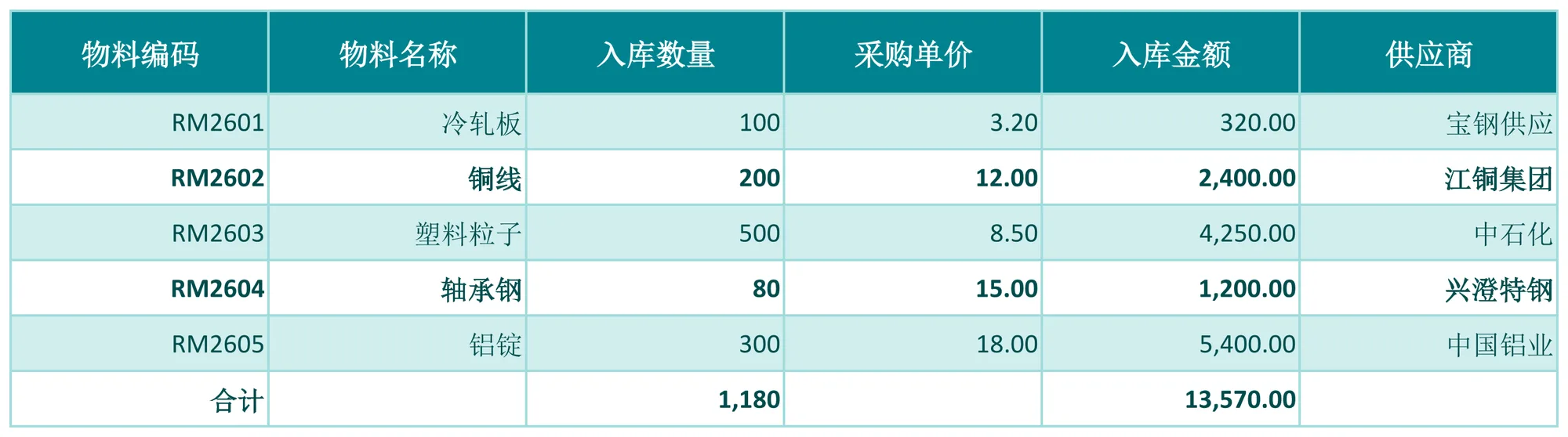
About this demo
This demo exports the "Purchase Receipt" workbook: 1 data sheet(s); MAPPING over 6 columns (物料编码, 物料名称, 入库数量, 采购单价, 入库金额, 供应商), 8 formula(s), 1 style rule(s). On the Java side it builds 6 data rows and calls exportPurchaseInbound() once — everything else is driven by the config.
It belongs to the "Formula & Calculated Reports" group: FORMULAS — inline expressions and aggregate functions such as Quantity × Unit Price or Balance = Receivable − Received, with SUM totals on the last row.
What you can copy from this page
- The complete Java test class (61 lines, runnable as-is)
- The complete XML config (31 lines: mapping, formulas, styles, charts and every other rule)
- The exported xlsx file (real output, comparable with the preview above)
Related searches: Java export Excel formulas, Java Excel SUM formula export, Apache POI write formula example, Java computed column export, export Purchase Receipt to Excel with Java
Output specs
- Scene no.
- 0056
- Group
- Formula & Calculated Reports
- Config lines
- 31
- Source lines
- 61
Java source · Formulas0056PurchaseInboundDemo.java
This is the complete test class that produced the Excel file above — copy it and run as-is. Java only builds the data rows; all statistics and styling live in the XML config.
package com.github.paohaijiao.biz.formulas;

import com.github.paohaijiao.statement.JQuickRow;
import com.github.paohaijiao.xml.ex.JQuickExcelExportXmlParseFactory;
import com.github.paohaijiao.xml.factory.JQuickFactory;
import com.github.paohaijiao.xml.factory.JQuickXmlFactory;
import com.github.paohaijiao.xml.handler.JQuickParseHandler;
import org.junit.Test;

import java.io.File;
import java.io.FileOutputStream;
import java.io.OutputStream;
import java.util.ArrayList;
import java.util.List;

public class Formulas0056PurchaseInboundDemo {

    private static final String XML = "jquick/biz/formulas/0056_formulas_purchase-inbound.xml";

    /** 导出:纯 XML 完成入库金额、数量合计与金额合计。 */
    @Test
    public void exportPurchaseInbound() throws Exception {
        List<JQuickRow> rows = new ArrayList<>();
        rows.add(line("RM2601", "冷轧板", 100, 3.20, "宝钢供应"));
        rows.add(line("RM2602", "铜线", 200, 12.00, "江铜集团"));
        rows.add(line("RM2603", "塑料粒子", 500, 8.50, "中石化"));
        rows.add(line("RM2604", "轴承钢", 80, 15.00, "兴澄特钢"));
        rows.add(line("RM2605", "铝锭", 300, 18.00, "中国铝业"));
        // 合计占位行:数量与金额合计留给 FORMULAS
        JQuickRow total = new JQuickRow();
        total.put("a", "合计");
        total.put("b", null);
        total.put("c", null);
        total.put("d", null);
        total.put("e", null);
        total.put("f", null);
        rows.add(total);

        File out = new File("D:/test/excel/biz/formulas/0056_formulas_purchase-inbound.xlsx");
        try (OutputStream os = new FileOutputStream(out)) {
            JQuickParseHandler parser = new JQuickExcelExportXmlParseFactory("cyan", rows, os);
            JQuickFactory factory = new JQuickXmlFactory(parser, XML);
            Formulas0056PurchaseInboundService service = factory.createApi(Formulas0056PurchaseInboundService.class);
            service.exportPurchaseInbound("field", "value");
        }

    }

    /** 构造一条入库明细(a=编码,b=名称,c=数量,d=单价,f=供应商,e 留空由 FORMULAS 计算)。 */
    private static JQuickRow line(String materialCode, String materialName, int quantity, double unitPrice, String supplier) {
        JQuickRow row = new JQuickRow();
        row.put("a", materialCode);
        row.put("b", materialName);
        row.put("c", quantity);
        row.put("d", unitPrice);
        row.put("e", null);
        row.put("f", supplier);
        return row;
    }
}
Minimal invocation (4 lines)
The core is these four lines: hand the rows to the parser, the parser to the factory, get a typed Service and call it. Copy them straight into your project.
// rows 由业务代码构造(List<JQuickRow>),os 为输出流,见下方完整源码
JQuickParseHandler parser = new JQuickExcelExportXmlParseFactory("cyan", rows, os);
JQuickFactory factory = new JQuickXmlFactory(parser, XML);
Formulas0056PurchaseInboundService service = factory.createApi(Formulas0056PurchaseInboundService.class);
XML config · 0056_formulas_purchase-inbound.xml
Formats (FORMAT), formulas (FORMULAS) and styles (STYLE) are all declared in this XML, fully decoupled from the Java code. The full config is below — copy it as-is.
<?xml version="1.0" encoding="UTF-8"?>
<!DOCTYPE excels PUBLIC "-//PAOHAIJIAO//DTD API EXCEL 1.0//EN"
        "classpath:paohaijiao/dtd/Jquick-excel.dtd">
<excels namespace="com.github.paohaijiao.biz.formulas.Formulas0056PurchaseInboundService">

    <!-- 导出:采购入库单 -->
    <excel name="exportPurchaseInbound" returnClass="void">
        <![CDATA[
            EXPORT WITH SHEET="采购入库单", HEADER=true,
                MAPPING={"a":"物料编码","b":"物料名称","c":"入库数量","d":"采购单价","e":"入库金额","f":"供应商"},
                FORMAT={"c":"#,##0","d":"#,##0.00","e":"#,##0.00"},
                FORMULAS={
                    E2:'C2*D2',E3:'C3*D3',E4:'C4*D4',E5:'C5*D5',E6:'C6*D6',
                    C7:'SUM(C2:C6)',E7:'SUM(E2:E6)'
                },
                STYLE={
                    ROW 7:{bold:true,fillPattern:solid_foreground,fillForegroundColor:lightYellow,alignment:right,verticalAlignment:center}
                }
        ]]>
    </excel>

    <!-- 导入解析:读取导出的采购入库单 -->
    <excel name="importPurchaseInbound" returnClass="java.util.List">
        <![CDATA[
            IMPORT WITH SHEET="采购入库单", HEADER=true,
                MAPPING={"物料编码":"materialCode","物料名称":"materialName","入库数量":"quantity","采购单价":"unitPrice","入库金额":"amount","供应商":"supplier"}
        ]]>
    </excel>

</excels>
More demos in this group
The Excel file, preview image, XML config and source code on this page were all produced by a real JQuick-Excel run and are free to copy into your own project.